CSS in Next.js
Style a Next.js app with global CSS in the root layout, CSS Modules and Sass, and see how Next.js scopes, orders and splits CSS, and how to avoid conflicts.
- 01Put each style in the right fileImport global CSS once in the root layout, and give a component its own CSS Module or Sass file.
- 02Read the CSS Next.js builtFind the stylesheets a page loads, the class names a CSS Module became, and the order the rules come in.
- 03Avoid style conflictsTell why a global stylesheet imported by one page can change another page, and fix it with a CSS Module.
The tea shop gets its look
In the routing lessons, the tea shop got a root layout with a header of links, pages for /, /teas and /about, and a footer. Every page still looked like the browser's plain default: black text on white. Here the shop gets a look with CSS, the language for colors, fonts and spacing, in three ways Next.js supports: global CSS, CSS Modules and Sass. Tailwind CSS, a fourth way, has a lesson of its own.
Start with one stylesheet for the whole shop. This example is a real Next.js 16.4.3 project, built with next build and run with next start. Because these examples are about how pages look, the recorder also opened each page in real Chrome and took a picture of it. The Browser tab shows that picture.
app/layout.tsximport Link from "next/link";import "./globals.css"; export const metadata = { title: "Tea shop" }; export default function RootLayout({ children }: LayoutProps<"/">) { return ( <html lang="en"> <body> <header> <Link href="/">Home</Link> <Link href="/teas">Teas</Link> <Link href="/about">About</Link> </header> {children} <footer>Open every day, 9 to 5.</footer> </body> </html> );}
A picture of the page in real Chrome, in a window 800 px wide, taken once the page had loaded with its styles. Open it full size
Line 2 of app/layout.tsx imports ./globals.css. The import has no name and no from: the file is imported only for its effect, which is to put its rules on the page. Open app/globals.css in the file tree. Lines 1 to 6 set the font and colors of body, lines 8 to 13 make the header a green bar, and lines 15 to 19 make its links white and bold. The Browser tab shows the result: a green header over a cream page. Pick /about above the picture. It has the same look, though AboutPage imports no CSS at all.
Now open the Network tab. In the HTML's <head>, one line links the stylesheet: <link rel="stylesheet" href="/_next/static/chunks/0-diosfj8fyss.css">. Under the HTML is the CSS Next.js built from globals.css. It's the same rules, minified: made as small as possible, with the spaces taken out, white written as #fff and bold as 700. The page for /about links the very same file.
app/layout.tsx imports globals.css. The root layout wraps every page, so the HTML of / and of /about both link the stylesheet Next.js built from it: the same file, 0-diosfj8fyss.css.A tea shop has house rules on the door: speak quietly, no food. They hold in every room. Each shelf also has labels, and each label has its shelf's number printed on it, so "Green tea, shelf 4" can't be confused with a green tea label on shelf 7. Trouble starts when one room puts up a sign for a sale and nobody takes it down: every room starts following it.
- In real life: House rules at the shop's door, for every room
- In Next.js: Global CSS, imported once by the root layout
- In real life: A label on one shelf, with the shelf's number printed on it
- In Next.js: A CSS Module: its class names get a code for their file
- In real life: A sign from one room's sale, left up after the sale, that every room now follows
- In Next.js: A global stylesheet one page loaded, still on the page after the visitor leaves
Next.js turns the CSS files your components import into stylesheets, and each page's HTML links the ones it needs. Global CSS reaches every element its rules match, so import it once, in the root layout. A CSS Module (a file named .module.css) is for one component: Next.js renames its classes so they can't clash with any other file's. Sass works the same way, once the sass package is installed.
Global CSS, from the root layout
Global CSS is a stylesheet whose rules reach every element they match. The rule header a on line 15 of globals.css makes every link inside every <header> white, on every page that has the stylesheet. That's what you want for the shop's font, colors and spacing, and the reason to import the file in one place: the root layout. It wraps every page, so every page's HTML links the stylesheet, whichever page a visitor opens first.
Next.js lets any layout, page or component in app import a global stylesheet, and also the stylesheets that npm packages ship, like a date picker's CSS. (In the older Pages Router, global CSS could only be imported in pages/_app.) The docs still recommend global CSS only for styles that really are for the whole app: a global rule that one page loads can change other pages too, as the tea shop's About page does below. You never write the <link> tag yourself: Next.js adds it to the page's <head>.
Look at that tag again in the Network tab: it ends with data-precedence="next". React 19 can put a stylesheet in the <head> from anywhere in the page, in the order its precedence says (Metadata, stylesheets and resource hints shows how), and Next.js uses this for every stylesheet. Because the link is in the HTML, the browser loads the CSS before it draws the page, even before any JavaScript runs, so a visitor never sees the shop without its look.
CSS Modules: class names that can't clash
The tea page needs a card for each tea, with a border and a price in green. In global CSS, a class named .card would reach every element with that class in the whole app, so another component that also says card would get its border too. A CSS Module fixes that. It's a CSS file whose name ends in .module.css, and its classes are local to that file: they reach only the elements whose className uses them, through the object you import. Several components can import the same CSS Module and share its classes; no other file's .card can reach them. (Styling components shows CSS Modules in a React app; here is what Next.js does with them.)
app/teas/tea-card.tsximport styles from "./tea-card.module.css"; export default function TeaCard({ name, price }: { name: string; price: number }) { return ( <div className={styles.card}> <h2>{name}</h2> <p className={styles.price}>${price} a box</p> </div> );}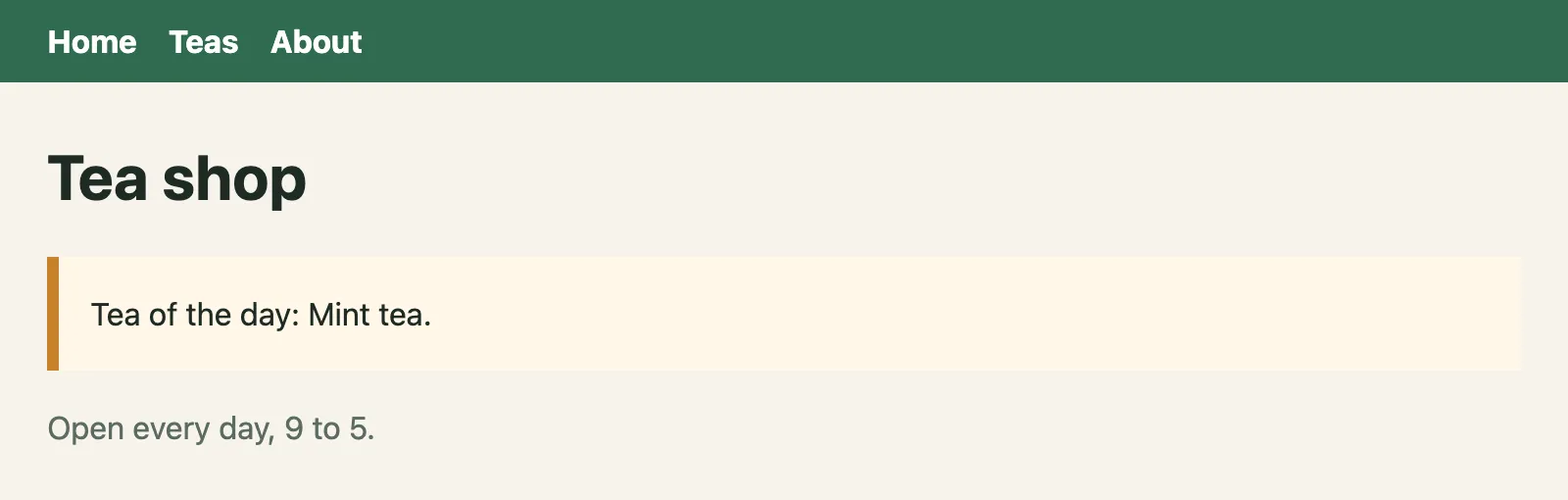
A picture of the page in real Chrome, in a window 800 px wide, taken once the page had loaded with its styles. Open it full size
Line 1 of app/teas/tea-card.tsx imports the CSS Module as styles: an object with one property for each class in the file. Line 5 gives the card's <div> the class styles.card, and line 7 gives the price styles.price. Open app/teas/tea-card.module.css: its .card on lines 1 to 6 draws the border, and its .price on lines 8 to 11 makes the price green and bold. app/page.module.css, the home page's own CSS Module, also has a .card, with an orange edge.
Open the Network tab and pick /teas. The HTML says <div class="MwTT_a_card"> and <p class="MwTT_a_price">, and the CSS under it has .MwTT_a_card. styles.card was never the text card: it's the name Next.js gave the class. Pick /: in this build, the home page's card is E0kJGG_card. Two files said .card, and the build made two names that can never meet.
.card, and each class stays local to its file. In this recorded production build, the home page got E0kJGG_card and the tea cards got MwTT_a_card; the form of these names is internal and can change. The two rules can never reach each other's elements.These exact names are a fact about this recorded production build of Next.js 16.4.3, with Turbopack. In next dev the names look different, and the format can change with the mode, the bundler or the version. So never type one by hand, or write CSS that expects one: always use styles.card. What Next.js guarantees is the scoping itself: a CSS Module's classes are local to their file.
The Steps tab shows it in real Chrome: open /, then click Teas. After step 2, the page has three stylesheets, because the home page's is still loaded. The tea cards look exactly like the fresh /teas in the Browser tab, because the home page's rule is for .E0kJGG_card, and no tea card has that class.
Next.js also checks that each selector in a CSS Module is pure: that it has a local class or id to hold on to. A selector made only of tags, like h1, fails the check, because nothing in it belongs to the file. A local class can hold a longer selector: .card h2 passes, and it styles every h2 inside a card, though that h2 has no class of its own. Here the About page imports a CSS Module whose only rule is for h1:
app/about/about.module.cssh1 { color: crimson;}$ next build▲ Next.js 16.4.3 (Turbopack)- Cache Components enabled- Partial Prefetching enabled Creating an optimized production build ... > Build error occurredError: Turbopack build failed with 1 error:./app/about/about.module.cssError: Transforming CSS failedSelector "h1" is not pure. Pure selectors must contain at least one local class or id. Import trace: Server Component: ./app/about/about.module.css ./app/about/page.tsx at ignore-listed framesThe build stops while it compiles: Selector "h1" is not pure. Pure selectors must contain at least one local class or id. In plain words: h1 alone would reach every heading in the app, nothing in it ties it to this file, so Next.js refuses it. The import trace under the error names the file that imported it, ./app/about/page.tsx.
Each row compares the two kinds of stylesheet.
| Question | Global CSS | A CSS Module |
|---|---|---|
| Which file names does it use? | Any .css file, like globals.css. | Names that end in .module.css, or .module.scss with Sass. |
| How do you use it? | Import it for its effect: import "./globals.css";. | Import an object of class names: import styles from "./tea-card.module.css";. |
| Which elements does a rule reach? | Every element that matches it, on every page while the stylesheet is loaded. | Only elements inside its own selector, which starts from a local class: .card reaches elements with styles.card, and .card h2 the headings inside them. |
| What can its rules select? | Anything: body, h1, header a. | Selectors that pass the purity check, held by a local class or id, like .card h2. A bare h1 stops the build. |
| What is it good for? | Styles that really are for the whole app: the page's font, colors and spacing. | The styles of one component or one page. |
Sass: install it, then write .scss
Sass is a language that turns into CSS. It adds what plain CSS writes the long way, such as variables that start with $ and rules written inside other rules. Next.js builds Sass files once the sass package is installed: npm install --save-dev sass. Then a file ending in .scss works like a CSS file, and one ending in .module.scss is a CSS Module. Here is the tea card in Sass:
app/teas/tea-card.module.scss$leaf: #2f6b4f;$radius: 12px; .card { border: 2px solid $leaf; border-radius: $radius; padding: 4px 16px; background: white; h2 { margin-bottom: 0; } .price { color: $leaf; font-weight: bold; }}
A picture of the page in real Chrome, in a window 800 px wide, taken once the page had loaded with its styles. Open it full size
Line 1 of app/teas/tea-card.module.scss stores the shop's green in the variable $leaf, and line 2 the corner size in $radius. Lines 5 and 6 use them. Lines 10 to 12 and 14 to 17 are rules written inside .card: they only reach an h2 or a .price inside a card. Open package.json: line 19 is what npm install --save-dev sass added. (It isn't marked create-next-app, because it's the project's own copy now.) tea-card.tsx imports ./tea-card.module.scss instead of the CSS file.
Open the Network tab and look at the CSS. Sass is gone: #2f6b4f is where $leaf was, and the inner rules became .qnQAJW_card h2 and .qnQAJW_card .qnQAJW_price. The browser only ever gets CSS. The Browser tab shows the same cards as the CSS Module version.
Sass has a second way to write it, in files ending in .sass, with indents instead of braces. The docs suggest .scss if you're not sure, because every CSS file is already valid SCSS. To change how Sass runs, for example to add a line of variables to every Sass file, Next.js has the sassOptions setting in next.config.ts.
How Next.js orders and splits your CSS
When next build runs, it bundles the CSS files your components import into chunks: built CSS files under /_next/static/chunks/. It doesn't make one big file for the whole app: each route loads close to only the CSS it needs. How the CSS is grouped into files depends on the experimental.cssChunking setting in next.config.ts (on by default), so the files below are what this recorded build made, not a rule. Here is what the two pages of the CSS Modules example link. Each row is one route.
| Route | Stylesheets | What they hold |
|---|---|---|
/ | 0-diosfj8fyss.css, then 18t505wiwowcq.css | The global CSS, then the home page's CSS Module. |
/teas | 0-diosfj8fyss.css, then 3pws2b_-ykmgl.css | The global CSS, then one file with the tea card's CSS Module and the tea page's, in the order the page imports them. |
/teas's file, the tea card's rules come before the grid's, because app/teas/page.tsx imports TeaCard before page.module.css.Both routes start with the same 0-diosfj8fyss.css, so the browser downloads it once and keeps it for the next page. Then each adds a file of its own. /teas's file holds two CSS Modules in one: the tea card's rules, then the grid's. With cssChunking on, Next.js merges CSS that loads together to make fewer requests; another app, or another version, can group it differently.
Inside a route, the order of the CSS follows the order of your imports. app/teas/page.tsx imports TeaCard on line 1, which imports its CSS Module, before it imports page.module.css on line 2, and that's the order of the rules in the file. Order matters only when everything else ties. When two rules set the same thing on one element, the browser first looks at !important and at cascade layers, then at specificity: how precise each selector is (an id counts more than a class, and a class more than a tag). Only when those are equal does the rule that comes later win. The two rules below are one class each, equally specific, so their order decides. In the playground, the home page's button gets two classes, one from the button's own CSS Module (grey) and one from the page's (green). Before you switch versions, guess which color each order gives.
app/page.tsxNext.jsapp/page.tsximport BaseButton from "./base-button";import styles from "./page.module.css"; export default function HomePage() { return ( <main> <h1>Tea shop</h1> <BaseButton className={styles.buy}>Buy mint tea</BaseButton> </main> );}
A picture of the page in real Chrome, in a window 800 px wide, taken once the page had loaded with its styles. Open it full size
Line 1 imports BaseButton, whose CSS Module has .button, and line 2 imports the page's .buy. The built CSS has .Tb-MvW_button first and .E0kJGG_buy after it, so the green from .buy wins.
With BaseButton imported first, the built CSS has the button's rule first and the page's after it, and the button is green. Swap the two imports, and the button is grey, though no line of CSS changed. That's why the docs recommend keeping CSS imports predictable:
- Import global CSS in the root layout, before everything else.
- Give each component one CSS Module, imported by that component's file.
- Turn off tools that sort imports for you, like ESLint's
sort-importsrule: they can change the order of your CSS. - Check the order with
next build. Innext dev, the order can be different, and a change to a CSS file shows at once, with Fast Refresh.
Global CSS stays after you leave a page
Asha wants the heading on the About page in crimson. She writes app/about/about.css with one rule, h1 { color: crimson; }, and imports it on line 1 of the About page. A fresh load of each page looks right. Then real Chrome opens /, clicks About, and clicks Home:
app/about/page.tsximport "./about.css"; export default function AboutPage() { return ( <main> <h1>About us</h1> <p>Asha and Ravi run the shop.</p> </main> );}Each step was taken in real Chrome against next start. Pick one to see the page after it.

A picture of the window in real Chrome after this step. Open it full size
- Focus
- the link “Home”
- Scrolled
- 0 px down
- Stylesheets on the page
0-diosfj8fyss.css,08gnpgf55u_dr.css
No requests during this step: the page already had what it needed
The Steps tab opens on step 3. The home page's heading is crimson, though the home page imports no about.css. Under the picture, the page has two stylesheets: 0-diosfj8fyss.css and 08gnpgf55u_dr.css, the one built from about.css. Pick step 1: one stylesheet, and a dark heading. In the Browser tab, a fresh load of / is dark too. The difference is the visit to About.
Clicking a Link between pages that share the root layout doesn't load a new document: Next.js swaps in the new page, and loads the stylesheets it needs. The docs say what happens to the old ones: because Next.js uses React's own support for stylesheets, it doesn't remove them as you navigate. So a global rule that one page loaded keeps applying to every page the visitor sees next, until a full page load. That's a style conflict: CSS written for one page changes another.
about.css. Clicking Home doesn't remove it, so its h1 rule now colors the home page's heading too. A fresh load of / wouldn't have it.The fix is to scope the rule. Give the heading a class in a CSS Module, and the rule only reaches that heading. The playground shows both versions; step 3 is where they differ.
app/about/page.tsxNext.jsapp/about/page.tsximport "./about.css"; export default function AboutPage() { return ( <main> <h1>About us</h1> <p>Asha and Ravi run the shop.</p> </main> );}Each step was taken in real Chrome against next start. Pick one to see the page after it.
A picture of the window in real Chrome after this step. Open it full size
- Focus
- the link “Home”
- Scrolled
- 0 px down
- Stylesheets on the page
0-diosfj8fyss.css,08gnpgf55u_dr.css
No requests during this step: the page already had what it needed
Line 1 imports about.css, whose rule is for every h1. Back on Home in step 3, about.css is still on the page, and the home page's heading is crimson too.
With the CSS Module, step 3 still has two stylesheets, but the second one's rule is for .-i9KWa_title, and the home page's heading has no such class: it keeps its color. To avoid style conflicts:
- Keep global CSS for what's truly global, and import it in the root layout, where every page loads it anyway.
- Style components and pages with CSS Modules (or with Tailwind CSS, in the next lesson), never with bare tag selectors.
- When one page needs a different look, give its element a class, instead of a rule for every element of a kind.
- Keep the import order predictable, so the same rule always wins.
Choosing global CSS or a CSS Module
Every style in the shop ends up in one of two places. Ask: is it for every page, or for one component? Sort these styles from the tea shop.
- The font and text color of every page.
- Taking away the browser's margin around
body. - The green bar of the header that the root layout draws on every page.
- The border and corners of the tea card.
- The green, bold price on a tea card.
- A red heading on the About page only.
- The grid that puts the tea cards side by side on
/teas.
Sort each style: the global CSS that the root layout imports, or a CSS Module next to its component?
Common mix-ups
- "Any CSS file I import is scoped to its component." No. Only files named
.module.css(or.module.scss) are CSS Modules. A plain.cssfile is global, wherever you import it. - "
styles.cardis the textcard." No. It's the name Next.js made, likeMwTT_a_cardin the recorded build. WritingclassName="card"by hand matches no rule of the CSS Module. - "Global CSS can only be imported in the root layout." No. Any file in
appcan import it. The root layout is the place the docs recommend, and the Pages Router's rule waspages/_app. - "A page's stylesheet goes away when you leave the page." No. After a client-side navigation, the stylesheets the old page loaded stay on the page.
- "Next.js puts all the app's CSS in one file." No. Each route loads close to only the CSS it needs. In the recorded build, that was a shared file for the global CSS and a file for each route's own CSS Modules.
- "Sass works with nothing to install." Next.js knows how to build Sass, but you install the
sasspackage first. - "Which CSS file I write first decides which rule wins." No. The order of the imports decides the order of the rules, and the later rule wins only when the two are equally specific (and neither is
!importantor in a cascade layer).
Practice exercises
These exercises are about Next.js projects, which can't run inside this page. Answer first, then use the hints.
These are the tea shop's files. Which one should import globals.css, so that every page gets it, whichever page a visitor opens first?
app/
  about/
    page.tsx
  globals.css
  layout.tsx
page.tsx// app/layout.tsx
import "./globals.css";app/layout.tsx, the root layout. It wraps every page, so every page's HTML links the stylesheet. In the recording, / and /about both link 0-diosfj8fyss.css.
This is part of the HTML the recorded build sent for /teas. Which class did the price's <p className={styles.price}> get in this build?
<div class="ZxKLwq_grid">
  <div class="MwTT_a_card">
    <h2>Green tea</h2>
    <p class="MwTT_a_price">$<!-- -->4<!-- --> a box</p>
</div>MwTT_a_price, from <p class="MwTT_a_price">. That's the name this recorded build gave .price. Another build, or next dev, can name it differently, which is why the code always says styles.price.
Rewrite the About page so its heading is crimson without any rule for every h1. Then: after a visitor opens /, clicks About and clicks Home, what color is the home page's heading?
import "./about.css";

export default function AboutPage() {
  return (
    <main>
      <h1>About us</h1>
      <p>Asha and Ravi run the shop.</p>
    </main>
  );
}
import styles from "./about.module.css";

export default function AboutPage() {
  return (
    <main>
      <h1 className={styles.title}>About us</h1>
      <p>Asha and Ravi run the shop.</p>
    </main>
  );
}

/* app/about/about.module.css */
.title {
  color: crimson;
}
The home page's heading stays dark. The CSS Module's rule became .-i9KWa_title, and only the About heading has that class. The recorded steps still show its stylesheet on the home page after the visit, and the picture of the home page is the same as before it.
Lines 14 to 17 of this tea-card.module.scss write .price inside .card. Which selector does Sass write for it? (Use the classes' own names; Next.js renames them afterwards.)
$leaf: #2f6b4f;
$radius: 12px;

.card {
  border: 2px solid $leaf;
  border-radius: $radius;
  padding: 4px 16px;
  background: white;

  h2 {
    margin-bottom: 0;
  }

  .price {
    color: $leaf;
    font-weight: bold;
  }
}
.card .price: the card's class, a space, then the price's. The space means "a .price inside a .card". Then Next.js renames both classes: in the recorded build, the CSS has .qnQAJW_card .qnQAJW_price, with #2f6b4f where $leaf was.
Asha renamed about.css to about.module.css to make it scoped, and next build now stops with: Selector "h1" is not pure. What does the rule need?
/* app/about/about.module.css */
h1 {
  color: crimson;
}/* app/about/about.module.css */
.title {
color: crimson;
}
A class. h1 alone would reach every heading in the app, so a CSS Module can't scope it, and the build stops. .title is pure: Next.js renames it, and the About page puts it on its heading with className={styles.title}. The recorded build with this version passes.
In the CSS Modules example, the home page's .card has an orange edge, and the tea card's .card has a green border. A visitor opens / and then clicks Teas. Do the tea cards get the orange edge?
No. After the click, the home page's stylesheet is still loaded, but its rule is for .E0kJGG_card, and the tea cards have MwTT_a_card. The recorded picture after the click is the same as a fresh load of /teas.
Check your understanding
For each question, ask which elements a rule can reach, and which stylesheets are on the page.
Question 1 of 7Where do you import
globals.cssso that every page of the app gets it?Choose an answer to see the explanation.
Question 2 of 7The home page's
page.module.cssand the tea card'stea-card.module.cssboth have a.cardrule. What happens when both pages are built?Choose an answer to see the explanation.
Question 3 of 7This About page imports
about.module.css, whose only rule ish1 { color: crimson; }. What doesnext builddo?Read the code, then predictTSXimport "./about.module.css"; export default function AboutPage() { return ( <main> <h1>About us</h1> <p>Asha and Ravi run the shop.</p> </main> ); }Choose an answer to see the explanation.
Question 4 of 7In this home page, both the button's own CSS Module and the page's set
background, with one class each. Which background wins?Read the code, then predictTSXimport styles from "./page.module.css"; import BaseButton from "./base-button"; export default function HomePage() { return ( <main> <h1>Tea shop</h1> <BaseButton className={styles.buy}>Buy mint tea</BaseButton> </main> ); }Choose an answer to see the explanation.
Question 5 of 7The About page imports
about.csswithh1 { color: crimson; }. A visitor opens/, clicks About, then clicks Home. What color is the home page's heading now?Choose an answer to see the explanation.
Question 6 of 7What do you add to a new Next.js app before it can build a
.module.scssfile?Choose an answer to see the explanation.
Question 7 of 7In the recorded build of the CSS Modules example, which stylesheets does the HTML for
/teaslink?Choose an answer to see the explanation.
Key takeaways
- Import global CSS once, in the root layout: its rules reach every element they match, and every page's HTML links the stylesheet Next.js builds from it.
- A CSS Module is a file named
.module.csswhose classes are local to it. Usestyles.card, never the generated name: its form depends on the build. A bare tag selector likeh1fails its purity check. - Sass needs the
sasspackage; then.scssand.module.scssfiles build to plain CSS. - Each route loads close to only the CSS it needs, ordered by your imports: for two equally specific rules, the later import wins.
- Stylesheets stay on the page after a client-side navigation, so a global rule from one page can change the next. Scope page and component styles with CSS Modules.
Remember the one-liner.
Global CSS once in the root layout, a CSS Module for everything else, and the import order is the CSS order.
Coming next: Tailwind CSS in Next.js. It sets up Tailwind CSS the way create-next-app does, and styles the shop with utility classes, a theme of its own, and dark mode.