Project: a full-stack app
Build an invoices dashboard from the course's parts: Postgres, sign-in, a data access layer, Server Actions, caching, streaming, tests and a standalone deploy.
- 01Plan a full-stack appDecide the routes, the tables, where each check lives and what may be cached, before you write a page.
- 02Assemble the partsPut a database, sign-in, a data access layer, a Server Action, a shared cache and streaming together, each where it belongs.
- 03Prove it and ship itTest the action with Vitest and the app with Playwright, build a standalone server, and know what production changes.
An invoices dashboard, built from parts you know
The tea company has two sellers, Asha and Ben. Each one bills cafés and shops for boxes of tea, and wants one place to see what they have billed and what is still unpaid. Here you build that place: a small invoices dashboard with a real database, sign-in, a form that saves invoices, a cached total, a page that streams, tests and a server you can deploy.
The app is built in this order: plan the routes and the tables, make the database, add sign-in and the data access layer, write the pages, save invoices with a Server Action, cache the one value everyone shares, stream the dashboard, handle failures, test, and deploy.
Here is the finished app. It's a real Next.js 16.4.3 project, built with next build and run with next start; then real Chrome signed in as Asha and used it. Click a file in the tree to read it. Open the Steps tab under the files and click through what Chrome did: Asha signs in and the dashboard fills in, she makes a mistake in the new-invoice form and sees what's wrong, she saves invoice 6, the dashboard shows it, and then she types the address of Ben's invoice 4 and gets Invoice not found.
app/dashboard/page.tsximport { Suspense } from "react";import type { Metadata } from "next";import { Totals, TotalsSkeleton } from "./totals";import { InvoiceTable, InvoiceTableSkeleton } from "./invoice-table"; export const metadata: Metadata = { title: "Dashboard" }; export default function DashboardPage() { return ( <main> <h1>Dashboard</h1> <Suspense fallback={<TotalsSkeleton />}> <Totals /> </Suspense> <Suspense fallback={<InvoiceTableSkeleton />}> <InvoiceTable /> </Suspense> </main> );}Each step was taken in real Chrome against next start. Pick one to see the page after it.
$120.00
$125.50
$339.50
| Invoice | Customer | Amount | Status |
|---|---|---|---|
| Invoice 3 | River Books | $80.00 | pending |
| Invoice 2 | Hill Bakery | $45.50 | pending |
| Invoice 1 | Lake Café | $120.00 | paid |
- Focus
- nothing: the page itself
- Scrolled
- 0 px down
No requests during this step: the page already had what it needed
The app has five pages. The picture shows each page file, the address it makes, and two facts the rest of the lesson builds on: the symbol next build printed for it, and who may open it. ○ means, in the build's own words, prerendered as static content. ◐ means prerendered as static HTML with dynamic server-streamed content: a static shell made during the build, with the parts for one visitor streamed in for each request.
next build printed for each page. ○ pages are the same for everyone, so the build made them. The two ◐ pages hold one user's data, which streams in for each request.Cooks practice each dish on its own. Opening night is different: every dish comes out of one kitchen, on one menu, for real guests. The host checks bookings at the door, but the waiter still checks each order at the table, because a booking doesn't say what someone may eat. The soup is made once for everyone. Each guest's own dishes are made for them and brought as soon as they're ready.
- In real life: Dishes the cooks practiced one at a time
- In Next.js: The earlier lessons: auth, the data access layer, Server Actions, caching
- In real life: The pantry everyone cooks from
- In Next.js: The database: two tables in Postgres
- In real life: The door host who turns away anyone without a booking
- In Next.js: proxy.ts: no session cookie, no page
- In real life: The waiter who checks each table's order before serving it
- In Next.js: lib/dal.ts: who is asking, and is this theirs?
- In real life: The soup of the day, made once and served to everyone
- In Next.js: The team's total in a shared
"use cache"entry - In real life: Each table's dishes, brought as soon as each is ready
- In Next.js: The dashboard's parts, streamed into the static shell
- In real life: The dress rehearsal before the doors open
- In Next.js: The tests: Vitest for the action, Playwright for the app
A full-stack Next.js app is a few decisions made once, then followed everywhere: where the data lives, who may see each piece, what may be cached, and what streams. One data access layer answers "who is asking, and may they?" for every page and every action. In this app, only data that is the same for everyone goes into a shared cache.
Plan the routes and the data
Before any code, write down three things: the pages and who may open each one, the tables, and where each check happens. A plan this small fits in one table. Each row is one page:
| Address | File | Who may open it | What next build printed |
|---|---|---|---|
/ | app/page.tsx | Anyone. | ○: nothing on it depends on the visitor. |
/sign-in | app/sign-in/page.tsx | Anyone. | ○: the form is the same for everyone. |
/dashboard | app/dashboard/page.tsx | Signed-in users, each seeing their own invoices. | ◐: the heading and skeletons are made in the build; the totals and the table stream in. |
/invoices/new | app/invoices/new/page.tsx | Signed-in users. The form holds nothing private; the action checks who saves. | ○: one form for everyone. |
/invoices/[id] | app/invoices/[id]/page.tsx | The invoice's owner only. | ◐: the layout is made in the build; the invoice streams in. |
Two pages need a word. /invoices/new is only for sellers, yet the build made it once for everyone. That's fine, because the form on it holds nothing private: the Server Action that saves the invoice checks who is asking. And the invoice page is one file for every invoice, a dynamic route, so the build can't know which invoices exist. Its layout is made during the build, and the invoice itself streams in.
The data is two tables:
- users: an id, a name, an email that must be unique, and a password hash. Never the password itself.
- invoices: an id, the user who wrote it, the customer, the amount in cents (whole numbers, so money never meets rounding errors), and a status,
pendingorpaid.
And the checks have two places, as in Authorization and the data access layer:
proxy.tsruns before the pages and sends anyone with no session cookie at all to/sign-in. It's quick, and only a first door.lib/dal.ts, the data access layer, is the only code that reads or writes invoices. Every function in it finds out who is asking first, and returns only that user's rows.
Then build it in this order, each part on top of the one before: the data, sign-in and the data access layer, the pages, the form, the cache, streaming, errors, tests and the deploy. Here is what next build printed for the finished app, the same build as the recording above:
Route (app)
┌ ○ /
├ ○ /_not-found
├ ◐ /dashboard
├   /invoices/[id]
│ └ ◐ /invoices/[id]
├ ○ /invoices/new
└ ○ /sign-in

ƒ Proxy (Middleware)

○  (Static)             prerendered as static content
◐  (Partial Prerender)  prerendered as static HTML with dynamic server-streamed content
Every page matches the plan: ○ for the three pages that are the same for everyone, ◐ for the two that hold one user's data. /invoices/[id] is listed on its own line with no symbol, and its shell under it. ƒ Proxy (Middleware) is proxy.ts, which runs on the server for each request it matches. Nobody told Next.js which page is which: it worked it out from what each page reads, as Cache Components taught.
The database: two tables in PGlite
The database is Postgres, read and written with Drizzle ORM, as in Connecting a database. For this project it's PGlite: Postgres compiled to WebAssembly, running inside the app, in memory. It needs no database server, so the recordings run anywhere. Install the app's packages, the database, its ORM, jose for signed cookies and Zod for forms:
npm install @electric-sql/pglite drizzle-orm jose zodnext.config.ts is the one from Connecting a database: create-next-app's, with PGlite in serverExternalPackages, so Node.js loads it as it is instead of Next.js bundling it. The tables, described in TypeScript:
import { index, integer, pgTable, serial, text } from "drizzle-orm/pg-core"; export const users = pgTable("users", { id: text().primaryKey(), name: text().notNull(), email: text().notNull().unique(), passwordHash: text("password_hash").notNull(),}); export const invoices = pgTable( "invoices", { id: serial().primaryKey(), userId: text("user_id").notNull().references(() => users.id), customer: text().notNull(), amountCents: integer("amount_cents").notNull(), status: text({ enum: ["pending", "paid"] }).notNull(), }, (table) => [index("invoices_user_id").on(table.userId)],); Lines 3 to 8 are the users table. Line 6 makes each email unique: the database itself refuses a second account with the same email, even if two sign-ups arrive at the same moment. Checking for the email first and then inserting can't promise that; the constraint can. Lines 10 to 20 are the invoices. Line 14 says each invoice belongs to one user, and references makes the database refuse an invoice for a user who doesn't exist. Line 16 keeps the amount in cents, and line 19 adds an index on the owner, so "this user's invoices", the question every page asks, stays fast as the table grows.
import { PGlite } from "@electric-sql/pglite";import { drizzle } from "drizzle-orm/pglite";import { seed } from "./seed"; // Postgres inside the app, in memory: it starts empty each time the server starts.// In production, connect to a Postgres server instead.const client = new PGlite();export const db = drizzle({ client }); await client.exec(` CREATE TABLE IF NOT EXISTS users ( id text PRIMARY KEY, name text NOT NULL, email text NOT NULL UNIQUE, password_hash text NOT NULL ); CREATE TABLE IF NOT EXISTS invoices ( id serial PRIMARY KEY, user_id text NOT NULL REFERENCES users (id), customer text NOT NULL, amount_cents integer NOT NULL CHECK (amount_cents > 0), status text NOT NULL CHECK (status IN ('pending', 'paid')) ); CREATE INDEX IF NOT EXISTS invoices_user_id ON invoices (user_id);`);await seed(db); Line 7 starts PGlite in memory, and line 8 hands it to Drizzle. Lines 10 to 25 make the tables with the SQL that matches the schema; on a database server, drizzle-kit would run it once instead. Lines 21 and 22 add two more rules the database keeps: an amount above zero, and a status that is pending or paid. Line 26 adds the first rows from db/seed.ts: Asha and Ben with their password hashes, three invoices for Asha and two for Ben. In memory, the database starts empty every time a server starts, which is why each recording starts from the same five invoices.
Two more small files: lib/users.ts finds a user by email for the sign-in action, and lib/money.ts turns cents into dollars for the pages, so 4550 shows as $45.50.
Who is asking: sign-in and the data access layer
Sign-in is the Authentication lesson's, file for file. lib/password.ts hashes passwords with scrypt at OWASP's cost and compares them in constant time. lib/session.ts signs a session into an httpOnly, secure, sameSite cookie with jose, and reads it back. The sign-in form and its Server Action are the same too; only the action's redirect changed, to redirect("/dashboard").
The project keeps two of that lesson's recording-only fixtures. .env holds a fixed SESSION_SECRET; a real app generates random bytes and gives them to the server when it starts. And the recorded requests send copies of Asha's and Ben's session cookies made ahead of time with that secret, which expire in 2100; a real session cookie lasts the week lib/session.ts sets.
The first check is proxy.ts, as in proxy.ts:
import { NextResponse, type NextRequest } from "next/server"; // Only looks for the cookie. The data access layer checks the session itself.export function proxy(request: NextRequest) { if (!request.cookies.has("session")) { return NextResponse.redirect(new URL("/sign-in", request.url)); }} export const config = { matcher: ["/dashboard", "/invoices/:path*"] }; Line 10 matches the dashboard and every invoice address. Line 5 asks only whether a cookie named session was sent, and line 6 sends anyone without one to /sign-in. In the finished app's recording, open the Network tab and pick /dashboard with no cookie: 307, with location: /sign-in, before any page code ran. A made-up cookie would pass this check. That's why it's only the first door.
The real checks are in the data access layer. Every read and write of invoices goes through this file:
import "server-only";import { cache } from "react";import { redirect } from "next/navigation";import { cacheLife, cacheTag } from "next/cache";import { and, desc, eq, sum } from "drizzle-orm";import { db } from "@/db";import { invoices, users } from "@/db/schema";import { readSession } from "./session"; // Who is asking. React's cache() runs it once per render pass, however many components ask.export const getCurrentUser = cache(async () => { const session = await readSession(); if (!session) return null; const [user] = await db.select({ id: users.id, name: users.name }).from(users).where(eq(users.id, session.userId)); return user ?? null;}); // For pages: anyone without a valid session goes to the sign-in page.export async function verifySession() { const user = await getCurrentUser(); if (!user) redirect("/sign-in"); return user;} // Only the fields pages show.const shown = { id: invoices.id, customer: invoices.customer, amountCents: invoices.amountCents, status: invoices.status }; // The signed-in user's invoices, newest first.export const getMyInvoices = cache(async () => { const user = await verifySession(); return db.select(shown).from(invoices).where(eq(invoices.userId, user.id)).orderBy(desc(invoices.id));}); // One invoice, for its owner only. Anyone else gets null, as if it didn't exist.export async function getInvoice(id: string) { if (!/^\d{1,9}$/.test(id)) return null; const user = await verifySession(); const [invoice] = await db .select(shown) .from(invoices) .where(and(eq(invoices.id, Number(id)), eq(invoices.userId, user.id))); return invoice ?? null;} // The whole team's total, for anyone signed in.export async function getTeamTotal() { await verifySession(); return teamTotal();} // Not exported, so nothing skips the check above. It takes no user and returns// nobody's own data, so one cached entry can serve everyone.async function teamTotal() { "use cache"; cacheLife("hours"); cacheTag("team-total"); console.log("team total: read from the database"); const [row] = await db.select({ cents: sum(invoices.amountCents) }).from(invoices); return Number(row.cents ?? 0);} export type NewInvoice = { customer: string; amountCents: number; status: "pending" | "paid" }; // The owner comes from the session, never from the form.export async function createInvoice(invoice: NewInvoice) { const user = await getCurrentUser(); if (!user) return null; const [row] = await db.insert(invoices).values({ ...invoice, userId: user.id }).returning({ id: invoices.id }); return row.id;} - Lines 11 to 16,
getCurrentUser, read the session (line 12 checks the cookie's signature and expiry) and find the user. Line 14 asks only for the id and the name. React'scache()runs it once per render pass, however many components on the page ask. - Lines 19 to 23,
verifySession, are for pages: without a valid session, line 21 redirects to/sign-in. - Line 26 lists the only fields pages get: the id, the customer, the amount and the status. That's the DTO, the data transfer object, from the Authorization lesson. Nothing else from a row can reach a page, or the payload sent to the browser.
- Lines 29 to 32,
getMyInvoices, read the signed-in user's invoices. Line 31 filters byuser.id, which comes from the session, never from the page. - Lines 35 to 43,
getInvoice, find one invoice. Line 36 refuses an id that isn't a number. Line 41 asks for the invoice with this id and this owner, so Ben's invoice never comes back for Asha: she getsnull, the same answer as for an invoice that doesn't exist. - Lines 65 to 70,
createInvoice, save an invoice. Line 68 sets the owner from the session too.
Lines 45 to 60 hold the team's total, the one cached value in the app. Every query here runs after the session is read, which only exists when a request comes in, so none of them runs during the build.
lib/dal.ts checks the session's signature, finds the user, and puts the owner into every query, so a page can only receive that user's rows.In the recording's Steps, the step Click Sign in starts with POST /sign-in, answered 200 with text/x-component. That's the Server Action, called by the form with JavaScript running: one request that returns the redirect and the next page's RSC payload together, and the router moves to /dashboard. The requests after it are the router prefetching the dashboard's links.
The pages and their titles
The root layout gives every page its navigation, and every title its ending, with the Metadata API:
import Link from "next/link";import type { Metadata } from "next";import HydrationMarker from "./hydration-marker"; export const metadata: Metadata = { title: { template: "%s | Tea invoices", default: "Tea invoices" },}; export default function RootLayout({ children }: LayoutProps<"/">) { return ( <html lang="en"> <body> <nav> <Link href="/dashboard">Dashboard</Link> <Link href="/invoices/new">New invoice</Link> </nav> {children} <HydrationMarker /> </body> </html> );} Line 6 is a title template, from The Metadata API: a page whose title is Dashboard gets Dashboard | Tea invoices, and a page with no title of its own gets the default. Line 14 links the two pages a seller uses. Line 17 is HydrationMarker, from End-to-end testing: an Effect that marks the page once React has hydrated it, which the browser tests below wait for.
The invoice page is the dynamic route:
import { Suspense } from "react";import type { Metadata } from "next";import { notFound } from "next/navigation";import { getInvoice } from "@/lib/dal";import { dollars } from "@/lib/money"; export async function generateMetadata({ params }: PageProps<"/invoices/[id]">): Promise<Metadata> { const { id } = await params; return { title: `Invoice ${id}` };} async function Invoice({ params }: Pick<PageProps<"/invoices/[id]">, "params">) { const { id } = await params; const invoice = await getInvoice(id); if (!invoice) notFound(); return ( <> <h1>Invoice {invoice.id}</h1> <p> {invoice.customer}: {dollars(invoice.amountCents)}, {invoice.status} </p> </> );} export default function InvoicePage({ params }: PageProps<"/invoices/[id]">) { return ( <main> <Suspense fallback={<p>Loading the invoice…</p>}> <Invoice params={params} /> </Suspense> </main> );} Lines 7 to 10 give each invoice its own title from the address alone, without reading the database: Invoice 4 | Tea invoices in the recording. Invoice, on lines 12 to 24, waits for params and asks getInvoice on line 14. When that returns null, line 15 calls notFound(), and Next.js shows app/invoices/[id]/not-found.tsx: Invoice not found, with It doesn't exist, or it isn't yours. One answer for both cases means the page never tells Asha whether invoice 4 exists. Line 29 is the Suspense boundary that lets the layout go out first.
The new-invoice page is the plainest: a heading, a metadata title, and the form.
Creating an invoice with a Server Action
Saving an invoice is a Server Action, checked with Zod as in Forms:
"use server"; import { updateTag } from "next/cache";import { redirect } from "next/navigation";import { z } from "zod";import { createInvoice } from "@/lib/dal"; const newInvoice = z.object({ customer: z.string().trim().min(2, "Write the customer's name."), amount: z .string() .trim() .regex(/^\d{1,5}(\.\d{2})?$/, "Write an amount like 45 or 45.50.") .transform((text) => { const [dollars, cents = "00"] = text.split("."); return Number(dollars) * 100 + Number(cents); }) .refine((cents) => cents > 0, "An invoice is for more than $0."), status: z.enum(["pending", "paid"], "Pick pending or paid."),}); export type InvoiceState = { message: string; errors: { customer?: string[]; amount?: string[]; status?: string[] }; values: { customer: string; amount: string; status: string };}; export async function addInvoice(previous: InvoiceState, formData: FormData): Promise<InvoiceState> { const values = { customer: String(formData.get("customer") ?? ""), amount: String(formData.get("amount") ?? ""), status: String(formData.get("status") ?? ""), }; const result = newInvoice.safeParse(values); if (!result.success) { return { message: "Check the fields above.", errors: z.flattenError(result.error).fieldErrors, values }; } const { customer, amount, status } = result.data; const id = await createInvoice({ customer, amountCents: amount, status }); if (id === null) return { message: "Sign in again to save this invoice.", errors: {}, values }; updateTag("team-total"); redirect(`/invoices/${id}`);} - Lines 8 to 20 describe a good form. The customer needs two letters or more. The amount must look like
45or45.50(line 13), and lines 14 to 17 turn it into cents:12.50becomes1250. Line 18 refuses zero. The status must be one of the two the database allows. - Lines 29 to 33 read the three fields as text. Line 34 checks them, and on any mistake line 36 returns a message for each field and the values as they were typed.
- Line 39 saves through
createInvoice, which takes the owner from the session. If the session has ended, it returnsnull, and line 40 says so. - Line 41 expires the cached team total, and line 42 opens the new invoice.
redirectthrows to stop the action, soupdateTagmust come first.
Zod checks the shape of what arrives; the data access layer decides whose it is. An action is a public endpoint, as Securing Server Actions showed, so it needs both. Next.js adds an Origin check of its own: in 16.4.3, a request whose Origin doesn't match the host is refused, but one with no Origin only logs a warning and runs. It adds to the checks above; it never replaces them. The form is a Client Component, because it calls useActionState:
"use client"; import { useActionState } from "react";import { addInvoice, type InvoiceState } from "./actions"; const empty: InvoiceState = { message: "", errors: {}, values: { customer: "", amount: "", status: "pending" } }; export default function InvoiceForm() { const [state, formAction, isPending] = useActionState(addInvoice, empty); return ( <form action={formAction}> <label htmlFor="customer">Customer</label> <input id="customer" name="customer" defaultValue={state.values.customer} aria-describedby="customer-error" /> <p id="customer-error">{state.errors.customer?.[0]}</p> <label htmlFor="amount">Amount in dollars</label> <input id="amount" name="amount" inputMode="decimal" defaultValue={state.values.amount} aria-describedby="amount-error" /> <p id="amount-error">{state.errors.amount?.[0]}</p> <label htmlFor="status">Status</label> <select id="status" name="status" defaultValue={state.values.status}> <option value="pending">Pending</option> <option value="paid">Paid</option> </select> <button disabled={isPending}>{isPending ? "Saving…" : "Save invoice"}</button> <p aria-live="polite">{state.message}</p> </form> );} Line 9 gets three values from useActionState: the state the action returned last, the formAction the form posts to, and isPending, true while the action runs. Line 13 fills the box with what was typed: React resets a form after its action finishes without throwing, and the reset puts each box back to its defaultValue, which is now the typed value. Line 14 shows the field's message, and line 26 disables the button while the action runs.
Both ways of sending the form are in the recording. Before the JavaScript loads, the browser posts the form itself: in the Network tab, pick /invoices/new Save invoice with two mistakes. The server answered with the whole page, 200, showing Write the customer's name. and Write an amount like 45 or 45.50., and the boxes still hold L and 12.5. With JavaScript, in the Steps tab, the step that clicks Save invoice after typing 12.5 made one request, POST /invoices/new, answered 200 with text/x-component, and only the amount's message showed. After 12.50, the next click sent the same kind of request, and the router opened /invoices/6. A save posted without JavaScript gets a 303 to the invoice instead.
One shared total, and nothing personal in a cache
A shared cache keeps one copy of a result for everyone who asks with the same key. This app sets itself a strict rule, a choice of its own and not something Next.js requires: only data that is the same for everyone who may see it goes into a shared cache. Each row is one piece of the app's data:
| Data | The same for everyone? | Where it comes from |
|---|---|---|
Who is asking (getCurrentUser) | No. It's one visitor's session. | For each request, once per render pass, with React's cache(). |
Asha's invoices (getMyInvoices) | No. They belong to one user. | For each request, inside Suspense, from the database. |
One invoice (getInvoice) | No. Only its owner may see it. | For each request, inside Suspense, with the owner in the query. |
The team's total (teamTotal) | Yes. It's one number for the whole team, with nobody's own rows in it. | From a "use cache" entry, kept for hours and expired by updateTag("team-total"). |
Only the team's total passes. It's one number for the whole team, with nobody's own rows in it, and this team wants it on every seller's dashboard. (This app is one company: a team total would need a team id in a multi-company app.) Lines 45 to 60 of lib/dal.ts handle it in two functions:
getTeamTotal, on lines 46 to 49, is exported. It checks the session first, like every function in the file, then asksteamTotal.teamTotal, on lines 53 to 60, is the cached one. Line 54,"use cache", keeps its result (The 'use cache' directive). Line 55,cacheLife("hours"), lets the entry live for hours, and line 56 tags itteam-total(Cache lifetimes and tags). It isn't exported, so no page can skip the check. It takes no arguments, so its key holds nothing about the visitor.
Line 57 prints a line each time the total is really read from the database. In the finished app's recording, open the Terminal tab: under $ next start, team total: read from the database appears twice. The first is Asha's first dashboard. Ben's dashboard came next and printed nothing: it got the same cached total, $339.50. The second line came after Asha saved invoice 6, because line 41 of the action had expired the entry.
By that rule, everything personal stays out of shared caches. getMyInvoices and getInvoice read the database for each request, inside Suspense. Other apps choose differently: the Authentication lesson caches each user's orders with plain "use cache", keyed by the verified user id. That's a valid pattern; it keeps per-user data in the server's shared cache, which is fine where that storage is allowed. Where a policy forbids it, use "use cache: private", which keeps a result for one visitor only (Private and remote caches), or don't cache. Next.js also stops the most direct mistake: with "use cache" on getMyInvoices, the build stops, because cookies() can't be read inside it.
Now the tag. Both versions below are the whole app; only the action changes. Chrome signed in as Asha, saved one invoice, and went back to the dashboard. Before you pick, guess: which cards change without updateTag?
app/invoices/new/actions.tsNext.jsapp/invoices/new/actions.ts"use server"; import { updateTag } from "next/cache";import { redirect } from "next/navigation";import { z } from "zod";import { createInvoice } from "@/lib/dal"; const newInvoice = z.object({ customer: z.string().trim().min(2, "Write the customer's name."), amount: z .string() .trim() .regex(/^\d{1,5}(\.\d{2})?$/, "Write an amount like 45 or 45.50.") .transform((text) => { const [dollars, cents = "00"] = text.split("."); return Number(dollars) * 100 + Number(cents); }) .refine((cents) => cents > 0, "An invoice is for more than $0."), status: z.enum(["pending", "paid"], "Pick pending or paid."),}); export type InvoiceState = { message: string; errors: { customer?: string[]; amount?: string[]; status?: string[] }; values: { customer: string; amount: string; status: string };}; export async function addInvoice(previous: InvoiceState, formData: FormData): Promise<InvoiceState> { const values = { customer: String(formData.get("customer") ?? ""), amount: String(formData.get("amount") ?? ""), status: String(formData.get("status") ?? ""), }; const result = newInvoice.safeParse(values); if (!result.success) { return { message: "Check the fields above.", errors: z.flattenError(result.error).fieldErrors, values }; } const { customer, amount, status } = result.data; const id = await createInvoice({ customer, amountCents: amount, status }); if (id === null) return { message: "Sign in again to save this invoice.", errors: {}, values }; updateTag("team-total"); redirect(`/invoices/${id}`);}Each step was taken in real Chrome against next start. Pick one to see the page after it.
$120.00
$138.00
$352.00
| Invoice | Customer | Amount | Status |
|---|---|---|---|
| Invoice 6 | Lake Café | $12.50 | pending |
| Invoice 3 | River Books | $80.00 | pending |
| Invoice 2 | Hill Bakery | $45.50 | pending |
| Invoice 1 | Lake Café | $120.00 | paid |
- Focus
- the link “Dashboard”
- Scrolled
- 0 px down
No requests during this step: the page already had what it needed
Line 41 expires the team-total entry after the invoice is saved. Back on the dashboard, every card is new: Pending $138.00 and Whole team $352.00. The Terminal shows a second team total: read from the database.
Without updateTag, Asha's Pending card went from $125.50 to $138.00, because her invoices are read for each request, and the table lists Invoice 6. The Whole team card still said $339.50: the cached entry had hours to live, and nothing told Next.js it was out of date. With it, the action expired the tag before redirecting, the next render read the database again, and the card said $352.00. That's reading your own write, from Updating the UI after a mutation.
Streaming the dashboard without a jump
The dashboard has a heading that is the same for everyone, and two parts that belong to one seller. That's the shape Streaming with Suspense taught: a Suspense boundary around each part that waits.
import { Suspense } from "react";import type { Metadata } from "next";import { Totals, TotalsSkeleton } from "./totals";import { InvoiceTable, InvoiceTableSkeleton } from "./invoice-table"; export const metadata: Metadata = { title: "Dashboard" }; export default function DashboardPage() { return ( <main> <h1>Dashboard</h1> <Suspense fallback={<TotalsSkeleton />}> <Totals /> </Suspense> <Suspense fallback={<InvoiceTableSkeleton />}> <InvoiceTable /> </Suspense> </main> );} Line 11, the heading, needs nothing, so next build puts it in the static shell, the part of a ◐ page made during the build (Partial Prerendering). Lines 12 and 15 are two boundaries, so the totals and the table stream in on their own, each when its data is ready. Their fallbacks are in the shell too. Both parts ask getMyInvoices, and React's cache() answers the second one from the first, within the render.
import { getMyInvoices, getTeamTotal } from "@/lib/dal";import { dollars } from "@/lib/money";import styles from "./dashboard.module.css"; function Card({ title, value }: { title: string; value: string }) { return ( <section className={styles.card}> <h2>{title}</h2> <p>{value}</p> </section> );} export async function Totals() { const [invoices, teamTotal] = await Promise.all([getMyInvoices(), getTeamTotal()]); const total = (status: string) => invoices.filter((invoice) => invoice.status === status).reduce((sum, invoice) => sum + invoice.amountCents, 0); return ( <div className={styles.cards}> <Card title="Paid" value={dollars(total("paid"))} /> <Card title="Pending" value={dollars(total("pending"))} /> <Card title="Whole team" value={dollars(teamTotal)} /> </div> );} export function TotalsSkeleton() { return ( <div className={styles.cards} aria-busy="true"> <Card title="Paid" value="…" /> <Card title="Pending" value="…" /> <Card title="Whole team" value="…" /> </div> );} Line 15 asks for Asha's invoices and the team's total at the same time, with Promise.all, from Parallel and sequential fetching. Lines 20 to 22 draw three cards. Lines 27 to 35 are the skeleton: the same three Cards, with … for each value. A skeleton is a fallback shaped like what replaces it.
.cards { display: grid; grid-template-columns: repeat(3, 1fr); gap: 12px;} .card { height: 96px; padding: 12px; border: 1px solid #d9d4c7; border-radius: 8px;} .card h2 { margin: 0; font-size: 14px;} .card p { margin: 8px 0 0; font-size: 28px;} .tableBox { min-height: 240px; margin-top: 24px;} Line 8 makes every card 96 pixels tall, skeleton or not. Line 25 keeps 240 pixels for the table, so its skeleton, Loading your invoices…, takes the table's space. When the real parts arrive, nothing under them moves. Content that moves while you look at it is what CLS measures, from Core Web Vitals.
Here is the dashboard drawn by real Chrome, with its CSS. The first recorded response is the page as Asha sees it. The second was taken with JavaScript turned off, so the streamed parts never replaced the fallbacks: it shows the static shell as it first arrives. Switch between them in the Browser tab:
app/dashboard/dashboard.module.css.cards { display: grid; grid-template-columns: repeat(3, 1fr); gap: 12px;} .card { height: 96px; padding: 12px; border: 1px solid #d9d4c7; border-radius: 8px;} .card h2 { margin: 0; font-size: 14px;} .card p { margin: 8px 0 0; font-size: 28px;} .tableBox { min-height: 240px; margin-top: 24px;}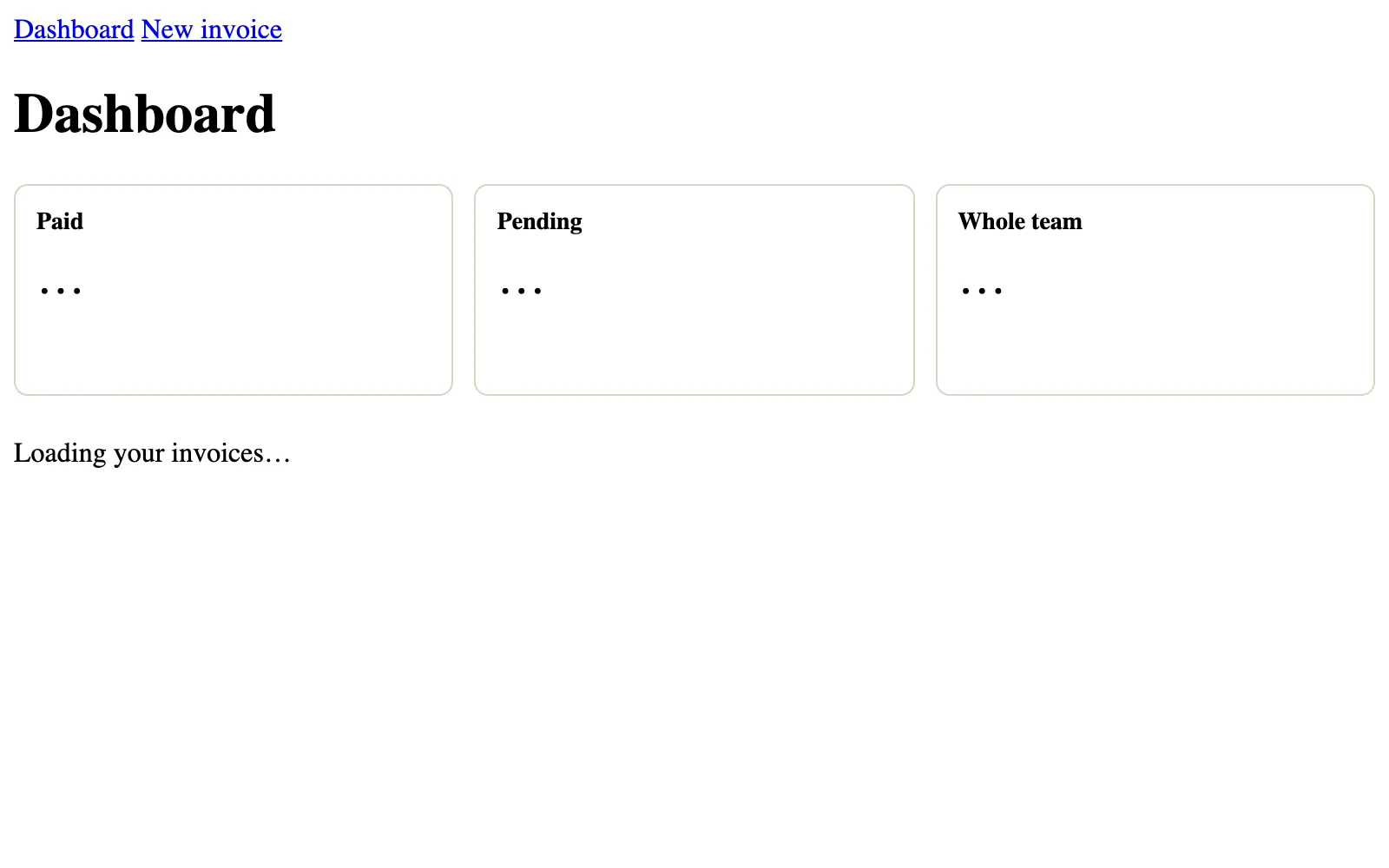
Sent with cookie: session=eyJhbGciOiJIUzI1NiJ9.eyJ1c2VySWQiOiJ1MSIsImlhdCI6MTc5MzMxODQwMCwiZXhwIjo0MTAyNDQ0ODAwfQ.sY9GVxj1-v3mOJvS4ev9s8MSmkxEorTL7e01C0TNkVQ. A picture of the page in real Chrome, in a window 800 px wide, taken once the page had loaded with its styles. Open it full size
The cards and the table's box are in the same places in both pictures. The Network tab says the same in text: the HTML that arrived first holds Paid, … and Loading your invoices…, and the parts streamed after it hold $120.00, $125.50, $339.50 and the three invoices.
When something fails
Two things can go wrong on the dashboard and the invoice page: the database can fail, and an invoice can be missing or not yours. Each has its own file, from Error handling and Not found, forbidden and unauthorized.
app/dashboard/error.tsx is a Client Component with a heading, a sentence and a Try again button that calls retry(). To see it, this version of the app has a database that is down: getMyInvoices throws The invoices table did not answer., a stand-in written for this recording.
app/dashboard/error.tsx"use client"; export default function DashboardError({ retry }: { error: unknown; retry: () => void }) { return ( <main> <h1>Your dashboard did not load</h1> <p>Something went wrong on our side.</p> <button onClick={() => retry()}>Try again</button> </main> );}Each step was taken in real Chrome against next start. Pick one to see the page after it.
Something went wrong on our side.
- Focus
- nothing: the page itself
- Scrolled
- 0 px down
Errors in Chrome's console during this step (1)
Error: Minified React error #441; visit https://react.dev/errors/441 for the full message or use the non-minified dev environment for full errors and additional helpful warnings.
Requests the page made during this step (3), without the files it loaded
GET/dashboard200a whole pageGET/invoices/new200text/x-component- rsc
- 1
- next-router-prefetch
- 1
- next-router-segment-prefetch
- /_tree
- next-url
- /dashboard
GET/invoices/new200text/x-component- rsc
- 1
- next-router-prefetch
- 1
- next-router-segment-prefetch
- /invoices/new/__PAGE__
- next-url
- /dashboard
In Steps, Chrome shows Your dashboard did not load in place of the page, under the layout's navigation. The message the browser got is Minified React error #441: React leaves the real one out in production. The real message is in the server's log: open the Terminal tab and find ⨯ Error: The invoices table did not answer., with a digest, the short code that ties the two together.
The missing invoice is in the first recording. In its Steps, the last step opens /invoices/4 as Asha, and Chrome shows Invoice not found. Now open its Network tab and pick /invoices/4 Ben's invoice, with Asha's session cookie. The status is 200, not 404, and the HTML holds Loading the invoice… and <meta name="robots" content="noindex">. The static shell had already gone out with 200 when notFound() ran inside Suspense, so Next.js added the noindex tag, and React drew not-found.tsx in the browser. Search engines never sign in, so they never see these pages anyway; what matters is that Asha sees nothing of Ben's.
Testing the action and the whole app
Two kinds of test, as in Testing components and End-to-end testing. A unit test runs one piece of code on its own, fast. An end-to-end test drives a real browser against the built app. The action is worth a unit test: it decides what gets saved.
app/invoices/new/actions.test.tsimport { beforeEach, expect, test, vi } from "vitest";import { updateTag } from "next/cache";import { redirect } from "next/navigation";import { createInvoice } from "@/lib/dal";import { addInvoice, type InvoiceState } from "./actions"; vi.mock("@/lib/dal", () => ({ createInvoice: vi.fn() }));vi.mock("next/cache", () => ({ updateTag: vi.fn() }));vi.mock("next/navigation", () => ({ redirect: vi.fn() })); const empty: InvoiceState = { message: "", errors: {}, values: { customer: "", amount: "", status: "pending" } }; function invoiceForm(customer: string, amount: string) { const formData = new FormData(); formData.set("customer", customer); formData.set("amount", amount); formData.set("status", "pending"); return formData;} beforeEach(() => { vi.clearAllMocks();}); test("explains each mistake and saves nothing", async () => { const state = await addInvoice(empty, invoiceForm("L", "12.5")); expect(state.errors).toEqual({ customer: ["Write the customer's name."], amount: ["Write an amount like 45 or 45.50."], }); expect(state.values.customer).toBe("L"); expect(createInvoice).not.toHaveBeenCalled();}); test("saves cents, refreshes the team total and opens the invoice", async () => { vi.mocked(createInvoice).mockResolvedValue(6); await addInvoice(empty, invoiceForm("Lake Café", "12.50")); expect(createInvoice).toHaveBeenCalledWith({ customer: "Lake Café", amountCents: 1250, status: "pending" }); expect(updateTag).toHaveBeenCalledWith("team-total"); expect(redirect).toHaveBeenCalledWith("/invoices/6");}); test("asks someone whose session ended to sign in again", async () => { vi.mocked(createInvoice).mockResolvedValue(null); const state = await addInvoice(empty, invoiceForm("Lake Café", "12.50")); expect(state.message).toBe("Sign in again to save this invoice."); expect(updateTag).not.toHaveBeenCalled();});$ npx vitest run --reporter=verbose RUN v5.0.5 /my-app ✓ app/invoices/new/actions.test.ts > explains each mistake and saves nothing ✓ app/invoices/new/actions.test.ts > saves cents, refreshes the team total and opens the invoice ✓ app/invoices/new/actions.test.ts > asks someone whose session ended to sign in again Test Files 1 passed (1) Tests 3 passed (3) $ next build▲ Next.js 16.4.3 (Turbopack)- Environments: .env- Cache Components enabled- Partial Prefetching enabled Creating an optimized production build ...✓ Compiled successfully Running TypeScript ... Finished TypeScript ... Collecting page data ...✓ Generating static pages (7/7) Finalizing page optimization ... Route (app)┌ ○ /├ ○ /_not-found├ ◐ /dashboard├ /invoices/[id]│ └ ◐ /invoices/[id]├ ○ /invoices/new└ ○ /sign-in ƒ Proxy (Middleware) ○ (Static) prerendered as static content◐ (Partial Prerender) prerendered as static HTML with dynamic server-streamed contentIn app/invoices/new/actions.test.ts, lines 7 to 9 replace three modules with stand-ins: the data access layer, and updateTag and redirect from Next.js. A test calls the action directly, outside the request Next.js opens for a Server Action, where the real updateTag throws; the mocks also record what the action asked for. Then each test calls addInvoice with a form. The first sends L and 12.5 and expects both messages and no save. The second sends 12.50 and expects createInvoice to get 1250 cents, then updateTag("team-total") and redirect("/invoices/6"). The third has createInvoice return null, as for an ended session. The Terminal tab shows what npx vitest run printed: three tests passed.
The end-to-end test signs in through the real form and uses the app as Asha does:
e2e/invoices.spec.tsimport { expect, test } from "@playwright/test";import { waitForHydration } from "./hydration"; test.beforeEach(async ({ page }) => { await page.goto("/sign-in"); await waitForHydration(page); await page.getByLabel("Email").fill("asha@example.com"); // Asha's password in the seeded users table: a test fixture, never a real account's. await page.getByLabel("Password").fill("green-tea-123"); await page.getByRole("button", { name: "Sign in" }).click(); await expect(page.getByRole("heading", { name: "Dashboard" })).toBeVisible();}); test("saves an invoice after fixing a mistake", async ({ page }) => { await page.getByRole("link", { name: "New invoice" }).click(); await page.getByLabel("Customer").fill("Lake Café"); await page.getByLabel("Amount in dollars").fill("12.5"); await page.getByRole("button", { name: "Save invoice" }).click(); await expect(page.getByText("Write an amount like 45 or 45.50.")).toBeVisible(); await page.getByLabel("Amount in dollars").fill("12.50"); await page.getByRole("button", { name: "Save invoice" }).click(); await expect(page).toHaveURL(/\/invoices\/\d+$/); await expect(page.getByText("Lake Café: $12.50, pending")).toBeVisible();}); test("can't open another user's invoice", async ({ page }) => { await page.goto("/invoices/4"); await expect(page.getByRole("heading", { name: "Invoice not found" })).toBeVisible(); await expect(page.getByText("Station Café")).toBeHidden();});$ npx playwright testRunning 2 tests using 1 worker ✓ 1 [chrome] › e2e/invoices.spec.ts:14:5 › saves an invoice after fixing a mistake ✓ 2 [chrome] › e2e/invoices.spec.ts:26:5 › can't open another user's invoice 2 passed $ next build▲ Next.js 16.4.3 (Turbopack)- Environments: .env- Cache Components enabled- Partial Prefetching enabled Creating an optimized production build ...✓ Compiled successfully Running TypeScript ... Finished TypeScript ... Collecting page data ...✓ Generating static pages (7/7) Finalizing page optimization ... Route (app)┌ ○ /├ ○ /_not-found├ ◐ /dashboard├ /invoices/[id]│ └ ◐ /invoices/[id]├ ○ /invoices/new└ ○ /sign-in ƒ Proxy (Middleware) ○ (Static) prerendered as static content◐ (Partial Prerender) prerendered as static HTML with dynamic server-streamed contentIn e2e/invoices.spec.ts, lines 4 to 12 sign in before each test. Line 6 waits for hydration first: Playwright waits for the email box to exist, not for React, and before hydration a click would post the form without the Server Action's JavaScript. The first test makes the mistake, fixes it and saves; line 22 checks the address with a pattern, not a fixed id, so a retry that saves a second invoice still passes. The second test opens Ben's invoice and expects Invoice not found, and never Station Café. playwright.config.ts builds and starts the app itself. The Terminal shows npx playwright test: two tests passed, with one worker, as on a CI server. The project's .gitignore keeps .env and Playwright's results out of git.
Deploying it
For a server of your own, Self-hosting builds a standalone folder: the server and only the packages it needs. One line in next.config.ts turns it on, output: "standalone", and three commands build it, copy the files the server sends as they are, and start it:
npm run build
cp -r public .next/standalone/ && cp -r .next/static .next/standalone/.next/
node .next/standalone/server.js
The recording below ran exactly that, twice, from one build: two instances, copies of the same server, as a load balancer would run them. Then it asked instance 1 for the dashboard, saved an invoice there without JavaScript, and asked both instances for Asha's dashboard.
next.config.tsimport type { NextConfig } from "next"; const nextConfig: NextConfig = { /* config options here */ cacheComponents: true, partialPrefetching: true, output: "standalone", serverExternalPackages: ["@electric-sql/pglite"],}; export default nextConfig;GET /dashboard200
Answered by instance 2 of the app.
- Sent with the request
cookiesession=eyJhbGciOiJIUzI1NiJ9.eyJ1c2VySWQiOiJ1MSIsImlhdCI6MTc5MzMxODQwMCwiZXhwIjo0MTAyNDQ0ODAwfQ.sY9GVxj1-v3mOJvS4ev9s8MSmkxEorTL7e01C0TNkVQ
- Response headers
Varyrsc, next-router-state-tree, next-router-prefetch, next-router-segment-prefetch, Accept-Encodingx-nextjs-stale-time300x-nextjs-prerender1x-nextjs-postponed1X-Powered-ByNext.jsCache-Controlprivate, no-cache, no-store, max-age=0, must-revalidateContent-Typetext/html; charset=utf-8
The HTML that arrived, one element per line, with the code of its 18 scripts left out
<!DOCTYPE html>
<html lang="en">
  <head>
    <meta charset="utf-8">
    <meta name="viewport" content="width=device-width, initial-scale=1">
    <link rel="stylesheet" href="/_next/static/chunks/20vm6th768-j-.css" data-precedence="next">
    <link rel="preload" as="script" fetchpriority="low" href="/_next/static/chunks/1x6obpmlu1_c2.js">
    <script src="/_next/static/chunks/06bs-nf19b2js.js" async=""></script>
    <script src="/_next/static/chunks/2ki52vdnbo2ft.js" async=""></script>
    <script src="/_next/static/chunks/0yuq46kwp2ick.js" async=""></script>
    <script src="/_next/static/chunks/2gsxhio73malr.js" async=""></script>
    <script src="/_next/static/chunks/turbopack-2c3mg3r-05n1w.js" async=""></script>
    <script src="/_next/static/chunks/3lpb-5n2j6tj6.js" async=""></script>
    <script src="/_next/static/chunks/22cnum47sjw92.js" async=""></script>
    <title>Dashboard | Tea invoices</title>
    <script src="/_next/static/chunks/0cz1d0mv5g_q7.js" nomodule=""></script>
  </head>
  <body>
    <div hidden="">
      <!--$-->
      <!--/$-->
    </div>
    <nav><a href="/dashboard">Dashboard</a> <a href="/invoices/new">New invoice</a></nav>
    <!--&-->
    <!--&-->
    <main>
      <h1>Dashboard</h1>
      <!--$?-->
      <template id="B:0"></template>
      <div class="Gx_nyq_cards" aria-busy="true">
        <section class="Gx_nyq_card">
          <h2>Paid</h2>
          <p>…</p>
        </section>
        <section class="Gx_nyq_card">
          <h2>Pending</h2>
          <p>…</p>
        </section>
        <section class="Gx_nyq_card">
          <h2>Whole team</h2>
          <p>…</p>
        </section>
      </div>
      <!--/$-->
      <!--$?-->
      <template id="B:1"></template>
      <div class="Gx_nyq_tableBox" aria-busy="true">
        <p>Loading your invoices…</p>
      </div>
      <!--/$-->
    </main>
    <!--$-->
    <!--/$-->
    <!--/&-->
    <!--/&-->
    <script>…</script>
    <script id="_R_">…</script>
    <script src="/_next/static/chunks/1x6obpmlu1_c2.js" async=""></script>
    <script>…</script>
    <script>…</script>
    <script>…</script>
    <script src="/_next/static/chunks/0cz1d0mv5g_q7.js" nomodule=""></script>
    <div hidden="" id="S:1">
      <div class="Gx_nyq_tableBox">
        <table>
          <thead>
            <tr>
              <th>Invoice</th>
              <th>Customer</th>
              <th>Amount</th>
              <th>Status</th>
            </tr>
          </thead>
          <tbody>
            <tr>
              <td><a href="/invoices/3">Invoice <!-- -->3</a></td>
              <td>River Books</td>
              <td>$80.00</td>
              <td>pending</td>
            </tr>
            <tr>
              <td><a href="/invoices/2">Invoice <!-- -->2</a></td>
              <td>Hill Bakery</td>
              <td>$45.50</td>
              <td>pending</td>
            </tr>
            <tr>
              <td><a href="/invoices/1">Invoice <!-- -->1</a></td>
              <td>Lake Café</td>
              <td>$120.00</td>
              <td>paid</td>
            </tr>
          </tbody>
        </table>
      </div>
    </div>
    <script>…</script>
    <div hidden="" id="S:0">
      <div class="Gx_nyq_cards">
        <section class="Gx_nyq_card">
          <h2>Paid</h2>
          <p>$120.00</p>
        </section>
        <section class="Gx_nyq_card">
          <h2>Pending</h2>
          <p>$125.50</p>
        </section>
        <section class="Gx_nyq_card">
          <h2>Whole team</h2>
          <p>$339.50</p>
        </section>
      </div>
    </div>
    <script>…</script>
    <script>…</script>
  </body>
</html>
In the Network tab, /robots.txt answered 200 from public, copied in by the second command. Save invoice, on instance 1 answered 303 with location: /invoices/6: the form post without JavaScript. Instance 1's dashboard then said Pending $138.00 and Whole team $352.00, with Invoice 6 in the table. Instance 2's said $125.50 and $339.50, with no Invoice 6. Each instance had started its own PGlite, in its own memory.
That's the line between this project and production. Each row is one thing this project does for its recordings, and what a real deployment does instead:
| Part | In this project | In production |
|---|---|---|
| The database | PGlite in each server's memory, seeded when it starts. | One Postgres server for every instance, through DATABASE_URL, with its tables made once. |
| The session secret | A fixed secret in .env, for the recordings only. | Random bytes from a secret store, given to the server when it starts, never in a file the build copies. |
The "use cache" entries | Each server's own memory. | A cache handler that keeps entries where every instance reaches them, so updateTag reaches every instance. |
| Two instances | Two databases and two caches that never meet. | One database and one cache store behind every instance. |
For the database, only db/index.ts changes, to a pool of connections to one Postgres server:
import { drizzle } from "drizzle-orm/node-postgres";
import { Pool } from "pg";

// Every instance of the app connects to the same database.
const pool = new Pool({ connectionString: process.env.DATABASE_URL, max: 10 });

export const db = drizzle({ client: pool });
Line 5 opens up to ten connections to the server in DATABASE_URL, shared by every query this instance sends, as Connecting a database showed. The session secret leaves .env: Self-hosting showed that the build copies the env files it loads into the standalone folder, so a real secret is given to the server when it starts, from a secret store. The Dockerfile, a CDN in front, and a cache handler shared by every instance, so that updateTag on one reaches all of them, are in that lesson too. Before launch, go through The production checklist; Deploying Next.js compares the other ways to run it.
Which part does each job?
The app works because each job has one home. When you add a feature, the first question is where each part of it goes. Sort these jobs into the file that does them in this app:
- Send a visitor with no session cookie at all to
/sign-in. - Find out whether the session cookie is real and whose it is.
- Answer
nullwhen Asha asks for Ben's invoice. - Hand pages only the id, customer, amount and status.
- Keep the team's total for hours, for everyone.
- Refuse
12.5and turn12.50into1250. - Tell Next.js the team's total changed.
- Show three cards with
…while the totals load. - Show
Your dashboard did not loadwhen the database fails.
Sort each job into the part of the invoices app that does it.
For a bigger app, Structuring a large app shows how the same homes grow into feature folders: each feature with its own pages, actions and data access, and the same rules inside.
Common mix-ups
- "proxy.ts protects the invoices." No. It only checks that a cookie named
sessionwas sent. A made-up cookie passes it;getCurrentUseris what stops it. - "A page only sellers use must be made for each request." No.
/invoices/newholds nothing private, so the build made it once (○). The Server Action checks who saves. - "Anything slow should go in
"use cache"." No. A shared cache gives one copy to everyone with the same key. In this app only the team's total is the same for everyone; by its own policy, each seller's invoices stream in instead. - "
notFound()always answers 404." Only before the response starts. InsideSuspense, the shell had gone out with200, so Next.js added a noindex tag instead. - "Zod checks that the invoice is yours." No. Zod checks the shape of the form. The data access layer decides whose data it is.
- "Playwright waits for React." No. It waits for elements. A test that clicks a JavaScript form waits for hydration first.
- "Two instances of the server share the database." Not with PGlite in memory: each server has its own. Production uses one Postgres server and one cache store for every instance.
Practice exercises
These exercises are about the invoices app, which can't run inside this page. Answer first, then use the hints.
Only signed-in sellers should save invoices. Which symbol did next build print for /invoices/new?
○. The page renders a heading and the form, and reads nothing from the request, so the build made it once for everyone. The recorded build printed ○ /invoices/new. Who saves is checked in the action, through createInvoice.
Asha's session cookie asked for /invoices/4, Ben's invoice. Chrome showed Invoice not found. Which status code did the HTML response have?
200. The static shell, with Loading the invoice…, had already gone out with 200 when notFound() ran inside Suspense. Next.js added <meta name="robots" content="noindex">, and React drew Invoice not found in the browser.
A teammate simplified getInvoice. Now Asha can open Ben's invoices. Which condition is missing from the query?
// One invoice, for its owner only. Anyone else gets null, as if it didn't exist.
export async function getInvoice(id: string) {
  if (!/^\d{1,9}$/.test(id)) return null;
  const user = await verifySession();
  const [invoice] = await db
    .select(shown)
    .from(invoices)
    .where(eq(invoices.id, Number(id)));
  return invoice ?? null;
} .where(and(eq(invoices.id, Number(id)), eq(invoices.userId, user.id)));The owner: eq(invoices.userId, user.id). Without it, line 8 finds any invoice by its id. The recorded version of this mistake sent Asha Station Café: $64.00, paid, Ben's invoice 4. With the owner back in the query, she gets Invoice not found.
To make the dashboard faster, a teammate turns getMyInvoices into this. What does next build do?
// The signed-in user's invoices, newest first.
export async function getMyInvoices() {
  "use cache";
  const user = await verifySession();
  return db.select(shown).from(invoices).where(eq(invoices.userId, user.id)).orderBy(desc(invoices.id));
}The build fails: Route "/dashboard": cookies() can't be read inside "use cache". A shared entry's key is the function and its arguments, and the cookie isn't one of them, so one seller's invoices could be served to another. Keep them uncached, inside Suspense, or use "use cache: private".
Asha wants a Mark as paid button on each pending invoice. Write the function in the data access layer, the action, and the button. Which function from next/cache does the action call so the page shows the new status?
import { Suspense } from "react";
import type { Metadata } from "next";
import { notFound } from "next/navigation";
import { getInvoice } from "@/lib/dal";
import { dollars } from "@/lib/money";

export async function generateMetadata({ params }: PageProps<"/invoices/[id]">): Promise<Metadata> {
  const { id } = await params;
  return { title: `Invoice ${id}` };
}

async function Invoice({ params }: Pick<PageProps<"/invoices/[id]">, "params">) {
  const { id } = await params;
  const invoice = await getInvoice(id);
  if (!invoice) notFound();
  return (
    <>
      <h1>Invoice {invoice.id}</h1>
      <p>
        {invoice.customer}: {dollars(invoice.amountCents)}, {invoice.status}
      </p>
    </>
  );
}

export default function InvoicePage({ params }: PageProps<"/invoices/[id]">) {
  return (
    <main>
      <Suspense fallback={<p>Loading the invoice…</p>}>
        <Invoice params={params} />
      </Suspense>
    </main>
  );
}
// lib/dal.ts
// Marks one of the signed-in user's invoices as paid. False when it isn't theirs.
export async function markInvoicePaid(id: number) {
  const user = await getCurrentUser();
  if (!user) return false;
  const rows = await db
    .update(invoices)
    .set({ status: "paid" })
    .where(and(eq(invoices.id, id), eq(invoices.userId, user.id)))
    .returning({ id: invoices.id });
  return rows.length === 1;
}

// app/invoices/[id]/actions.ts
"use server";

import { refresh } from "next/cache";
import { z } from "zod";
import { markInvoicePaid } from "@/lib/dal";

// The id comes from the page, and anyone can post another one. Zod checks its shape:
// a whole number from 1 to the largest id a Postgres integer holds.
const invoiceId = z.number().int().positive().max(2_147_483_647);

export async function markPaid(id: unknown) {
  const result = invoiceId.safeParse(id);
  if (!result.success) return;
  // markInvoicePaid checks the owner.
  if (await markInvoicePaid(result.data)) refresh();
}

// app/invoices/[id]/page.tsx, under the <p>
{invoice.status === "pending" && (
  <form action={markPaid.bind(null, invoice.id)}>
    <button>Mark as paid</button>
  </form>
)}refresh(). The action is a public endpoint, so Zod checks the id first: a whole number from 1 up, which refused the forged 0, -3, 2.5, "2" and null in the recorded tests. markInvoicePaid puts the owner into the where, so an id for someone else's invoice changes nothing. The page reads its data for each request, so refresh() renders it again; the team's total counts every amount whatever its status, so no tag changes. Chrome showed Hill Bakery: $45.50, paid after the click.
Two standalone servers run from one build. Asha saves a $12.50 pending invoice on instance 1. Her next request goes to instance 2. What does her Pending card say there?
$125.50. Each instance started its own PGlite in memory, so the invoice saved on instance 1 never reached instance 2: the recorded dashboard there showed $125.50 and no Invoice 6. In production, both connect to one Postgres server.
Check your understanding
For each question, think about who is asking, and whether the answer is the same for everyone.
Question 1 of 8proxy.ts only checks that a cookie named
sessionexists. Why is that enough there?Choose an answer to see the explanation.
Question 2 of 8A teammate changed
getInvoiceto this. Asha's session cookie asks for/invoices/4, which is Ben's. What does she see?Read the code, then predictTypeScript// One invoice, for its owner only. Anyone else gets null, as if it didn't exist. export async function getInvoice(id: string) { if (!/^\d{1,9}$/.test(id)) return null; const user = await verifySession(); const [invoice] = await db .select(shown) .from(invoices) .where(eq(invoices.id, Number(id))); return invoice ?? null; }Choose an answer to see the explanation.
Question 3 of 8Which of these does the app read from a
"use cache"entry?Choose an answer to see the explanation.
Question 4 of 8What did the dashboard show after Asha saved an invoice in the version whose action has no
updateTag?Choose an answer to see the explanation.
Question 5 of 8What does
useActionState(addInvoice, empty)return?Choose an answer to see the explanation.
Question 6 of 8The totals' skeleton draws the same three cards, 96 pixels tall, with
…in them. What does that size prevent?Choose an answer to see the explanation.
Question 7 of 8Before the Playwright test types into the sign-in form, it calls
waitForHydration(page). Why?Choose an answer to see the explanation.
Question 8 of 8Asha saved invoice 6 on instance 1. Why didn't instance 2's dashboard show it?
Choose an answer to see the explanation.
Key takeaways
- Plan first: the pages and who may open each one, the tables, and where each check lives.
- Let the database keep the rules it can: a unique email, an owner for every invoice, amounts in cents above zero.
- proxy.ts is a quick first door. The data access layer is the real check: it finds who is asking, puts the owner into every query, and returns only the fields pages show.
- A Server Action checks the form's shape with Zod, saves through the data access layer, calls
updateTag, then redirects. - This app caches only what is the same for everyone, like the team's total, and streams each user's own data. That's its policy: plain
"use cache"keyed by a verified user id is fine where storing per-user data is allowed. - Give each
Suspenseboundary a skeleton the size of what replaces it, and anerror.tsxand anot-found.tsxfor when things fail. - Test the action with Vitest and the app with Playwright, waiting for hydration. Deploy with one shared database and cache.
Remember the one-liner.
One data access layer decides who sees what; only what everyone may share is cached; everything personal streams.
Coming next: Pages Router basics. Many existing Next.js apps are built with the older pages folder; the next lesson teaches enough of it to work in one.