Optimizing fonts
Load Google and local fonts with next/font: self-hosted at build time, preloaded, with a size-adjusted fallback so text doesn't jump, and used as CSS variables.
- 01Load a font with next/fontPick a Google font with its subsets, weights and display, or a font file of your own, and apply it with className.
- 02Tell what the visitor downloadsRead the font files, the preload and the @font-face rules next/font writes, and see that no request goes to Google.
- 03Use fonts across your CSSGive each font a CSS variable, and use it from global CSS, a CSS Module or Tailwind CSS's @theme.
The tea shop gets its own font
A web font is a font file the browser downloads, so a page can show text in a font the visitor's computer doesn't have. The tea shop wants Lora, a serif font from Google Fonts, Google's free library of fonts. The usual way to add one is a <link> to Google's servers. Then every visitor's browser asks Google for the font, and the text waits, or jumps, while it arrives.
Next.js has its own way: next/font. You import the font as a function, call it, and put the class it gives you on an element. Here is the shop with Lora. It was built with real Next.js 16.4.3 and run with next start, and the page was opened in real Chrome, in a window 800 px wide. The Browser tab shows Chrome's picture of it.
app/layout.tsximport { Lora } from "next/font/google";import "./globals.css"; const lora = Lora({ subsets: ["latin"],}); export const metadata = { title: "Tea shop" }; export default function RootLayout({ children }: LayoutProps<"/">) { return ( <html lang="en"> <body className={lora.className}>{children}</body> </html> );}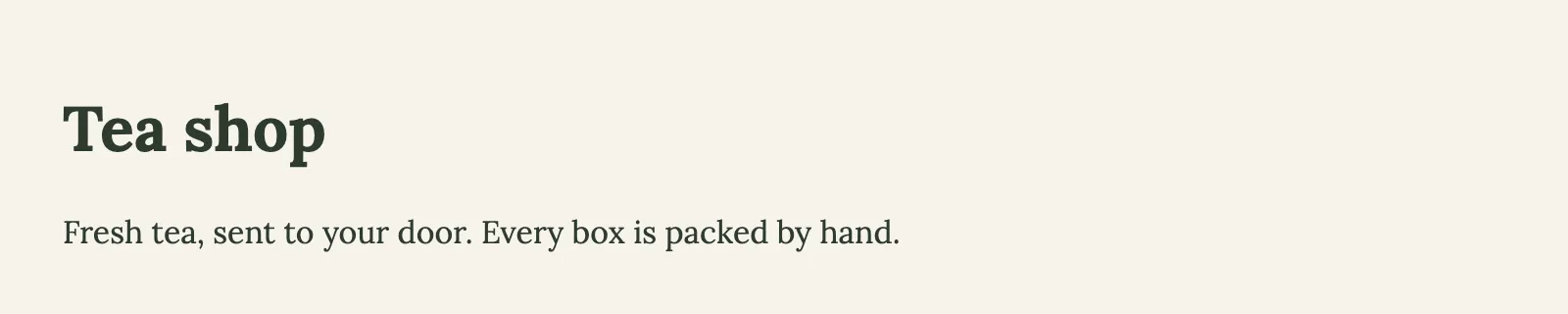
A picture of the page in real Chrome, in a window 800 px wide, taken once the page had loaded with its styles. Open it full size
Line 1 of app/layout.tsx imports Lora from next/font/google. Every Google font is there as a function, named after the font. Lines 4 to 6 call it: subsets: ["latin"] says the shop is written in latin letters. The call returns an object, and line 13 puts its className on <body>, so all the shop's text is in Lora. The call is at the top of the file, outside the component, and saved in a const: next/font needs it there, because it reads the call while the app builds.
Now look at what the visitor gets. Open the Network tab:
- A class. The body has
class="LwFUCa_className", a name next/font made up for this build. In the CSS, that class saysfont-family:Lora,Lora Fallback. - The font, in the shop's own CSS. The stylesheet has
@font-facerules: the CSS that tells the browser where a font's file is. Eachsrcpoints at../media/, a file in/_next/static/media/on the shop's own site. There's no Google address in it. - A preload. The response has a
linkheader withrel=preload; as="font". A preload tells the browser to start downloading a file now, before it reads the CSS that needs it.
Then open the Steps tab. It lists every file Chrome asked for while it opened the page: the page itself, then the font, then the stylesheet and the page's scripts. Every address is on the shop's own site. The browser never asked Google for anything.
next build asks Google Fonts once, and saves the font with the app's other files. A visitor's browser gets the HTML, the CSS and the font from the shop itself, and never asks Google.That's because the shop got Lora long before: next build asked Google Fonts for the CSS and the font files, saved the files with the app's other files, and wrote CSS that points at them. Next.js calls this self-hosting: your site hosts the font itself.
A café could send every guest to the bakery across town for bread. Each guest waits, and the bakery learns who came. Or the café buys flour once, early in the morning, and bakes the bread itself. When guests arrive, the bread is already on the counter, and the plates are already the right size for it.
- In real life: Each guest sent to the bakery across town for bread
- In Next.js: Each visitor's browser asking Google for the font
- In real life: The café buys flour once, early in the morning
- In Next.js:
next builddownloads the font once - In real life: The bread is on the counter when guests arrive
- In Next.js: The font comes from your own site, preloaded
- In real life: A plate that's already the bread's size
- In Next.js: A fallback font sized like the real one
next/font downloads a font when you build, and serves it from your own site. You call the font's function once, at the top of a file, and use the className or variable it gives you. Next.js writes the @font-face rules, preloads the font where it's used, and adds a fallback font sized like it, so the text barely moves while the font arrives. The visitor's browser never asks Google.
A Google font, downloaded when you build
Each Google font is a function in next/font/google, named after the font. A font with a space in its name has an underscore instead: Roboto Mono is Roboto_Mono. Call it at the top of a file, outside any component, and save what it returns in a variable. Each row is one option you can pass:
| Option | What it does | Example |
|---|---|---|
subsets | Which parts of the font to preload, like latin. The other parts stay in the CSS, downloaded only for pages that use their letters. | subsets: ["latin"] |
weight | Which weights to load. A variable font needs none; a font that isn't variable must have at least one. | weight: ["400", "700"] |
display | What the browser shows while the font downloads. The default, swap, shows the fallback first, then swaps. | display: "swap" |
variable | Also make a class that defines a CSS variable with the font's name. | variable: "--font-lora" |
preload | Whether to tell the browser to start downloading the font early. On by default. | preload: false |
subsets: which letters to preload
Google splits each font into subsets: one file for latin letters, one for Cyrillic, one for Vietnamese, and so on. The recorded CSS has an @font-face rule for each of Lora's subsets, and each rule has a unicode-range: the letters its file covers. subsets: ["latin"] doesn't remove the others; it picks which files to preload. In the recording, only the latin file is in the link header, so the browser starts downloading it right away, whatever letters the page has. A file that isn't preloaded is downloaded only when the page has a letter in its unicode-range. Next.js's docs say it warns you if you leave subsets out while preload is on.
display: what shows while the font downloads
Every rule in the recorded CSS says font-display:swap, next/font's default. It means: show the text at once in the fallback font, and swap to Lora when it arrives. The other values come from CSS: optional, for example, uses the font only if it arrives very quickly, and keeps the fallback otherwise.
Whom the browser asks
Compare the two ways to load Lora. Before you switch, guess: which version's page asks another site for something?
app/layout.tsximport "./globals.css"; export const metadata = { title: "Tea shop" }; export default function RootLayout({ children }: LayoutProps<"/">) { return ( <html lang="en"> <head> <link rel="stylesheet" href="https://fonts.googleapis.com/css2?family=Lora:wght@400..700&display=swap" /> </head> <body>{children}</body> </html> );}Each step was taken in real Chrome against next start. Pick one to see the page after it.
Fresh tea, sent to your door. Every box is packed by hand.
- Focus
- nothing: the page itself
- Scrolled
- 0 px down
Requests the page made during this step (8), files and other sites included
GET/200a whole pageGET/_next/static/chunks/37iayjfhyo4qp.css200text/cssGET/_next/static/chunks/3cfn99dbrcvvp.js200application/javascriptGEThttps://fonts.googleapis.com/css2?family=Lora:wght@400..700&display=swapnot sent: another sitestylesheetGET/_next/static/chunks/1j_b1xq_woyiy.js200application/javascriptGET/_next/static/chunks/2ki52vdnbo2ft.js200application/javascriptGET/_next/static/chunks/turbopack-3-ry682tkyiqk.js200application/javascriptGET/_next/static/chunks/1tq6ppe__m8m-.js200application/javascript
Line 9 links Google's stylesheet. The request list has an address on fonts.googleapis.com: the visitor's browser asks Google for the font's CSS. The recorder stopped it there; a real answer would send the browser on to Google's font files.
With the <link>, the page's requests include fonts.googleapis.com: each visitor's browser asks Google for the CSS, and then for the font files on Google's servers. That's another site to connect to before the text can change, and Google sees each visitor's address. In these recordings, Chrome never reached Google: the recorder stops every request to another site before it leaves, and the list shows it as not sent. With next/font, the list has only the shop's own addresses.
Weights, and fonts that hold them all
A font's weight is how thick its letters are: 400 is regular, 700 is bold. Most fonts are a set of files, one per weight. A variable font is one file that holds a range of weights, and the browser draws any weight in that range from it. Lora is variable, from 400 to 700, so the shop's Lora call needed no weight: every recorded Lora rule says font-weight:400 700, and the bold heading and the regular text come from the same file. Next.js's docs recommend variable fonts for that reason.
Poppins isn't variable. Try it without a weight, then with two:
app/layout.tsximport { Poppins } from "next/font/google";import "./globals.css"; const poppins = Poppins({ subsets: ["latin"],}); export const metadata = { title: "Tea shop" }; export default function RootLayout({ children }: LayoutProps<"/">) { return ( <html lang="en"> <body className={poppins.className}>{children}</body> </html> );}$ next build▲ Next.js 16.4.3 (Turbopack)- Cache Components enabled- Partial Prefetching enabled Creating an optimized production build ... > Build error occurredError: Turbopack build failed with 1 error:./app/layout.tsxError: Module not found: Can't resolve 'next/font/google/target.css'Missing weight for Poppins. Available weights: 100, 200, 300, 400, 500, 600, 700, 800, 900 Debug info:- Execution of <ModuleAssetContext as AssetContext>::resolve_asset failed- Execution of resolve failed- Execution of resolve_internal failed- Execution of NextFontGoogleReplacer::import_map_result failed- Execution of *get_font_css_properties failed- Execution of font_options_from_query_map failed- Missing weight for Poppins. Available weights: 100, 200, 300, 400, 500, 600, 700, 800, 900Error while looking up import map: Missing weight for Poppins. Available weights: 100, 200, 300, 400, 500, 600, 700, 800, 900 Debug info:- Execution of NextFontGoogleReplacer::import_map_result failed- Execution of *get_font_css_properties failed- Execution of font_options_from_query_map failed- Missing weight for Poppins. Available weights: 100, 200, 300, 400, 500, 600, 700, 800, 900 https://nextjs.org/docs/messages/module-not-found at <unknown> (https://nextjs.org/docs/messages/module-not-found)Poppins isn't a variable font, and lines 4 to 6 don't say which weight to load. The build stops with Missing weight for Poppins, and lists the weights Poppins has.
Without a weight, the build stops: Missing weight for Poppins. Available weights: 100, 200, 300, 400, 500, 600, 700, 800, 900. Next.js can't guess which files you want. With weight: ["400", "700"] on line 6, it builds, and the CSS has rules for weight 400 and for weight 700, each with its own file. Every weight you add means more files in the build, and more for the browser to download when a page uses it, so ask only for the ones the design uses. A variable font can also take weight, as a range like "400 700".
The fallback that keeps text from jumping
Until Lora arrives, the browser shows the text in a fallback font, one already on the computer. When Lora arrives, it swaps. If the two fonts take different room, every line changes length, and the text below moves: the page shifts. Visitors lose their place, or click the wrong thing. It has a name, Cumulative Layout Shift, and it's one of the Core Web Vitals, the numbers Google measures for how a page feels to use.
next/font makes a fallback that takes the font's room. The shop's recorded CSS, at the top of the page, has this rule after Lora's:
font-family:Lora Fallbackandsrc:local(Times New Roman): a font namedLora Fallback, which is Times New Roman from the visitor's computer. next/font picks Times New Roman for a serif font like Lora, and Arial for a sans-serif one.size-adjust:115.2%: draw it 15.2% bigger, so its letters are as wide as Lora's, on average.ascent-override:87.33%,descent-override:23.78%andline-gap-override:0.0%: how much room each line takes above and below the letters, set to Lora's.
The class says font-family:Lora,Lora Fallback: Lora when it has arrived, the resized Times New Roman until then. The numbers come from measurements of each font that Next.js ships with. To see the difference, the shop's comparison page draws one sentence three times, each in one font, with a box around it:
app/compare/page.tsximport styles from "./compare.module.css"; const sentence = "Green tea, mint tea and oolong"; export default function ComparePage() { return ( <main> <p className={styles.label}>Lora, once it has loaded</p> <p className={styles.lora}>{sentence}</p> <p className={styles.label}>Lora Fallback: Times New Roman, resized</p> <p className={styles.fallback}>{sentence}</p> <p className={styles.label}>Times New Roman as it is</p> <p className={styles.plain}>{sentence}</p> </main> );}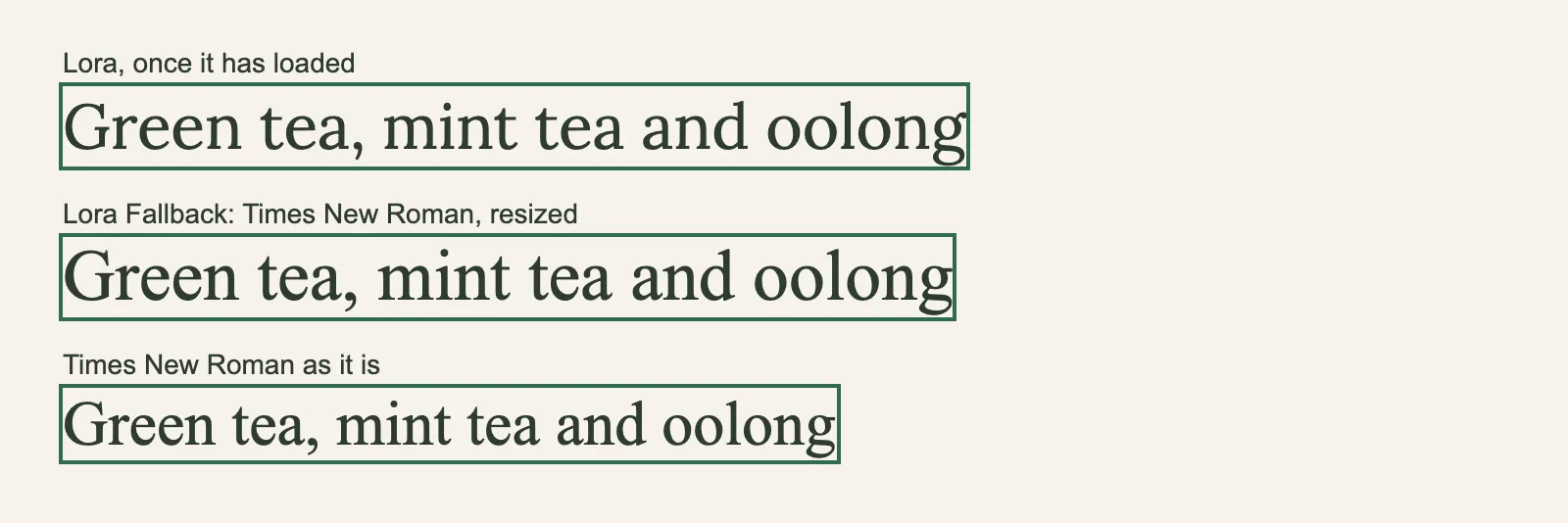
A picture of the page in real Chrome, in a window 800 px wide, taken once the page had loaded with its styles. Open it full size
In app/compare/page.tsx, lines 9, 11 and 13 draw the sentence with three classes from compare.module.css, a CSS Module. Lines 14 to 16 of the CSS Module name "Lora Fallback" directly, only to show it on its own. Real Chrome's picture shows the result: the resized fallback's box is almost exactly as wide and as tall as Lora's, and plain Times New Roman's is clearly narrower and shorter. Swap the second line for the first and almost nothing moves. Swap the third for the first and the line grows.
display: "swap", the browser shows a fallback font while Lora downloads, then swaps. Plain Times New Roman takes less room than Lora, so the text moves when they swap. Lora Fallback is Times New Roman resized to take Lora's room, so it barely moves.You get this without asking. Two options change it, and they're easy to mix up:
adjustFontFallbackis meant to control the resized fallback itself. For a Google font it'strueorfalse, andtrueby default. webpack honours it, but with Turbopack, the default, 16.4.3 ignores it for a Google font: the Rust code that reads the options expectsadjust_font_fallback(issue 74134), soadjustFontFallback: falsestaystrue. Images and fonts under the hood records it. For a local font it names the font to resize:"Arial"(the default),"Times New Roman", orfalsefor none.fallbackis a list of font families of your own, for the CSS to try when the font isn't there, like["Georgia", "serif"].
Here is Lora with fallback, built the same way:
app/layout.tsximport { Lora } from "next/font/google";import "./globals.css"; const lora = Lora({ subsets: ["latin"], fallback: ["Georgia", "serif"],}); export const metadata = { title: "Tea shop" }; export default function RootLayout({ children }: LayoutProps<"/">) { return ( <html lang="en"> <body className={lora.className}>{children}</body> </html> );}GET /200
- Response headers
Varyrsc, next-router-state-tree, next-router-prefetch, next-router-segment-prefetch, Accept-Encodingx-nextjs-cacheHITx-nextjs-prerender1x-nextjs-stale-time300X-Powered-ByNext.jsCache-Controls-maxage=31536000Content-Typetext/html; charset=utf-8
The HTML that arrived, one element per line, with the code of its 14 scripts left out
<!DOCTYPE html>
<html lang="en">
  <head>
    <meta charset="utf-8">
    <meta name="viewport" content="width=device-width, initial-scale=1">
    <link rel="stylesheet" href="/_next/static/chunks/2b4wod6nsrv18.css" data-precedence="next">
    <link rel="preload" as="script" fetchpriority="low" href="/_next/static/chunks/3cfn99dbrcvvp.js">
    <script src="/_next/static/chunks/1j_b1xq_woyiy.js" async=""></script>
    <script src="/_next/static/chunks/2ki52vdnbo2ft.js" async=""></script>
    <script src="/_next/static/chunks/turbopack-3-ry682tkyiqk.js" async=""></script>
    <script src="/_next/static/chunks/1tq6ppe__m8m-.js" async=""></script>
    <title>Tea shop</title>
    <script src="/_next/static/chunks/0cz1d0mv5g_q7.js" nomodule=""></script>
  </head>
  <body class="_9nL0yG_className">
    <div hidden="">
      <!--$-->
      <!--/$-->
    </div>
    <!--&-->
    <main>
      <h1>Tea shop</h1>
      <p>Fresh tea, sent to your door. Every box is packed by hand.</p>
    </main>
    <!--$-->
    <!--/$-->
    <!--/&-->
    <script id="_R_">…</script>
    <script src="/_next/static/chunks/3cfn99dbrcvvp.js" async=""></script>
    <script>…</script>
    <script>…</script>
    <script>…</script>
    <script>…</script>
    <script>…</script>
    <script>…</script>
    <script>…</script>
  </body>
</html>
The stylesheet the HTML links, with the CSS Next.js built for it, laid out to read
/_next/static/chunks/2b4wod6nsrv18.css@font-face { font-family:Lora; font-style:normal; font-weight:400 700; font-display:swap; src:url(../media/c713a0aab7a8ca36.0mybutugvu-lq.woff2)format("woff2"); unicode-range:U+460-52F,U+1C80-1C8A,U+20B4,U+2DE0-2DFF,U+A640-A69F,U+FE2E-FE2F } @font-face { font-family:Lora; font-style:normal; font-weight:400 700; font-display:swap; src:url(../media/2c6bb81ef2959eb3.2fpqrm51ez0iq.woff2)format("woff2"); unicode-range:U+301,U+400-45F,U+490-491,U+4B0-4B1,U+2116 } @font-face { font-family:Lora; font-style:normal; font-weight:400 700; font-display:swap; src:url(../media/e929b158eb81aae9.02frcczqg7k-8.woff2)format("woff2"); unicode-range:U+302-303,U+305,U+307-308,U+310,U+312,U+315,U+31A,U+326-327,U+32C,U+32F-330,U+332-333,U+338,U+33A,U+346,U+34D,U+391-3A1,U+3A3-3A9,U+3B1-3C9,U+3D1,U+3D5-3D6,U+3F0-3F1,U+3F4-3F5,U+2016-2017,U+2034-2038,U+203C,U+2040,U+2043,U+2047,U+2050,U+2057,U+205F,U+2070-2071,U+2074-209F,U+20D0-20DC,U+20E1,U+20E5-20EF,U+2100-2112,U+2114-2115,U+2117-2121,U+2123-214F,U+2190,U+2192,U+2194-21AE,U+21B0-21E5,U+21F1-21F2,U+21F4-2211,U+2213-2214,U+2216-22FF,U+2308-230B,U+2310,U+2319,U+231C-2321,U+2336-237A,U+237C,U+2395,U+239B-23B7,U+23D0,U+23DC-23E1,U+2474-2475,U+25AF,U+25B3,U+25B7,U+25BD,U+25C1,U+25CA,U+25CC,U+25FB,U+266D-266F,U+27C0-27FF,U+2900-2AFF,U+2B0E-2B11,U+2B30-2B4C,U+2BFE,U+3030,U+FF5B,U+FF5D,U+1D400-1D7FF,U+1EE?? } @font-face { font-family:Lora; font-style:normal; font-weight:400 700; font-display:swap; src:url(../media/02ee680d6f7b72e4.2936i88_6qsfd.woff2)format("woff2"); unicode-range:U+1-C,U+E-1F,U+7F-9F,U+20DD-20E0,U+20E2-20E4,U+2150-218F,U+2190,U+2192,U+2194-2199,U+21AF,U+21E6-21F0,U+21F3,U+2218-2219,U+2299,U+22C4-22C6,U+2300-243F,U+2440-244A,U+2460-24FF,U+25A0-27BF,U+28??,U+2921-2922,U+2981,U+29BF,U+29EB,U+2B??,U+4DC0-4DFF,U+FFF9-FFFB,U+10140-1018E,U+10190-1019C,U+101A0,U+101D0-101FD,U+102E0-102FB,U+10E60-10E7E,U+1D2C0-1D2D3,U+1D2E0-1D37F,U+1F0??,U+1F100-1F1AE,U+1F1E6-1F1FF,U+1F30D-1F30F,U+1F315,U+1F31C,U+1F31E,U+1F320-1F32C,U+1F336,U+1F378,U+1F37D,U+1F382,U+1F393-1F39F,U+1F3A7-1F3A8,U+1F3AC-1F3AF,U+1F3C2,U+1F3C4-1F3C6,U+1F3CA-1F3CE,U+1F3D4-1F3E0,U+1F3ED,U+1F3F1-1F3F3,U+1F3F5-1F3F7,U+1F408,U+1F415,U+1F41F,U+1F426,U+1F43F,U+1F441-1F442,U+1F444,U+1F446-1F449,U+1F44C-1F44E,U+1F453,U+1F46A,U+1F47D,U+1F4A3,U+1F4B0,U+1F4B3,U+1F4B9,U+1F4BB,U+1F4BF,U+1F4C8-1F4CB,U+1F4D6,U+1F4DA,U+1F4DF,U+1F4E3-1F4E6,U+1F4EA-1F4ED,U+1F4F7,U+1F4F9-1F4FB,U+1F4FD-1F4FE,U+1F503,U+1F507-1F50B,U+1F50D,U+1F512-1F513,U+1F53E-1F54A,U+1F54F-1F5FA,U+1F610,U+1F650-1F67F,U+1F687,U+1F68D,U+1F691,U+1F694,U+1F698,U+1F6AD,U+1F6B2,U+1F6B9-1F6BA,U+1F6BC,U+1F6C6-1F6CF,U+1F6D3-1F6D7,U+1F6E0-1F6EA,U+1F6F0-1F6F3,U+1F6F7-1F6FC,U+1F700-1F80B,U+1F810-1F847,U+1F850-1F859,U+1F860-1F887,U+1F890-1F8AD,U+1F8B0-1F8BB,U+1F8C0-1F8C1,U+1F8D0-1F8D8,U+1F900-1F90B,U+1F93B,U+1F946,U+1F984,U+1F996,U+1F9E9,U+1FA00-1FA6F,U+1FA70-1FA7C,U+1FA80-1FAC6,U+1FAC8,U+1FACC-1FADD,U+1FADF-1FAEB,U+1FAEF-1FAFA,U+1FB?? } @font-face { font-family:Lora; font-style:normal; font-weight:400 700; font-display:swap; src:url(../media/80aaaae4466959af.15gdzqknx46iu.woff2)format("woff2"); unicode-range:U+102-103,U+110-111,U+128-129,U+168-169,U+1A0-1A1,U+1AF-1B0,U+300-301,U+303-304,U+308-309,U+323,U+329,U+1EA0-1EF9,U+20AB } @font-face { font-family:Lora; font-style:normal; font-weight:400 700; font-display:swap; src:url(../media/1854c6960aa5e9fd.2qdkzeru_ecot.woff2)format("woff2"); unicode-range:U+100-2BA,U+2BD-2C5,U+2C7-2CC,U+2CE-2D7,U+2DD-2FF,U+304,U+308,U+329,U+1D00-1DBF,U+1E00-1E9F,U+1EF2-1EFF,U+2020,U+20A0-20AB,U+20AD-20C4,U+2113,U+2C60-2C7F,U+A720-A7FF } @font-face { font-family:Lora; font-style:normal; font-weight:400 700; font-display:swap; src:url(../media/c3d9c74ef0d9c07b.p.23aeddxv5enbo.woff2)format("woff2"); unicode-range:U+??,U+131,U+152-153,U+2BB-2BC,U+2C6,U+2DA,U+2DC,U+304,U+308,U+329,U+2000-206F,U+20AC,U+2122,U+2191,U+2193,U+2212,U+2215,U+FEFF,U+FFFD } ._9nL0yG_className { font-family:Lora,Georgia,serif; font-style:normal } body { color:#2f3b2f; background:#f6f3ea; margin:0; padding:24px 32px }
Line 6 of app/layout.tsx passes fallback: ["Georgia", "serif"]. In the Network tab, the class says font-family:Lora,Georgia,serif, and the CSS has no Lora Fallback rule: in this recorded build, with Turbopack, the families you list took the resized fallback's place. How the two combine depends on the bundler in Next.js 16.4.3: Turbopack uses your list instead (font_fallback.rs, lines 67 and 68), while the webpack loader keeps the resized fallback and adds your families after it (postcss-next-font.ts, lines 132 to 136). To keep text from jumping, leave fallback out.
A font file of your own
The shop's tea of the day is written in Caveat, a handwriting font, from a file the shop keeps in its project. (Caveat is free to share under the SIL Open Font License; the license travels with the file.) For a font file, use localFont from next/font/local. The shop keeps its fonts in one file, app/fonts.ts, and imports them where they're used:
app/fonts.tsimport localFont from "next/font/local"; export const caveat = localFont({ src: "./fonts/Caveat.woff2", weight: "400 700",});
A picture of the page in real Chrome, in a window 800 px wide, taken once the page had loaded with its styles. Open it full size
Line 1 of app/fonts.ts imports localFont. Lines 3 to 6 call it and export the result as caveat. Line 4 is the file's path, relative to app/fonts.ts: the file is app/fonts/Caveat.woff2 in the tree. (WOFF2 is the compressed font format every current browser reads.) Caveat is a variable font, so line 5 gives its range of weights, "400 700". For a font that comes as several files, like a regular and a bold one, src takes a list, with a path, weight and style for each. In app/teas/page.tsx, line 1 imports caveat, and line 6 puts its className on the heading.
Open the Network tab, and pick each page above the HTML:
- The CSS has an
@font-facerule whosesrcis a copy of the file in/_next/static/media/, withfont-weight:400 700, and a fallback rule:src:local(Arial)withsize-adjust:74.77%. For a local font, next/font measures the file itself while it builds, and uses Arial unless you say otherwise. /teas'slinkheader preloads two fonts: Caveat and Lora./'s preloads only Lora. Next.js preloads a font on the routes whose files use it: Lora is in the root layout, so every route preloads it; Caveat is only in the teas page.
The rules are the same as for a Google font, without the download: the build copies the file, writes the CSS, preloads it, and sizes a fallback. Load each font once, in one place like app/fonts.ts, and import it where you need it: each call of a font function adds the font to the app again.
Fonts as CSS variables
className sets the font on one element. A shop with two fonts usually wants them in its CSS instead: Lora for the text, Caveat for every heading. For that, give each font a variable. Each row is one way to apply a font:
| What you use | What it is | What it reaches |
|---|---|---|
lora.className | A class that sets font-family. | One element and everything inside it. |
lora.style | A style object with fontFamily, for the style prop. | One element, without a class. |
lora.variable | A class that defines a CSS variable, like --font-lora. | Any CSS inside that element: global CSS, a CSS Module, Tailwind CSS. |
app/fonts.tsimport { Lora } from "next/font/google";import localFont from "next/font/local"; export const lora = Lora({ subsets: ["latin"], variable: "--font-lora",}); export const caveat = localFont({ src: "./fonts/Caveat.woff2", weight: "400 700", variable: "--font-caveat",});
A picture of the page in real Chrome, in a window 800 px wide, taken once the page had loaded with its styles. Open it full size
In app/fonts.ts, line 6 names Lora's variable --font-lora, and line 12 names Caveat's --font-caveat. Now lora.variable is a class that defines --font-lora. Line 8 of app/layout.tsx puts both classes on <html>. In app/globals.css, line 6 gives the body var(--font-lora), and line 10 gives every h1 var(--font-caveat). The Network tab shows the variables' classes (their names made up for this build), like .fAxLeq_variable{--font-lora:"Lora", "Lora Fallback"}: the value is the font and its fallback. Caveat's class sets --font-caveat:"caveat", "caveat Fallback" the same way, with the family names next/font gave the local font in this build.
lora.variable and caveat.variable are classes on <html>. Each defines a CSS variable, and every element inside can read it: body reads --font-lora, and h1 reads --font-caveat.A variable is just CSS, so it works from a CSS Module too, as font-family: var(--font-lora) in any class. It also works with Tailwind CSS. Tailwind CSS in Next.js pointed font-sans at Geist this way. A theme variable in Tailwind CSS's --font-* namespace makes a class of its own, so the shop can have a font-hand class for Caveat:
app/globals.css@import "tailwindcss"; @theme inline { --font-serif: var(--font-lora); --font-hand: var(--font-caveat);}
A picture of the page in real Chrome, in a window 800 px wide, taken once the page had loaded with its styles. Open it full size
Lines 3 to 6 of app/globals.css point --font-serif at Lora's variable and add --font-hand for Caveat's. The Network tab has .font-hand{font-family:var(--font-caveat)} and .font-serif{font-family:var(--font-lora)}, and the layout's body uses font-serif. Line 4 of app/page.tsx gives the heading font-hand, and the picture shows it in Caveat. app/fonts.ts and app/layout.tsx are the same as before.
Does the visitor's browser ask Google?
Fonts reach a page in many ways. Sort these: does each one make the visitor's browser ask Google, or only the shop's own site?
Lora({ subsets: ["latin"] })fromnext/font/google<link rel="stylesheet" href="https://fonts.googleapis.com/css2?…">@import url("https://fonts.googleapis.com/css2?family=Lora");inglobals.csslocalFont({ src: "./fonts/Caveat.woff2" })fromnext/font/localLora({ subsets: ["latin"], variable: "--font-lora" })@font-facewithsrc: url("https://fonts.gstatic.com/…")
Sort each way of loading a font: does the visitor's browser ask only the shop's own site, or Google too?
Common mix-ups
- "next/font/google loads the font from Google in the browser." No. The build downloads it, and the visitor's browser gets it from your site. The recorded visit asked no other site.
- "
subsetsremoves every other alphabet." No. The CSS still has a rule for each subset;subsetspicks which file to preload. - "Every font needs a
weight." Only fonts that aren't variable. A variable font like Lora has every weight in its range in one file. - "The fallback font is a second download." No. It's a font already on the computer, like Times New Roman or Arial, resized with
size-adjust. - "Calling the font function inside a component is fine." Call it once, at the top of a file, and import the result. Each call adds the font to the app again.
- "A font in the root layout and a font in one page are preloaded the same way." No. A font is preloaded on the routes that use it: the root layout's on every route, a page's only on that page.
- "
variablegives you the font's name." It gives you a class name. The class defines the CSS variable, so put it on an element around the text.
Practice exercises
A Next.js project can't run inside this page, so answer first, then use the hints.
A visitor opens the shop with this root layout. Which site does their browser download Lora from?
import { Lora } from "next/font/google";
import "./globals.css";

const lora = Lora({
  subsets: ["latin"],
});

export const metadata = { title: "Tea shop" };

export default function RootLayout({ children }: LayoutProps<"/">) {
  return (
    <html lang="en">
      <body className={lora.className}>{children}</body>
    </html>
  );
}
From the shop's own site, at an address under /_next/static/media/. next build downloaded Lora from Google and saved it with the app's files. The recorded visit asked only the shop.
The build stops with this layout. Which option is missing?
import { Poppins } from "next/font/google";
import "./globals.css";

const poppins = Poppins({
  subsets: ["latin"],
});

export const metadata = { title: "Tea shop" };

export default function RootLayout({ children }: LayoutProps<"/">) {
  return (
    <html lang="en">
      <body className={poppins.className}>{children}</body>
    </html>
  );
}
import { Poppins } from "next/font/google";
import "./globals.css";

const poppins = Poppins({
  subsets: ["latin"],
  weight: ["400", "700"],
});

export const metadata = { title: "Tea shop" };

export default function RootLayout({ children }: LayoutProps<"/">) {
  return (
    <html lang="en">
      <body className={poppins.className}>{children}</body>
    </html>
  );
}
weight. Poppins has a separate file for each weight, so next/font needs to know which ones you use. With weight: ["400", "700"] the recorded build passes, and the CSS has a rule for each weight.
app/fonts.ts loads Caveat, and only app/teas/page.tsx, below, uses it. The root layout uses Lora. Which of the shop's two pages, / and /teas, preloads Caveat?
import { caveat } from "../fonts";

export default function TeasPage() {
  return (
    <main>
      <h1 className={caveat.className}>Tea of the day: mint</h1>
      <p>Picked this morning, packed by hand.</p>
    </main>
  );
}
Only /teas. This page is the only file that uses Caveat, so its route preloads Caveat. The recorded link header of /teas has Caveat and Lora; / has only Lora.
Both fonts have a variable, and both classes are on <html>. What goes after font-family: so that every heading is in Caveat?
body {
  font-family: var(--font-lora);
}

h1 {
  font-family: /* Caveat goes here */;
  font-size: 48px;
}
body {
  margin: 0;
  padding: 24px 32px;
  background: #f6f3ea;
  color: #2f3b2f;
  font-family: var(--font-lora);
}

h1 {
  font-family: var(--font-caveat);
  font-size: 48px;
}
var(--font-caveat). The class on <html> defines --font-caveat, so any element inside can use it. The recorded CSS has h1{font-family:var(--font-caveat);font-size:48px}, and the picture shows the heading in Caveat.
The shop uses Tailwind CSS. Add one line to this globals.css so that the class font-hand puts text in Caveat.
@import "tailwindcss";

@theme inline {
  --font-serif: var(--font-lora);
}
@import "tailwindcss";

@theme inline {
  --font-serif: var(--font-lora);
  --font-hand: var(--font-caveat);
}
--font-hand: var(--font-caveat); inside @theme inline. The recorded CSS then has .font-hand{font-family:var(--font-caveat)}, and the heading with font-hand is in Caveat.
Another shop writes its own @font-face rule for a font file, with font-family: "Lora", serif. When the page loads, the heading appears in a plain serif font, then jumps wider when Lora arrives. Moving to next/font fixes the jump. What does next/font add that does it?
A fallback font sized like the real one: an @font-face rule that uses a font already on the computer with size-adjust and the ascent, descent and line gap overrides. In the recorded comparison, Lora Fallback takes almost the same room as Lora, so the text barely moves when Lora arrives.
Check your understanding
For each question, ask when the font is downloaded, by whom, and what the browser shows until it arrives.
Question 1 of 7When does this layout's Lora font get downloaded from Google?
Read the code, then predictTSXimport { Lora } from "next/font/google"; import "./globals.css"; const lora = Lora({ subsets: ["latin"], }); export const metadata = { title: "Tea shop" }; export default function RootLayout({ children }: LayoutProps<"/">) { return ( <html lang="en"> <body className={lora.className}>{children}</body> </html> ); }Choose an answer to see the explanation.
Question 2 of 7What does
subsets: ["latin"]change?Choose an answer to see the explanation.
Question 3 of 7Why does
Poppins({ subsets: ["latin"] })fail to build, whenLora({ subsets: ["latin"] })builds?Choose an answer to see the explanation.
Question 4 of 7What is the
Lora Fallbackfont in the recorded CSS?Choose an answer to see the explanation.
Question 5 of 7This
app/fonts.tsgives Lora avariable. What doeslora.variablegive you?Read the code, then predictTSimport { Lora } from "next/font/google"; import localFont from "next/font/local"; export const lora = Lora({ subsets: ["latin"], variable: "--font-lora", }); export const caveat = localFont({ src: "./fonts/Caveat.woff2", weight: "400 700", variable: "--font-caveat", });Choose an answer to see the explanation.
Question 6 of 7A font is loaded in
app/teas/page.tsxonly. Where does Next.js preload it?Choose an answer to see the explanation.
Question 7 of 7In this
globals.css, what does line 5 make?Read the code, then predictCSS@import "tailwindcss"; @theme inline { --font-serif: var(--font-lora); --font-hand: var(--font-caveat); }Choose an answer to see the explanation.
Key takeaways
next/font/googledownloads a Google font duringnext build, and your site serves it from/_next/static/media/. The visitor's browser never asks Google.- Call a font function once, at the top of a file, and use its
className,styleorvariable. Put fonts you share in one file, likeapp/fonts.ts. subsetspicks the file to preload. A variable font needs noweight; any other font needs at least one, and each weight is another file.- next/font adds a fallback font sized like yours, with
size-adjustand the line overrides, so text barely moves when the font arrives.displayisswapby default. next/font/localdoes the same for a font file of your own. A font is preloaded on the routes that use it.- With
variable, a font becomes a CSS variable that global CSS, CSS Modules and Tailwind CSS's@themecan use.
Remember the one-liner.
next/font fetches the font when you build, serves it from your site, and sizes a fallback so nothing jumps.
Coming next: Scripts and third-party code. It loads analytics, a chat widget, a map and a video with next/script, and records when each one loads.