Tailwind CSS in Next.js
Set up Tailwind CSS 4 in Next.js as create-next-app does, add design tokens with @theme, dark mode and a font variable, and keep class lists readable.
- 01Set up Tailwind CSSRead the three files create-next-app writes for it, or set it up with its PostCSS plugin, and import it once in the root layout.
- 02Make it the shop's ownAdd colors and sizes with @theme, turn on dark mode from the computer's setting or a class, and use a next/font variable.
- 03Write classes Tailwind CSS can findTell why a class built from pieces gets no CSS, and keep long class lists short and clear.
The tea shop, styled with utility classes
CSS in Next.js styled the tea shop with a global stylesheet and CSS Modules. Here the shop gets Tailwind CSS instead, a CSS library made of utility classes: small classes that each do one thing, like px-6 (padding on the left and right) or bg-emerald-800 (a dark green background). You put them in className, and Tailwind CSS writes the CSS for them. A new Next.js app has it unless you say no: Creating a Next.js app shows the question. (Styling components compares it with the other ways to style React components.)
Here is the shop with Tailwind CSS, set up the way create-next-app 16.4.3 does it. It was built with real Next.js and Tailwind CSS 4.3.3, the latest on October 30, 2026, and each page was pictured in real Chrome, in a window 800 px wide. The Browser tab shows the pictures.
app/teas/page.tsxconst teas = [ { name: "Green tea", price: 4 }, { name: "Mint tea", price: 3 },]; export default function TeasPage() { return ( <main className="px-6 py-4"> <h1 className="text-3xl font-bold">Our teas</h1> <ul className="mt-4 grid grid-cols-1 gap-4 md:grid-cols-2"> {teas.map((tea) => ( <li key={tea.name} className="rounded-xl border-2 border-emerald-800 bg-white px-4 py-3"> <h2 className="text-xl font-semibold">{tea.name}</h2> <p className="font-bold text-emerald-800">${tea.price} a box</p> </li> ))} </ul> </main> );}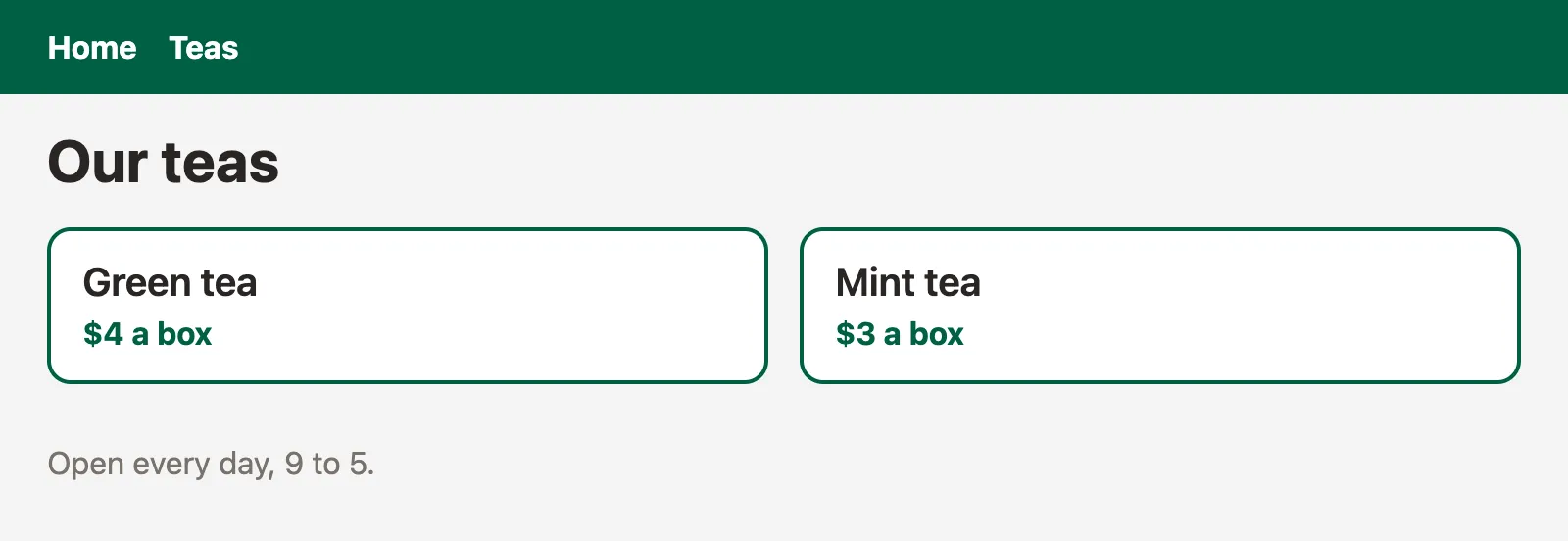
A picture of the page in real Chrome, in a window 800 px wide, taken once the page had loaded with its styles. Open it full size
Read the class lists in app/teas/page.tsx as a list of instructions. Line 10 makes the list a grid with grid, one column with grid-cols-1, and a gap of 1rem with gap-4. Then md:grid-cols-2 gives it two columns, but only on screens at least 48rem (768 px) wide: md: is a variant, a prefix that says when a utility applies. Line 12 gives each card round corners, a green border, a white background and padding, and line 14 makes the price bold and green. The picture is 800 px wide, so the cards sit side by side. Pick / above the picture: its link looks like a button, and hover:bg-emerald-800 on line 8 of app/page.tsx darkens it when the mouse is over it.
Now open the Network tab. Both pages link one stylesheet, 0pvj_uzeycuk5.css, of about 7 KB. It starts with a reset Tailwind CSS calls Preflight, which takes away the browser's own margins and heading sizes. Then the theme variables the classes need, like --color-emerald-800, and then one rule for each class in the files: .px-6 sets padding-inline:calc(var(--spacing) * 6). Variants become conditions: md:grid-cols-2 sits inside @media (min-width:48rem), and hover:bg-emerald-800 inside @media (hover:hover). Each color is there twice: as a hex color like #005f46, and again as lab(), another way CSS can write a color, inside @supports, a check that applies its rules only in browsers that support that feature.
px-6 and md:grid-cols-2, and writes a rule for each one it knows. A utility that no file uses gets no rule.A sign maker reads your order form and cuts the letters for exactly the words written on it. He doesn't cut every letter he could, and he can't cut a word the form only describes, like "whatever the customer says later". He needs to read it.
- In real life: The order form, with every word spelled out
- In Next.js: Your files, with every class name written whole
- In real life: The sign maker reads the form and cuts those letters
- In Next.js: Tailwind CSS reads the files and writes those rules
- In real life: A letter nobody ordered is never cut
- In Next.js: A utility no file uses gets no rule
- In real life: An order that says "the word the customer tells you later"
- In Next.js: A class built from pieces when the code runs
Tailwind CSS turns the class names written in your files into one stylesheet, which the root layout imports. create-next-app runs it as a Turbopack loader. Your colors, sizes and fonts go in @theme, where they make classes of their own, and dark: classes apply in dark mode. Write every class name whole, so Tailwind CSS can find it.
Setting up Tailwind CSS as create-next-app does
Click through the example's files: four of them set up Tailwind CSS. They're exactly what create-next-app writes with its default answers, without the linter.
package.json, lines 16 and 20: two packages,@tailwindcss/turbopackandtailwindcss, both^4, any version 4.next.config.ts, lines 7 to 14: aturbopackrule. Turbopack is the bundlernext builduses. The rule says: for every file whose name matches*.css, run the loader@tailwindcss/turbopack, and treat what it gives back as CSS. A loader is a function the bundler runs on a file's text before it bundles it.app/globals.css, line 1:@import "tailwindcss";. The loader replaces it with Preflight, the theme and the utilities.app/layout.tsx, line 2: the root layout importsglobals.css, as in the last lesson, so every page gets the stylesheet.
There's no tailwind.config.js. Tailwind CSS 4 keeps its settings in the CSS itself, in @theme, and finds your files on its own, with automatic source detection: starting from the folder the build runs in (the project's folder, here), it reads every file except node_modules, the files .gitignore lists, CSS files, images and lockfiles. In a repository that holds several projects, that starting folder matters: @import "tailwindcss" source("../src") changes it. @source "../ui" adds a folder it would skip, like a component library's, and @source inline("bg-teal-700") makes a utility that no file contains.
Next.js's CSS docs set it up another way, with Tailwind CSS's PostCSS plugin. PostCSS is a tool that runs plugins over CSS, and Next.js runs it on every CSS file when the project has a postcss.config.mjs. Each row compares the two setups:
| What | create-next-app with Turbopack | The docs' PostCSS setup |
|---|---|---|
package.json | tailwindcss and @tailwindcss/turbopack, in devDependencies. | tailwindcss and @tailwindcss/postcss, in devDependencies. |
| How Tailwind CSS runs | A rule in next.config.ts sends every .css file through the @tailwindcss/turbopack loader. | postcss.config.mjs adds the @tailwindcss/postcss plugin, which Next.js runs on every CSS file. |
app/globals.css | @import "tailwindcss"; | @import "tailwindcss"; |
| Who writes it this way | create-next-app, with Turbopack, the default bundler. | The docs' CSS page, and create-next-app --rspack, which uses the Rspack bundler. |
Try both. Before you switch, guess: does the page, or its CSS, change?
next.config.tsimport type { NextConfig } from "next"; const nextConfig: NextConfig = { /* config options here */ cacheComponents: true, partialPrefetching: true, turbopack: { rules: { "*.css": { loaders: ["@tailwindcss/turbopack"], as: "*.css", }, }, },}; export default nextConfig;A picture of the page in real Chrome, in a window 800 px wide, taken once the page had loaded with its styles. Open it full size
What create-next-app writes: lines 7 to 14 of next.config.ts send every .css file through @tailwindcss/turbopack, and package.json lists it. The tea page gets two cards side by side.
Nothing changes. The PostCSS version builds the very same stylesheet, 0pvj_uzeycuk5.css, with the same CSS in it, and the pictures are the same. Keep the setup create-next-app wrote; switching changes nothing in the CSS.
Design tokens with @theme
The colors, sizes and fonts a design is made of are its design tokens. Tailwind CSS keeps them as theme variables: CSS variables written inside @theme, where each one also makes utility classes. The tea shop has its own green and cream, and a corner size for its cards:
app/globals.css@import "tailwindcss"; @theme { --color-leaf: #2f6b4f; --color-cream: #f6f3ea; --radius-card: 12px;}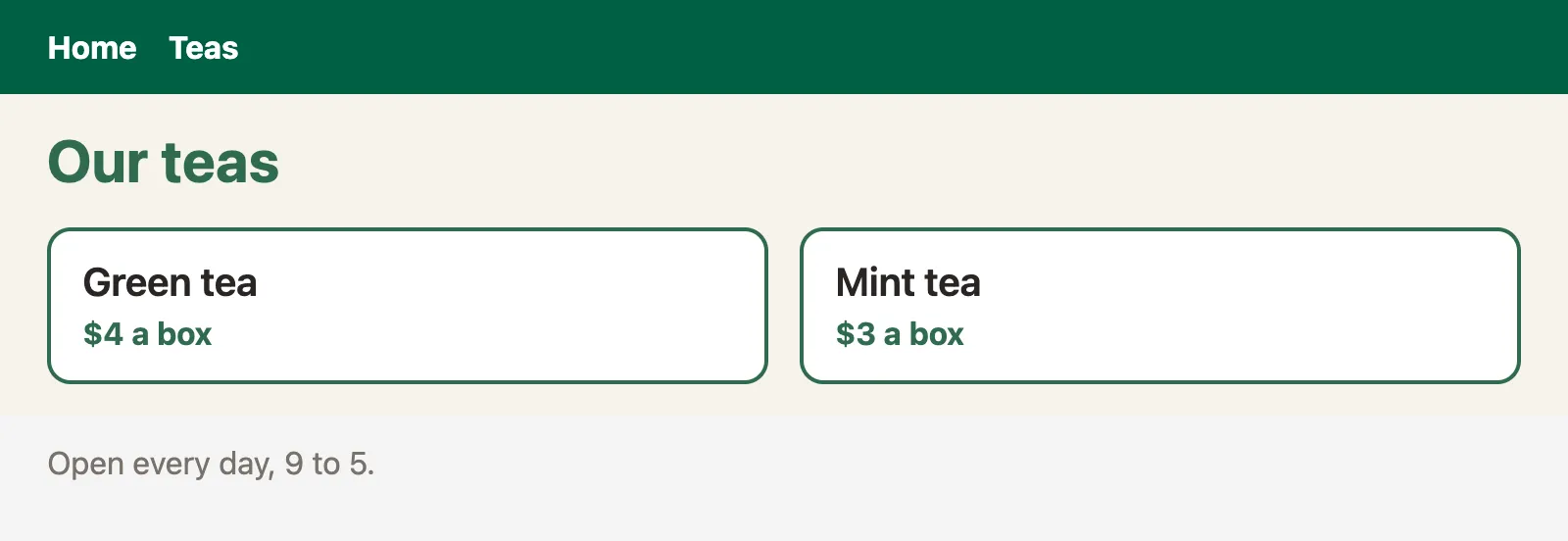
A picture of the page in real Chrome, in a window 800 px wide, taken once the page had loaded with its styles. Open it full size
Lines 4 to 6 of app/globals.css add three theme variables. A theme variable's name starts with its namespace, which says which utilities it makes: --color-leaf is in --color-*, so text-leaf, bg-leaf and border-leaf exist now, and --radius-card makes rounded-card. Open app/teas/page.tsx: line 8 uses bg-cream, line 9 text-leaf, and line 12 rounded-card and border-leaf. The Browser tab shows the cream page and the green headings.
In the Network tab, the CSS has the three variables, --color-leaf:#2f6b4f, --color-cream:#f6f3ea and --radius-card:12px, and utilities that use them, like .text-leaf{color:var(--color-leaf)}. It only has what the files use: no .bg-leaf, and none of Tailwind's colors the shop doesn't use, like --color-red-500. (@theme static writes every variable, used or not.) Each row is one namespace:
| Theme variable | Namespace | What it makes |
|---|---|---|
--color-leaf | --color-* | bg-leaf, text-leaf, border-leaf and every other color utility. |
--radius-card | --radius-* | rounded-card, and the corner utilities like rounded-t-card. |
--font-display | --font-* | font-display, a font-family utility. |
--breakpoint-tablet | --breakpoint-* | tablet:, a variant for screens at least that wide. |
@theme, --color-leaf makes every color utility for leaf, and --radius-card makes rounded-card. The built CSS only has the ones the tea page uses: text-leaf, border-leaf and rounded-card, but no bg-leaf.A plain CSS variable in :root still works, but makes no utility. Tailwind's docs suggest @theme for a token that should have classes, and :root for a variable that shouldn't.
Dark mode, two ways
The dark: variant applies a utility only in dark mode: dark:bg-stone-900 is a dark background, in dark mode. By default, dark mode means the computer's setting. This home page has a light and a dark version, and real Chrome took two steps: open the page, then switch the computer to dark mode.
app/page.tsxexport default function HomePage() { return ( <main className="min-h-screen bg-white px-6 py-4 text-stone-900 dark:bg-stone-900 dark:text-stone-100"> <h1 className="text-3xl font-bold">Tea shop</h1> <p className="mt-2 text-lg text-stone-600 dark:text-stone-300">Fresh tea, sent to your door.</p> </main> );}Each step was taken in real Chrome against next start. Pick one to see the page after it.

A picture of the window in real Chrome after this step. Open it full size
- Focus
- nothing: the page itself
- Scrolled
- 0 px down
- Stylesheets on the page
0hge9d7pfco-n.css
No requests during this step: the page already had what it needed
Line 3 gives the page a white background and dark text, and in dark mode a stone background and light text. Line 5 does the same for the paragraph. The Steps tab opens on step 2: the page turned dark, with no click and no request. Open the Network tab to see why: the CSS has the dark rules inside @media (prefers-color-scheme:dark), a condition the browser checks against the computer's setting, and checks again when the setting changes.
Some sites let the visitor choose, with a button. Then dark: should follow a class instead. One line in globals.css says so, and a small Client Component (a component whose code also runs in the browser, so it can handle a click; its file starts with "use client", as Client Components shows) puts the class on <html>. Switch between the two versions:
app/page.tsxexport default function HomePage() { return ( <main className="min-h-screen bg-white px-6 py-4 text-stone-900 dark:bg-stone-900 dark:text-stone-100"> <h1 className="text-3xl font-bold">Tea shop</h1> <p className="mt-2 text-lg text-stone-600 dark:text-stone-300">Fresh tea, sent to your door.</p> </main> );}Each step was taken in real Chrome against next start. Pick one to see the page after it.
A picture of the window in real Chrome after this step. Open it full size
- Focus
- nothing: the page itself
- Scrolled
- 0 px down
- Stylesheets on the page
0hge9d7pfco-n.css
No requests during this step: the page already had what it needed
Lines 3 and 5 have dark: classes. In step 2, Chrome switches the computer to dark mode, and the page turns dark at once, with no click and no request.
In the second version, line 3 of globals.css, @custom-variant dark (&:where(.dark, .dark *));, makes dark: mean "inside an element with the class dark". Step 2 changes nothing: the computer is dark, but nobody set the class. In step 3, line 7 of app/theme-button.tsx toggles dark on <html>, and the page turns dark. The class is on the current document's <html>, so it stays there through client-side navigations: in step 4, the link to /teas swaps in the tea page, and the page is still dark (the tea page has dark: classes too). Step 5 loads / again as a new document, and it's light: a full page load makes a new <html> from the server's HTML, without the class. Keeping the choice across full loads takes more code, which saves it and sets the class again each time a page loads.
dark: writes its rule inside @media (prefers-color-scheme: dark), so it follows the computer. After @custom-variant dark (&:where(.dark, .dark *));, the same class follows a dark class on <html> or any element around it.A font as a CSS variable
create-next-app's starter page uses the Geist font, through a CSS variable that Tailwind CSS's font-sans class reads. Here is the same idea in the tea shop:
app/layout.tsximport { Geist } from "next/font/google";import "./globals.css"; const geist = Geist({ variable: "--font-geist-sans", subsets: ["latin"],}); export const metadata = { title: "Tea shop" }; export default function RootLayout({ children }: LayoutProps<"/">) { return ( <html lang="en" className={geist.variable}> <body className="bg-stone-100 font-sans text-stone-800">{children}</body> </html> );}
A picture of the page in real Chrome, in a window 800 px wide, taken once the page had loaded with its styles. Open it full size
Line 1 of app/layout.tsx imports Geist from next/font/google, Next.js's way to load a font: it downloads the font when you build, and serves it from your own site. Lines 4 to 7 ask for it with variable: "--font-geist-sans", so geist.variable is a class that defines that CSS variable. Line 13 puts the class on <html>, and line 14 gives the body font-sans. In app/globals.css, lines 3 to 5 point Tailwind CSS's --font-sans at the variable.
Open the Network tab. In this recorded build, the HTML says <html lang="en" class="PZ6jEG_variable"> (a generated name, like a CSS Module's, whose form can change), and the CSS has .PZ6jEG_variable{--font-geist-sans:"Geist", "Geist Fallback"}, the @font-face rules next/font made, and .font-sans{font-family:var(--font-geist-sans)}. That last rule is what inline on line 3 does: the utility uses the value, var(--font-geist-sans), itself. Tailwind's docs use inline for a theme variable that points at another variable, so it works wherever the class is. The picture shows the shop in Geist. Optimizing fonts, later in this stage, teaches next/font, and what "Geist Fallback" is for.
Keeping class lists readable
Class lists grow long: the tea card on line 12 of the first example has six classes. They stay readable, and correct, with a few habits. The first one matters most, because without it a class gets no CSS at all: write every class name whole. Here the tea page picks each tea's color from its data:
app/teas/page.tsxconst teas = [ { name: "Green tea", color: "green" }, { name: "Mint tea", color: "teal" },]; export default function TeasPage() { return ( <main className="px-6 py-4"> <h1 className="text-3xl font-bold">Our teas</h1> <ul className="mt-4 flex gap-4"> {teas.map((tea) => ( <li key={tea.name} className={`rounded-xl px-4 py-3 text-white bg-${tea.color}-700`}> {tea.name} </li> ))} </ul> </main> );}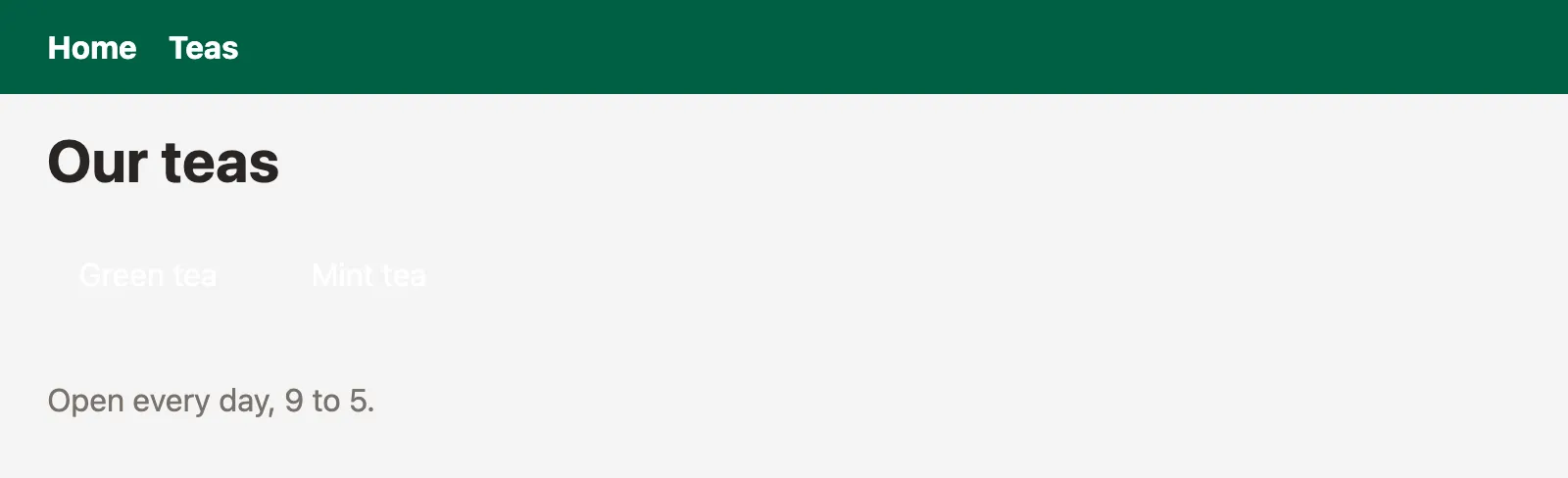
A picture of the page in real Chrome, in a window 800 px wide, taken once the page had loaded with its styles. Open it full size
Line 12 builds bg-green-700 and bg-teal-700 when the code runs. No file holds either name whole, so the built CSS has no rule for them, and the white names sit on no background.
In the first version, line 12 builds the class from pieces: bg-, then tea.color, then -700. Tailwind CSS reads the file as text when Next.js builds the CSS, long before the code runs, so it never sees bg-green-700, and the built CSS has no rule for it. In the second version, lines 2 and 3 hold the whole names, and the cards are green and teal.
The other habits:
- Make a component for markup you repeat. If the shop shows tea cards on two pages, move the
<li>and its six classes into aTeaCardcomponent. The classes are then written once, in the file they belong to, the way the last lesson's CSS Module was. - Choose between whole names. For a class that depends on data or state, keep the whole names in an object, like
{ green: "bg-green-700" }, or write both sides of a condition in full:isOn ? "bg-emerald-700" : "bg-stone-200". - Keep the same order everywhere. Tailwind CSS's official Prettier plugin,
prettier-plugin-tailwindcss, sorts each class list for you, so every list reads the same way. - Put a value with a name in
@theme.bg-creamsays more thanbg-[#f6f3ea], a class with a value used only here, in square brackets.
Will Tailwind CSS make this class?
Every class in the shop has to be found to be styled. Sort these snippets: does the built CSS get a rule for the class they use?
className="bg-teal-700"className={"bg-" + tea.color + "-700"}const colors = { mint: "bg-teal-700" };className={"text-" + size}isOn ? "bg-emerald-700" : "bg-stone-200"className="md:grid-cols-2"className={"bg-teal-" + shade}
Sort each snippet: Tailwind CSS makes the class, or there's no CSS for it.
Common mix-ups
- "Tailwind CSS needs a
tailwind.config.js." No. Tailwind CSS 4 keeps its settings in your CSS, in@theme, and finds your files on its own. - "Every utility is in the CSS, so any class works." No. The CSS only has rules for classes written whole in your files: about 7 KB in the recorded build of the shop.
- "A class built from a variable works if the result is a real class." No. Tailwind CSS reads files as text and doesn't run them, so it never sees the result.
- "Tailwind CSS runs in the browser." No. It runs when Next.js builds the CSS. The browser only gets the stylesheet.
- "
dark:follows adarkclass." Only after@custom-variant dark. By default, it follows the computer's setting. - "
@themeand:rootdo the same thing." Both make CSS variables, but only@thememakes utility classes from them. - "Next.js runs Tailwind CSS through PostCSS." It can, as the docs show, but
create-next-appruns it as a Turbopack loader. Both build the same CSS.
Practice exercises
These exercises are about Next.js projects, which can't run inside this page. Answer first, then use the hints.
These two rules are from the shop's built CSS. How much padding does px-6 put on the left and on the right, in rem?
/* From the shop's built CSS */
:root, :host {
  --spacing: .25rem;
}

.px-6 {
  padding-inline: calc(var(--spacing) * 6);
}1.5rem: px-6 sets padding-inline to 6 × --spacing, and this theme's --spacing is .25rem, as the recorded CSS shows. With the browser's default root font size of 16 px, that's 24 px. A project can change --spacing in @theme, and every spacing utility follows it.
The shop adds a mint color to its theme. Which class gives an element a mint background?
@import "tailwindcss";

@theme {
  --color-mint: #5fb49c;
}bg-mint. --color-mint is in the --color-* namespace, so it makes every color utility for mint: bg-mint, text-mint, border-mint. The shop's --color-cream made the recorded .bg-cream{background-color:var(--color-cream)} the same way.
The tea card gets a dark version. In a project with create-next-app's globals.css, inside which CSS rule does Tailwind CSS write dark:bg-stone-800?
<li className="rounded-card bg-white px-4 py-3 dark:bg-stone-800">
  Green tea
</li>Inside @media (prefers-color-scheme: dark). With no @custom-variant, dark: follows the computer's setting, as in the recorded dark example, whose CSS has @media (prefers-color-scheme:dark){.dark\:bg-stone-900{…}}.
In the "A button decides" version, the visitor clicks Dark mode, and the page turns dark. Then they load / again. Is the page dark?
No, it's light. The button put dark on the <html> of the document in the browser, which client-side navigations keep. Loading the page again makes a new <html> from the server's HTML, which has no class. The recorded step 4 shows the light page, the same picture as step 1.
On this tea page, the names show in white, on no background. Which rules are missing from the built CSS? Then fix the page.
const teas = [
  { name: "Green tea", color: "green" },
  { name: "Mint tea", color: "teal" },
];

export default function TeasPage() {
  return (
    <main className="px-6 py-4">
      <h1 className="text-3xl font-bold">Our teas</h1>
      <ul className="mt-4 flex gap-4">
        {teas.map((tea) => (
          <li key={tea.name} className={`rounded-xl px-4 py-3 text-white bg-${tea.color}-700`}>
            {tea.name}
          </li>
        ))}
      </ul>
    </main>
  );
}
const teas = [
  { name: "Green tea", color: "bg-green-700" },
  { name: "Mint tea", color: "bg-teal-700" },
];

export default function TeasPage() {
  return (
    <main className="px-6 py-4">
      <h1 className="text-3xl font-bold">Our teas</h1>
      <ul className="mt-4 flex gap-4">
        {teas.map((tea) => (
          <li key={tea.name} className={`rounded-xl px-4 py-3 text-white ${tea.color}`}>
            {tea.name}
          </li>
        ))}
      </ul>
    </main>
  );
}
.bg-green-700 and .bg-teal-700. Line 12 builds them from pieces, so no file holds either whole name, and the recorded CSS has neither. With the whole names in the data, on lines 2 and 3, the recorded CSS has both rules.
You're following Next.js's CSS docs in a project without Tailwind CSS. You ran this command. Which file do you add next, so that Next.js runs the plugin?
npm install -D tailwindcss @tailwindcss/postcss// postcss.config.mjs
const config = {
plugins: {
"@tailwindcss/postcss": {},
},
};
export default config;
postcss.config.mjs, which adds the @tailwindcss/postcss plugin. Next.js runs PostCSS on every CSS file when the project has one. Then @import "tailwindcss"; in globals.css, imported by the root layout, as before. The recorded build with this file has the same stylesheet as create-next-app's setup.
Check your understanding
For each question, ask what Tailwind CSS can read in your files, and when each rule applies.
Question 1 of 7With its default answers, what does
create-next-app16.4.3 add to a new project for Tailwind CSS?Choose an answer to see the explanation.
Question 2 of 7With automatic source detection, in the tea shop's project, which utility classes end up in the stylesheet Next.js builds?
Choose an answer to see the explanation.
Question 3 of 7This
globals.cssadds--color-leaf. Which class can a page use now?Read the code, then predictCSS@import "tailwindcss"; @theme { --color-leaf: #2f6b4f; --color-cream: #f6f3ea; --radius-card: 12px; }Choose an answer to see the explanation.
Question 4 of 7In a new Tailwind CSS project, when does
dark:bg-stone-900apply?Choose an answer to see the explanation.
Question 5 of 7With this
globals.css, the visitor switches the computer to dark mode. What does the page do?Read the code, then predictCSS@import "tailwindcss"; @custom-variant dark (&:where(.dark, .dark *));Choose an answer to see the explanation.
Question 6 of 7Why do these tea cards get no background color?
Read the code, then predictTSXconst teas = [ { name: "Green tea", color: "green" }, { name: "Mint tea", color: "teal" }, ]; export default function TeasPage() { return ( <main className="px-6 py-4"> <h1 className="text-3xl font-bold">Our teas</h1> <ul className="mt-4 flex gap-4"> {teas.map((tea) => ( <li key={tea.name} className={`rounded-xl px-4 py-3 text-white bg-${tea.color}-700`}> {tea.name} </li> ))} </ul> </main> ); }Choose an answer to see the explanation.
Question 7 of 7Why does this
globals.cssuse@theme inline?Read the code, then predictCSS@import "tailwindcss"; @theme inline { --font-sans: var(--font-geist-sans); }Choose an answer to see the explanation.
Key takeaways
- Tailwind CSS writes one rule for each utility class written whole in your files, into the stylesheet built from
globals.css, which the root layout imports. create-next-appruns it as a Turbopack loader:@tailwindcss/turbopackand aturbopackrule innext.config.ts. The docs' PostCSS plugin builds the same CSS.- Theme variables in
@thememake utilities by namespace:--color-leafmakesbg-leafandtext-leaf. Only the ones you use end up in the CSS. dark:follows the computer's setting, or, after@custom-variant dark, adarkclass.- A next/font variable becomes Tailwind CSS's font with
@theme inline { --font-sans: var(--font-geist-sans); }. - Never build a class name from pieces; choose between whole names, and repeat markup through a component.
Remember the one-liner.
Tailwind CSS styles what it can read: write each class whole, keep your tokens in @theme, and import it once in the root layout.
Coming next: CSS-in-JS and Server Components. It shows why libraries that write CSS while the page runs need a Client Component, and which ones don't.