The cost of hydration
See why a server-rendered button can look ready and do nothing, measure what hydration costs LCP and INP, and cut it with Suspense, islands or resumability.
- 01Explain what hydration doesWhy a server-rendered page shows its teas early, and why its buttons do nothing until React has hydrated them.
- 02Measure hydration's costTime hydration with marks, read its effect on LCP and INP, and spot the taps that INP never sees.
- 03Make hydration cheaperChoose between hydrating at once, Suspense boundaries, lazy hydration, islands and resumability.
Asha taps, and nothing happens
Ravi has moved the tea list to the server. Until now, React drew the teas in Asha's browser. Now the shop's server runs the same React code first. It sends finished HTML, with the first 8 teas already in it. This is called server rendering. Lesson 17.4 showed that it paints sooner.
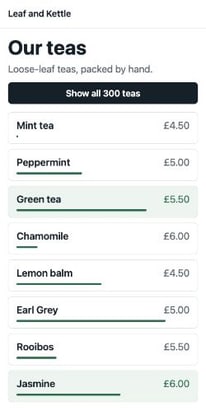
Asha opens the tea list on the bus. "Asha's phone" is the stand-in from lesson 22.1: Chrome 157 on a phone's screen, DevTools' Slow 4G network, and a CPU 4 times slower. The teas appear in under a second. She taps "Show all 300 teas". Nothing happens. She taps again, and this time the list opens. Here is her screen at five moments, in real frames:
The first four screens are the same. That's the trouble: the page looked ready, but it wasn't. Here are the moments as Chrome recorded them:
// The tea list, hydrated all at once, on Asha's phone (ms after she opened it).const teasOnScreen = 729;const firstTap = 1024;const secondTap = 1674;const listOpened = 1827; console.log(`The teas were on screen at ${teasOnScreen} ms.`);console.log(`Her first tap, at ${firstTap} ms, did nothing.`);console.log(`Her second tap, at ${secondTap} ms, opened the list at ${listOpened} ms.`);- Lines 2 to 5 hold four recorded times, in milliseconds after Asha opened the page.
- Lines 7 to 9 print
The teas were on screen at 729 ms.,Her first tap, at 1024 ms, did nothing.andHer second tap, at 1674 ms, opened the list at 1827 ms.
The button was on her screen for almost a second before it worked. It was the same button both times. So why did her first tap do nothing? The answer is in the page's only script, full.js:
import { hydrateRoot } from "react-dom/client";import { App } from "./app.js"; performance.mark("hydrate-start");hydrateRoot(document.getElementById("root"), <App />);- Line 1 imports
hydrateRootfrom React DOM. Line 2 importsApp, the same component the server ran. - Line 4 writes down the time, with the name
hydrate-start. You'll use it below. - Line 5 hands React two things: the box on the page that holds the server's HTML, and the
Appthat made it.
Line 5 starts hydration: React taking over HTML that is already on the page. React runs every component again. It matches each one to the HTML, and attaches the click handlers. React's docs say hydration "turns the initial HTML snapshot from the server into a fully interactive app".
Until full.js has arrived and React has started, the button is only HTML. It has no click handler. So a tap on it does nothing at all.
Leaf and Kettle opens its doors at eight. The staff's bus is late. Customers walk in and see every shelf, every tea and every price. One of them asks at the counter for a tea. Nobody is there to hear. When the staff arrive, they put on their aprons and learn where everything is. Only then can they serve anyone.
- In real life: Customers seeing every shelf
- In web performance: The server's HTML on Asha's screen
- In real life: The staff on a late bus
- In web performance: React's code still downloading
- In real life: Putting on aprons and learning the shelves
- In web performance: Hydration
- In real life: A question nobody was there to hear
- In web performance: Asha's first tap
- In real life: Serving customers
- In web performance: The button working
Server rendering shows the page early. Hydration makes it work, and it can't start until the page's JavaScript has arrived. Until then, the page looks ready but doesn't respond. So hydration costs three things: the code it needs, the time to run it, and every tap made before it ends.
The React lesson Server rendering and hydration shows how hydrateRoot matches the HTML. The system design lesson Server-side rendering calls such a page inert: it shows, but doesn't respond. Here, you measure what that costs.
Ravi built the same tea list four ways:
- Client-rendered, as before: the HTML has an empty box, and React builds the page in the browser.
- Hydrated all at once: the page above.
- With Suspense boundaries: the same HTML, hydrated in parts.
- Islands: only the parts that move are hydrated.
The course loaded each page six times. Three times Asha only watched, and three times she tapped. Every number comes from the middle one of each three. Here are the watched loads. Read each row across:
- Teas on screen is when Chrome painted the teas: the page's largest contentful paint.
- Button works from is when React had the button working. A mark in the code tells the course, as the next section shows.
- On screen, not yet working is the gap between those two.
- JavaScript it needed first is the code the button waited for, packed with Brotli. A KB is 1,024 bytes.
| How the tea list was built | Teas on screen | Button works from | On screen, not yet working | JavaScript it needed first |
|---|---|---|---|---|
| Client-rendered | 1,755 ms | 1,710 ms | None | 74.1 KB |
| Server-rendered, hydrated all at once | 706 ms | 1,686 ms | 980 ms | 74.1 KB |
| Server-rendered, with Suspense boundaries | 699 ms | 1,620 ms | 922 ms | 60.3 KB |
| Islands | 687 ms | 1,627 ms | 940 ms | 60.3 KB |
The three server-rendered pages showed the teas about a second sooner. But their buttons started working at about the same time as the client-rendered page's, within a tenth of a second. Why it matters: server rendering moves the paint. It hardly moves the moment the page works.
The rest of the lesson follows Ravi's questions:
- Where did that second go? What hydration does.
- What does it do to LCP and INP? The paint, and the taps.
- Can React hydrate one part at a time? Progressive and lazy hydration.
- Can most of the page skip it? Islands.
- Can a page skip it altogether? Resumability.
First, watch all four pages at once. Move the slider:
- Client-rendered
 shop's name
- All at once
 teas and buttontap at 1,024 ms: nothing
- Suspenseteas and buttontap at 986 ms: nothing
- Islandsteas and buttontap at 967 ms: nothing
Move the slider. Each frame is the last one Chrome had drawn by then, on the load where Asha tapped. Under it: what the button did at that moment, and the taps she had made so far.
What hydration does
To make server HTML work, a framework has to rebuild three things. The Qwik framework's docs list them:
- The listeners: the click handlers, attached to the right elements.
- The component tree: which component made which part of the page.
- The state: values like
all, which says whether every tea is showing.
React rebuilds all three the same way. It runs your components again, in the browser. It doesn't build the elements again. It keeps each one, and checks it against what the component returns.
A new teacher walks into a class that is already seated. She has the register, but she knows no faces. So she calls every name, one by one, and matches each voice to a desk. A child raises a hand halfway through. She will answer, but only when she reaches the end of the list.
- In real life: The class, already in their seats
- In web performance: The server's HTML
- In real life: Calling each name on the register
- In web performance: Running each component again
- In real life: Matching each voice to a desk
- In web performance: Matching each component to its HTML
- In real life: A hand raised during the register
- In web performance: A tap during hydration
- In real life: Answering it at the end of the list
- In web performance: The tap's handler running once hydration is done
One page, paid for twice
Hydration needs the data the server used. The tea list's first 8 teas are in the HTML. All 300 teas are in the JavaScript too, in teas.js: 20,169 bytes, or 1.1 KB with Brotli. web.dev calls this "one app for the price of two". The HTML shows the page. The JavaScript holds a full copy of the code that made it.
Timing hydration with two marks
How long does hydration take? React doesn't say. So Ravi writes down two moments. A mark is a named moment you record with performance.mark(), as lesson 11.6 showed. full.js marks hydrate-start just before hydrateRoot. tea-list.js marks the end:
import { useLayoutEffect, useState } from "react";import { TEAS } from "./teas.js"; export function TeaList() { const [all, setAll] = useState(false); useLayoutEffect(() => { performance.mark("tea-list-ready"); }, []); const teas = all ? TEAS : TEAS.slice(0, 8); // … then the button and the teas, as in lesson 23.2.- Line 5 holds the state:
allstarts asfalse, so the list shows 8 teas. - Line 6 is a layout effect: a function React runs right after it has put this component on the page, before the browser paints. During hydration, that is the moment React has finished with the tea list.
- Line 7 writes the mark
tea-list-ready. From then on, the button's click handler is attached. - Line 8 passes an empty list,
[], so the effect runs only once.
extras-list.js does the same for the 23 extras, with a mark called extras-ready. DevTools' Performance panel shows marks in its Timings track.
Where the second went
On the page hydrated all at once, the teas appeared at 706 ms. The button worked at 1,686 ms. Here is that stretch, split by the marks:
// The page hydrated all at once, on Asha's phone (ms).const teasOnScreen = 706;const codeArrived = 1598;const hydrateStart = 1657;const teaListReady = 1686; console.log(`Waiting for the code: ${codeArrived - teasOnScreen} ms`);console.log(`Running React's code: ${hydrateStart - codeArrived} ms`);console.log(`Hydrating: ${teaListReady - hydrateStart} ms`);- Lines 2 to 5 hold four recorded times: the teas, the code arriving, and the two marks.
- Line 7 prints
Waiting for the code: 892 ms. - Line 8 prints
Running React's code: 59 ms. That's React and the shop's code starting up. - Line 9 prints
Hydrating: 29 ms.
Hydration itself took 29 ms. The tea list is small: 8 teas and 23 extras. Most of the stretch was 74.1 KB of code crossing Asha's slow network. Why it matters: on a small page, the biggest cost of hydration is the code it needs. On a bigger page, the running grows too. React's working group warns that on a low-end device, hydration "may even lock up the screen for several seconds".
Pick a page to see each moment of a watched load:
- The teas on screen706 ms
- full-YFRIVRWF.js (74.1 KB)asked at 610 ms, arrived at 1,598 ms
- React's code started running1,602 ms
- hydrate-start1,657 ms
- The tea list works (tea-list-ready)1,686 ms
- The extras work (extras-ready)1,686 ms
Pick a page. The rows follow one load where Asha only watched. They show when the teas appeared, and when each file of code was asked for and arrived. Then when React started, and when each part of the page worked.
Hydration, LCP and INP
LCP: the teas come early
LCP, the largest contentful paint, is when the biggest thing in view was painted. Here, that's the teas.
// When the teas were painted: the page's largest contentful paint (ms).const clientRendered = 1755;const serverRendered = 706; console.log(`Server-rendered: ${serverRendered} ms. Client-rendered: ${clientRendered} ms.`);console.log(`The server's HTML showed the teas ${clientRendered - serverRendered} ms sooner.`);- Lines 2 and 3 hold the LCP of the client-rendered page and of the page hydrated all at once.
- Line 5 prints
Server-rendered: 706 ms. Client-rendered: 1755 ms. - Line 6 prints
The server's HTML showed the teas 1049 ms sooner.
The server-rendered teas were painted before any JavaScript had arrived. Hydration came after the paint, so it didn't hold it back. Lesson 17.4 found the same with a photo. Why it matters: put the page's biggest content in the server's HTML, and let hydration come after the paint. Hydration can still hurt LCP in three ways:
- A page that hides its HTML until hydration is done waits for the code all over again.
- A long hydration task can hold back the paint of something that arrives late, like a photo.
- If the browser's render doesn't match the server's HTML, React renders that part again. React's docs say this will "lead to a slowdown" at best.
INP: taps that vanish, and taps that wait
INP, Interaction to Next Paint, measures how long the page takes to answer a tap: from the tap to the next frame. A good INP is 200 ms or less. Lesson 11.4 split each tap into three parts, like ringing a bell at a café counter:
- Input delay: the wait before the tap's code starts.
- Processing: the tap's handlers running.
- Presentation delay: the wait from then until the next frame.
First, Asha's tap that did nothing. The browser's Event Timing API, from lesson 11.4, still reported it:
// Asha's first tap, on the page hydrated all at once (ms).const tap = { startTime: 1024, processingStart: 1026, processingEnd: 1026, duration: 0 }; console.log(`Input delay: ${tap.processingStart - tap.startTime} ms`);console.log(`Processing: ${tap.processingEnd - tap.processingStart} ms`);console.log(`Duration, as INP counts it: ${tap.duration} ms`);- Line 2 holds four numbers from the tap's entry, rounded to the millisecond.
- Lines 4 to 6 print
Input delay: 2 ms,Processing: 0 msandDuration, as INP counts it: 0 ms.
Zero. To INP, this was a perfect tap. The next frame came at once, because there was nothing to run. INP measures how fast the page answered, not whether it did anything. Why it matters: a page can have a good INP while its early taps are lost. Only the visitor knows.
Try it yourself. Open the course's copy of the page hydrated all at once. In DevTools' Network panel, tick Disable cache, set the network to Slow 4G, and reload. Tap the button as soon as it appears.
Then her second tap. The course made it land the moment the page wrote hydrate-start, just as React began. Here it is next to the tap on the client-rendered page:
// The tap that opened the list: its three parts (ms).const clientRendered = { inputDelay: 7, processing: 24, presentation: 89 };const hydratedAtOnce = { inputDelay: 6, processing: 51, presentation: 95 }; for (const [page, tap] of Object.entries({ clientRendered, hydratedAtOnce })) console.log(`${page}: ${tap.inputDelay} + ${tap.processing} + ${tap.presentation} = ${tap.inputDelay + tap.processing + tap.presentation} ms`);- Lines 2 and 3 hold each tap's three parts, in ms.
- Lines 5 and 6 print one line for each page:
clientRendered: 7 + 24 + 89 = 120 msandhydratedAtOnce: 6 + 51 + 95 = 152 ms.
Both taps waited only a few ms. The difference is in the processing: 51 ms against 24. On the client-rendered page, the handler only had to draw 292 more teas. On the hydrated page, the tea-list-ready mark fell in the middle of her tap's processing. React hydrated the page first, inside her tap, and only then ran her click.
All four taps stayed under 200 ms, because this page is small. Why it matters: hydration's work lands on any tap that comes during it. The more a page has to hydrate, the longer that tap takes. Compare the taps on all four pages:
- Tap 1, at 1,024 msnothing happened (0 ms, as INP counts it)
- Tap 2, at 1,674 mswaited 6 ms, handlers 51 ms, paint 95 ms: 152 ms in all
- The whole list on screen1,827 ms
Pick a page. Each row is one of Asha's taps, from Event Timing: when she tapped, and either its three parts or the fact that nothing happened. The last row is when the whole list was on her screen.
Progressive and lazy hydration
React's working group put the problem in one line: "you have to hydrate everything before you can interact with anything." Progressive hydration means hydrating a page one part at a time, instead of all at once. In React, you mark the parts with Suspense boundaries.
A Suspense boundary is a <Suspense> component around part of the page. Ravi puts one around each part of the tea list:
import { Suspense, lazy } from "react";import { TeaList } from "./tea-list.js"; const Extras = lazy(() => import("./extras.js")); export function App() { return ( <main> <h1>Our teas</h1> <p className="intro">Loose-leaf teas, packed by hand.</p> <Suspense fallback={null}> <TeaList /> </Suspense> <Suspense fallback={null}> <Extras /> </Suspense> </main> );}- Line 4 loads the extras with
lazy. Their code moves to a file of its own, as in lesson 22.4. - Lines 11 to 13 put a boundary around the button and the teas.
- Lines 14 to 16 put one around the extras.
- The server still renders both parts. The HTML is the same as before, with a marker where each boundary starts and ends.
React's working group, and React's own code, describe what boundaries change while a page hydrates:
- React hydrates the page outside the boundaries first. Here, that's only the heading and the intro.
- It hydrates each boundary on its own, in small pieces, with "tiny gaps in which the browser can handle events". React stops for a short gap every 5 ms.
- A boundary whose code hasn't arrived yet can wait. The rest still hydrates.
- If you tap inside a boundary that isn't hydrated yet, and its code is there, React hydrates that boundary first. Then it runs your tap.
Without boundaries, React hydrates the whole page in one go. Its source code marks that first hydration as work that never stops part-way.
You have just moved house, and everything is in boxes. You unpack one box at a time, with a short break between boxes. Then a friend arrives and asks for a cup of tea. You don't finish every box first. You open the box with the kettle.
- In real life: Each box
- In web performance: A Suspense boundary
- In real life: Unpacking one box at a time
- In web performance: Hydrating one boundary at a time
- In real life: A short break between boxes
- In web performance: React stopping every 5 ms, so the browser can handle taps
- In real life: Opening the kettle box first
- In web performance: Hydrating the boundary Asha tapped first
Here is what the boundaries changed on Asha's phone:
// When the main file arrived, and when the button worked (ms).const atOnce = { mainFile: 1598, buttonWorks: 1686 };const suspense = { mainFile: 1531, buttonWorks: 1620 }; console.log(`The main file arrived ${atOnce.mainFile - suspense.mainFile} ms sooner.`);console.log(`The button worked ${atOnce.buttonWorks - suspense.buttonWorks} ms sooner.`);- Lines 2 and 3 hold, for each page, when its main file of code arrived and when its button worked.
- Lines 5 and 6 print
The main file arrived 67 ms sooner.andThe button worked 66 ms sooner.
The main file was smaller, because the extras' code had moved out: 60.3 KB to start with, against 74.1 KB. The extras' own file came later, once React reached them, and the extras worked at 2,301 ms. Asha's tap spent 38 ms on its handlers, against 51 on the page hydrated all at once. React hydrated only the tea list before running her click. Why it matters: boundaries let the part people use first work first.
Lazy hydration: wake a part only when it's needed
Progressive hydration still hydrates everything, sooner or later. Lazy hydration goes further. A part is hydrated only when something calls for it:
- when it scrolls into view;
- when the phone is idle;
- when someone taps it, or moves the mouse over it.
Angular calls this incremental hydration, with triggers like hydrate on viewport and hydrate on interaction. Vue 3.5 has hydrateOnVisible and hydrateOnIdle. A part that is never needed is never hydrated. Ravi's last page uses it for the extras.
Islands: hydrate only the parts that move
Look at the tea list again. Most of it never moves: the shop's name, the heading, the intro. Why run code for them at all? Islands answer that. Astro is a framework for building sites. Its docs describe a page of "static HTML with smaller 'islands' of JavaScript", added only where the page needs to respond. The name comes from Katie Sylor-Miller at Etsy, in 2019. Jason Miller wrote the idea up in 2020.
Ravi's islands page has two islands: the button with the teas, and the extras. Here is its only script:
import { hydrateRoot } from "react-dom/client";import { TeaList } from "./tea-list.js"; performance.mark("hydrate-start");hydrateRoot(document.getElementById("tea-list"), <TeaList />); const extras = document.getElementById("extras-list");const watcher = new IntersectionObserver(async ([entry]) => { if (!entry.isIntersecting) return; watcher.disconnect(); const { ExtrasList } = await import("./extras-list.js"); hydrateRoot(extras, <ExtrasList />);});watcher.observe(extras);- Line 5 hydrates the tea list's island at once.
hydrateRootgets only the box around the button and the teas, not the whole page. - Lines 7 to 14 watch the extras. An IntersectionObserver tells your code when an element comes into view.
- Line 9 stops if the extras aren't in view yet.
- Line 11 downloads the extras' code only then. Line 12 hydrates them.
The heading, the intro and the extras' heading are never hydrated. They stay plain HTML. Astro does the same with its client:load and client:visible settings. Its docs say: "If the user never sees it, it never loads."
Most of a museum sits behind glass. You look, and you read the labels. A few exhibits have buttons, with a guide beside each one. The museum doesn't put a guide by every glass case. And the guide on the top floor starts work only when the first visitor climbs the stairs.
- In real life: The glass cases
- In web performance: The plain HTML
- In real life: An exhibit with buttons
- In web performance: An island
- In real life: Its guide
- In web performance: The island's JavaScript
- In real life: The top-floor guide, who starts when visitors arrive
- In web performance: The extras' island, hydrated when seen
// JavaScript Asha's phone downloaded before she scrolled, with Brotli (bytes).const atOnce = 75880;const islands = 58569 + 3173;const extrasIsland = 15087; const kb = (bytes) => (bytes / 1024).toFixed(1);console.log(`Hydrated at once: ${kb(atOnce)} KB`);console.log(`Islands: ${kb(islands)} KB, and ${kb(extrasIsland)} KB more if she scrolls down`);- Lines 2 to 4 hold the bytes, with Brotli: the page hydrated all at once, the islands page's two files, and the extras' file.
- Lines 7 and 8 print
Hydrated at once: 74.1 KBandIslands: 60.3 KB, and 14.7 KB more if she scrolls down.
The button worked at 1,627 ms. In the watched loads, Asha then scrolled down, at 4,655 ms. Only then did the extras' code download. They worked at 5,382 ms. If she never scrolls, it never downloads.
One thing islands don't remove is the framework. React DOM and the tea list make up most of the 60.3 KB. Each island still needs its framework's code. Astro lets each island use a different framework, such as Preact or Svelte. Why it matters: islands cut the code and the work for the parts that never move. They can't cut the framework the moving parts use.
Resumability: no hydration at all
Every page so far runs its components again in the browser. Qwik's docs put it plainly: hydration "replays all the application logic on the client." The Qwik framework takes another road, called resumability. It "pauses execution on the server, and resumes execution on the client."
How can a page skip hydration? The server writes the three things hydration rebuilds into the HTML:
- The listeners: each button says, in an attribute, which file holds its handler.
- The component tree: where each component starts and ends.
- The state: the values the components were using.
A small script, the Qwikloader, listens for every event on the page. Qwik's docs say it's "about 1 kb minified" and runs in "less than 5ms even on mobile devices". When Asha taps, it reads the button's attribute, fetches that one handler, and runs it. No component runs first.
You stop a long board game at bedtime. You write down where each piece stands, whose turn it is, and the score. The next day, you set out the pieces from the notes and carry on. You don't play every move again from the start to find where you were.
- In real life: Playing every move again from the start
- In web performance: Hydration running every component
- In real life: The notes
- In web performance: The state and handler addresses in the HTML
- In real life: Carrying on from the notes
- In web performance: Resuming: running only the tap's handler
The tap's own code still has to arrive. Qwik's docs say each page load fills the browser's cache ahead of time with the code for the taps that are possible on the page. So a handler can already be in the cache when the tap comes.
The course didn't record a Qwik page. Building the tea list again in another framework would change more than hydration. So these facts come from Qwik's docs, not from Asha's phone.
Here are all the ways side by side. Read each row across: the way, what runs before a tap can work, and where you find it.
| The way | What runs before a tap can work | Where you find it |
|---|---|---|
| Hydrate it all at once | React's code, then every component on the page, in one go. | hydrateRoot on the whole app. |
| Progressive hydration | React's code, then the part you tap. The rest follows in small pieces. | React: Suspense boundaries, with hydrateRoot. |
| Lazy hydration | Only the parts that are needed now. Others wait until they are seen, the phone is idle, or someone taps. | Angular's hydrate on triggers, Vue's hydrateOnVisible, Astro's client:visible. |
| Islands | Only the interactive parts. The rest of the page is plain HTML and never hydrates. | Astro's client:* directives. |
| Resumability | A loader of about 1 KB. The code for a tap downloads when it is needed. | Qwik. |
When should each part wake up?
Here are six parts of a shop's page. Sort each one by when it needs its JavaScript:
- The "Show all 300 teas" button, near the top
- The search box at the top of every page
- A carousel of reviews at the bottom of the page
- A chat button in the corner that few people open
- The shop's name in the header
- The footer's links to the delivery and returns pages
Sort each part by when it should be hydrated.
Common mix-ups
- "Server rendering makes the page work sooner." No. It shows the page sooner. The teas came at 706 ms instead of 1,755 ms, but the button worked at 1,686 ms, close to the client-rendered page's 1,710 ms.
- "A tap before hydration waits, then runs." No. In React, a tap that comes before React is listening is lost. Asha's tap at 1,024 ms never did anything.
- "A good INP means every tap worked." No. The lost tap counted as 0 ms. INP measures how fast the page answered, not whether it did anything.
- "Hydration builds the page again." No. React keeps the server's elements. It does run every component again.
- "Suspense boundaries make the code smaller." No. They let React hydrate in parts. The smaller first file came from
lazy, which moved the extras' code to a file of its own. - "Islands remove the framework." No. The islands page still needed 60.3 KB, mostly React DOM, before its button worked.
Practice exercises
Answer each one first, then open the hints if you need them.
Another shop's page shows its content at 900 ms and is hydrated at 2,400 ms. What does it print?
// Another shop's page, on a slow phone (ms).
const contentOnScreen = 900;
const hydrated = 2400;

console.log(`For ${hydrated - contentOnScreen} ms, the page looked ready and did nothing.`);For 1500 ms, the page looked ready and did nothing. The page showed its content at 900 ms, but nothing worked until 2,400 ms.
Asha taps three times. React starts listening at 1,650 ms. What does it print?
// When React started listening, and when Asha tapped (ms).
const listening = 1650;
const taps = [900, 1300, 1700];

const lost = taps.filter((tap) => tap < listening);
console.log(`${lost.length} of ${taps.length} taps did nothing.`);2 of 3 taps did nothing. The taps at 900 and 1300 ms came before React was listening. The tap at 1700 ms waits for hydration, then works.
On the islands page, when did Chrome ask for the extras' own file, in ms?
4,704 ms, about 49 ms after Asha scrolled down. The IntersectionObserver saw the extras come into view, and only then did the page ask for their code.
On the islands page, when was the whole list on Asha's screen, in ms?
1,725 ms. Her second tap, at 1,588 ms, took 136 ms in all. The frame with the whole list came just after.
Open the course's copy of the islands page in Chrome, with DevTools' device toolbar showing a phone. In the Network panel, which JavaScript file loads only when you scroll down to the extras?
extras-list-DIMFJ2G3.js. It holds the 23 extras' code. The page asks for it only when they come into view, so it's missing from the list until you scroll.
Ravi calls root.render right after hydrateRoot, before hydration has finished. What happens to the server's HTML?
import { hydrateRoot } from "react-dom/client";
import { App } from "./app.js";

const root = hydrateRoot(document.getElementById("root"), <App />);
// Ravi wants the page to show today's offer, so he renders it again at once.
root.render(<App offer="today" />);React clears the server's HTML and switches the whole root to client rendering. The page throws away its early paint and builds everything from nothing, as if it had never been server-rendered.
Check your understanding
For each question, ask two things: had React's code arrived yet, and what did it have to do before the tap could run?
Question 1 of 7Why did Asha's first tap, at about one second, do nothing at all?
Choose an answer to see the explanation.
Question 2 of 7What does the where-the-time-went example print on its first line?
Read the code, then predict// The page hydrated all at once, on Asha's phone (ms). const teasOnScreen = 706; const codeArrived = 1598; const hydrateStart = 1657; const teaListReady = 1686; console.log(`Waiting for the code: ${codeArrived - teasOnScreen} ms`); console.log(`Running React's code: ${hydrateStart - codeArrived} ms`); console.log(`Hydrating: ${teaListReady - hydrateStart} ms`);Choose an answer to see the explanation.
Question 3 of 7How did INP count Asha's first tap, the one that did nothing?
Choose an answer to see the explanation.
Question 4 of 7On the page hydrated all at once, why did the tap that worked spend about twice as long on its handlers as on the client-rendered page?
Choose an answer to see the explanation.
Question 5 of 7What did wrapping the extras in a Suspense boundary, with React.lazy, change on Asha's phone?
Choose an answer to see the explanation.
Question 6 of 7On the islands page, which parts never hydrate?
Choose an answer to see the explanation.
Question 7 of 7In Qwik's resumability, what does the browser need before a button can answer its first tap?
Choose an answer to see the explanation.
Key takeaways
- Server rendering shows the page early. Hydration makes it work. In between, the page looks ready and isn't.
- Hydration costs the code it needs, the time to run it, and every tap made before it ends.
- Time it with two marks: one before hydrateRoot, one in a layout effect.
- A tap before React listens is lost, and INP counts it as fast. A tap during hydration waits for it.
- Suspense boundaries hydrate in parts, the tapped part first. Lazy hydration and islands hydrate only what's needed.
- Resumability skips hydration: the HTML carries what the page needs, and a tap fetches only its own code.
Remember the one-liner.
Server rendering paints the page; hydration pays to make it work, so hydrate less, later, or not at all.
Sources
The facts on this page come from these docs, posts and source code:
- hydrateRoot, React docs.
- New Suspense SSR Architecture in React 18, React 18 Working Group.
- Resumable vs. Hydration, Qwik docs.
- Rendering on the Web, web.dev.
- Interaction to Next Paint (INP), web.dev.
- ReactFiberLane.js: which lanes render without stopping (v19.3.1), React source.
- ReactFiberBeginWork.js: Suspense boundaries hydrate later (v19.3.1), React source.
- SchedulerFeatureFlags.js: React yields every 5 ms (v19.3.1), React source.
- Incremental hydration, Angular docs.
- Lazy hydration, Vue docs.
- Islands architecture, Astro docs.
- Islands Architecture, Jason Miller.
- Client directives, Astro docs.
- Qwikloader, Qwik docs.
- Speculative module fetching, Qwik docs.
Coming next: The cost of third parties. The tea list's own code is now lean. Next, the scripts other companies add to it: analytics, ads and widgets.