Perceived performance
Make waiting feel shorter: what to show during a wait, skeletons, spinners and progress bars, optimistic updates, showing content first, and what the metrics still see.
- 01Pick the right feedbackChoose nothing, a spinner, a skeleton, a percent-done bar or an optimistic update, from how long a wait lasts and what it's for.
- 02Tell the feel from the numbersSay what a spinner or a skeleton changes in a recorded load: how the wait looks and the layout shifts, but not the LCP.
- 03Show useful content soonerShow each part of a page as it arrives, and avoid the tricks that backfire: flashing spinners, stalling bars and quiet failures.
Making a wait feel shorter
Asha is on the bus again, with Leaf and Kettle open on her phone. She taps Tea of the week. The shop's name and the heading appear. Then nothing happens. The space under the heading stays empty. Is the page broken? Should she tap again?
Ravi looks after the shop's website, and he knows why. The page asks the shop's server for the tea and for its reviews. The database behind the server is slow. It takes 1 second to send the tea and 3 seconds to send the reviews. Ravi can't make it faster yet.
The course recorded this page loading the way Asha's phone loads it. Here are two times from one load:
// One recorded load of the blank version, in milliseconds.const headingShown = 1216;const teaShown = 4240;const emptyWait = teaShown - headingShown;console.log(`For ${emptyWait} ms, the space under the heading stayed empty.`);- Line 1 is a comment. The times are in milliseconds (ms), from the start of the load. A millisecond is a thousandth of a second.
- Line 2 is when the shop's name and the heading appeared. Line 3 is when the tea and its reviews appeared.
- Line 4 subtracts one from the other. Line 5 prints
For 3024 ms, the space under the heading stayed empty.
Here is Asha's screen at three moments of that load:
That's about three seconds of empty space. Look at the middle screen: the tea has already arrived, but the screen hasn't changed. Why? The page's script waits for both answers before it shows either. The end of this lesson fixes that. But first, Ravi wonders: can he make those three seconds feel shorter? And would that change the numbers Google's tools use to judge the page?
Lesson 1.1, What is web performance?, gave the first question a name. How fast a page feels to the person using it is its perceived performance. Remember the two lifts that took just as long: the one with a floor display was easier to wait for.
You sit down in a busy restaurant. The kitchen needs a while to cook your meal. In one restaurant, nobody comes, and you stare at an empty table. In another, a waiter brings bread and water as soon as you sit down. The main course arrives at the same time in both. But the second wait feels shorter, because you had something to start on.
- In real life: The time the kitchen needs to cook
- In web performance: The time the server needs to answer
- In real life: Sitting at an empty table
- In web performance: An empty space on the screen
- In real life: Bread and water, brought as soon as you sit down
- In web performance: Something useful on the screen early, like the tea before its reviews
- In real life: The main course, at the same time as before
- In web performance: The rest of the page, when the server sends it
- In real life: A wait that feels shorter
- In web performance: Better perceived performance
Ravi tries four versions of the page. Each one shows something different while it waits:
- Blank: nothing where the tea and the reviews go, until both answers are in.
- Spinner: a small turning circle, with the words Loading the tea of the week.
- Skeleton: grey bars in the shape of the tea and the reviews.
- Content first: the same grey bars, but the tea replaces its bars as soon as its answer arrives. It doesn't wait for the reviews.
The course loaded each version in real Chrome 156. All four show the shop's name at about the same moment. The first three then look different while they wait, but the tea appears at the same moment in all three. Only content first shows the tea sooner, about two seconds sooner. The rest of this lesson compares the four recordings.
Perceived performance is how fast a page feels. You can't always make a wait shorter, but you can choose what fills it. Show something useful early. Keep people busy and informed. Keep the space for what's coming.
It doesn't replace real speed. The numbers that judge loading measure when the content shows up, not how the wait felt.
Active vs passive waiting
Back to Asha's three empty seconds. A stopwatch would show the same time whatever the page looks like. So why can one wait feel longer than another?
In 1985, David Maister wrote an essay called The Psychology of Waiting Lines, about queues in restaurants, airports, supermarkets and doctors' waiting rooms. From everyday examples, he wrote down rules for how waits feel. He called them propositions: ideas for later research to test. The first one is "Occupied time feels shorter than unoccupied time." That gives two kinds of wait:
- A passive wait has nothing in it but the wait: an empty space, a frozen button.
- An active wait gives people something to look at, read or do.
Alex Stone told this story in The New York Times in 2012. Passengers at a Houston airport complained about the wait for their bags. They walked for a minute to the baggage belt, then stood there for seven more. This time the airport didn't try to make the bags faster. It moved the arrival gates further away, and sent the bags to the furthest belt. Passengers now walked six times as long. Complaints dropped to near zero.
- In real life: Standing at the belt, watching it go round
- In web performance: A passive wait: an empty space on the screen
- In real life: Walking to the belt
- In web performance: An active wait: something to look at, read or do
- In real life: The airport didn't make the bags any faster
- In web performance: The server answers no sooner
- In real life: Complaints that almost stopped
- In web performance: A wait that feels shorter
The walk didn't bring the bags sooner. It filled the wait. It's a newspaper story, not an experiment, but it matches Maister's first proposition. Each row below is one of his propositions, and what a page can do about it:
| What Maister wrote | What a page can do |
|---|---|
| Occupied time feels shorter than unoccupied time. | Give people something to read or do: content that's already here, a form to fill in, a choice to make. |
| Waits before the service starts feel longer than waits during it. | Show at once that the tap was received: a pressed button, the page's frame, a first step. |
| Uncertain waits are longer than known, finite waits. | For a wait over about 10 seconds, say how long it will take, or how much is done. |
| Unexplained waits are longer than explained waits. | Say what's happening: Loading your orders, or Uploading 3 of 12 photos. |
| Anxiety makes waits seem longer. | Never leave people wondering whether it worked, or whether to tap again. |
Does this hold for web pages? Nielsen Norman Group (NN/g), a company that researches how people use websites, reports a study from the University of Nebraska-Lincoln. While a page loaded, one group saw a looping progress bar: a bar that kept moving, without showing how much was done. The other group saw nothing. The group with the moving bar was willing to wait about three times longer, on average.
Why it matters: an empty wait feels longer, and people are less willing to sit through it. Try it on yourself. The panel makes you wait twice, for lengths you can't see: once with nothing to do, once with steps to read and teas to pick. After each wait, guess how long it was:
function startWait(kind, seconds) { const started = performance.now(); if (kind === "active") showSteps(["Finding your order", "Checking stock", "Packing your tea"]); else showText("Please wait."); setTimeout(() => { const real = (performance.now() - started) / 1000; askForGuess(real); }, seconds * 1000);}No waits yet this round.
Press Start. You'll wait twice, for lengths you can't see: once with nothing to do, once with something to read and do. After each wait, guess how long it was.
In the panel's code:
- Line 3 starts the active wait. It shows steps one after another, and lets you pick teas.
- Line 4 starts the passive wait: the words Please wait, the whole time.
- Line 7 measures how long the wait really took. Your guess is compared with that.
One round says little. Play a few, and compare your guesses for the two kinds.
Skeletons and spinners
What to show depends on how long the wait is
Ravi's first idea is to put something in the empty space. But what? Lesson 2.1, 0.1 seconds, 1 second, 10 seconds, ended with a rough rule. NN/g's articles name the kind of feedback for each length of wait:
function feedbackFor(ms) { if (ms < 1000) return "nothing extra: just show the result"; if (ms < 10000) return "a spinner, or a skeleton for a whole page"; return "a percent-done bar";} for (const ms of [400, 3000, 15000]) { console.log(`${ms} ms: ${feedbackFor(ms)}`);}- Line 1 starts a function. It takes a wait, in milliseconds, and says what to show.
- Line 2: under 1,000 ms, show nothing extra. The result comes so soon that a loading sign would only flash.
- Line 3: under 10,000 ms, show a spinner or a skeleton. A spinner is a small animation that turns round and round. A skeleton is a set of grey shapes where the content will go.
- Line 4: from 10,000 ms on, show a percent-done bar. It fills up as the work gets done.
- Lines 7 to 9 try three waits. The first prints
400 ms: nothing extra: just show the result.
Each row of this table is one kind of feedback, when NN/g advises it, and what to watch for:
| What to show | When it fits | What to watch for |
|---|---|---|
| Nothing extra | Under about 1 second. | A loading sign would only flash, and a flash distracts. |
| A spinner: a small animation that turns | About 2 to 10 seconds, for one part of the page. | Say what's loading. Past 10 seconds, people can't tell whether it's stuck. |
| A skeleton: grey shapes where the content will go | Under 10 seconds, for a whole page that's loading. | Copy the shapes of the real page, so people can see what's coming. |
| A percent-done bar | 10 seconds or more, or a known number of steps. | Don't race ahead and then stall near the end. |
| Words that never change: Loading… | Avoid them. | Nothing moves, so people can't tell whether anything is happening. |
Asha's wait is about three seconds, and most of the page is waiting. So a spinner or a skeleton fits. The course measured both.
The skeleton, in code
Here is the skeleton version's HTML. The four versions differ only inside <main>:
<!doctype html><html lang="en"><head> <meta charset="utf-8"> <meta name="viewport" content="width=device-width, initial-scale=1"> <title>Leaf and Kettle</title> <link rel="stylesheet" href="styles.css"> <script src="app.js" defer></script></head><body> <header>Leaf and Kettle</header> <main class="reserved"> <h1>Tea of the week</h1> <section id="tea" aria-busy="true"> <div class="bar title"></div> <div class="bar"></div> <div class="bar"></div> <div class="bar"></div> <div class="bar short"></div> </section> <h2>Reviews</h2> <section id="reviews" aria-busy="true"> <div class="bar"></div> <div class="bar"></div> <div class="bar short"></div> </section> </main> <footer>Free delivery on every order over 2,000 cents.</footer></body></html>- Line 12 gives the main part the class
reserved, which keeps space for the tea and the reviews. - Lines 14 to 20 are the tea's grey bars.
aria-busy="true"tells screen readers that this part is still loading. - Lines 22 to 26 are the reviews' grey bars.
And here are the styles all four versions share:
body { margin: 0; font-family: system-ui, sans-serif; color: #1d1830; }header { padding: 16px; font-weight: 700; background: #f4efe4; }main { padding: 16px; }#hero { display: block; max-width: 100%; height: auto; }button { padding: 12px 20px; font-size: 16px; }h1 { margin: 0 0 8px; }#tea, #reviews { display: flow-root; }#about { font-size: 18px; line-height: 1.5; }.price { font-weight: 700; }#reviews ul { margin: 0; padding-left: 20px; line-height: 1.6; }footer { padding: 24px 16px; background: #f4efe4; }.reserved #tea { min-height: 260px; }.reserved #reviews { min-height: 96px; }.bar { height: 18px; margin: 0 0 14px; border-radius: 4px; background: #e8e2d6; }.bar.title { width: 50%; height: 28px; margin: 20px 0 22px; }.bar.short { width: 60%; }.spinner { display: flex; align-items: center; gap: 12px; color: #5c5670; }.spinner::before { content: ""; width: 24px; height: 24px; border: 3px solid #e8e2d6; border-top-color: #1d1830; border-radius: 50%; }@keyframes spin { to { transform: rotate(1turn); } }@keyframes pulse { to { opacity: 0.5; } }@media (prefers-reduced-motion: no-preference) { .spinner::before { animation: spin 1s linear infinite; } .bar { animation: pulse 0.9s ease-in-out infinite alternate; }}- Lines 1 to 5 are the tea shop's styles from lesson 1.1.
- Lines 12 and 13 keep the space.
min-heightmakes a box at least that tall, even while it's empty. - Lines 14 to 18 draw the grey bars and the spinner's circle.
- Lines 21 to 24 make them move, but only for people who haven't asked their system for less motion with
prefers-reduced-motion.
What the recordings show
The course loaded each version in real Chrome 156, set up like Asha's phone: a phone-sized screen, DevTools' Slow 4G network, and the processor slowed down four times. It kept the middle one of five loads. Reduced motion was on, so the spinner doesn't turn in the frames below.
Three numbers from each load answer Ravi's second question. The last two are Core Web Vitals: numbers Google's tools use to judge how a page feels to use.
- First contentful paint (FCP): when the browser first drew any text or image of the page. Here, that's the shop's name and the heading.
- Largest contentful paint (LCP): when the largest text or image on the screen was drawn. It answers "when did the main content show up?"
- Cumulative layout shift (CLS): a score for how much things on the screen jumped to a new place. 0 means nothing moved.
Here is the spinner version, frame by frame:
- Nothing drawn yet
0 ms to 1,219 msA blank screen

At 1,219 msA spinner
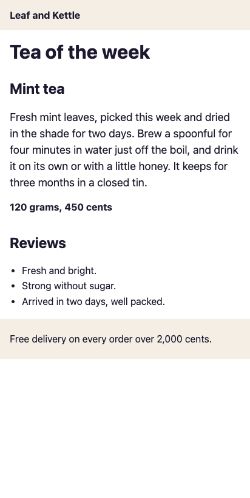
At 4,241 msTea and reviews: the LCP
And the skeleton version:
- Nothing drawn yet
0 ms to 1,229 msA blank screen

At 1,229 msA skeleton
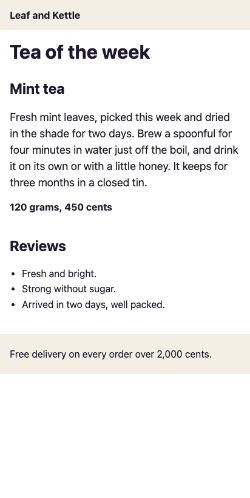
At 4,238 msTea and reviews: the LCP
Each row of this table is one version, what it showed while it waited, and its three numbers:
| Version | While it waits | First contentful paint | LCP | CLS |
|---|---|---|---|---|
| Blank | Nothing where the tea and reviews go, until both answers are in. | 1,216 ms | 4,240 ms | 0.09 |
| Spinner | A spinner and Loading the tea of the week, until both answers are in. | 1,220 ms | 4,240 ms | 0.07 |
| Skeleton | Grey bars the size of the tea and the reviews, until both answers are in. | 1,228 ms | 4,236 ms | 0 |
| Content first | The same skeleton, but the tea shows as soon as it arrives, and the reviews when they do. | 1,224 ms | 2,236 ms | 0 |
Now compare the first three rows:
- The same FCP. All three drew the shop's name around 1,216 ms.
- The same LCP. They reached it at 4,240 ms, 4,240 ms and 4,236 ms: just after the reviews arrived, at 4,219 ms. All three waited for both answers.
- A different CLS. The blank and spinner versions scored 0.09 and 0.07: when the content arrived, everything under the tea moved down. The skeleton scored 0.
So the spinner and the skeleton changed how the wait looked, but not when the content arrived. Why didn't LCP count them?
Why the LCP didn't move
LCP looks only at content. web.dev lists what counts: images, videos, and blocks of text. The grey bars are empty boxes filled with a colour, so LCP never picks them. The spinner's words are text, but they're one short line. On this page, the largest block of text is the tea's description, and it can't be drawn before the tea arrives.
Why it matters: a skeleton or a spinner changes how a wait feels. To move the LCP, the content itself has to show up sooner.
Why nothing moved in the skeleton version
A layout shift happens when something already on the screen jumps to a new place. In the blank and spinner versions, the tea needed far more room than its empty space had, so it pushed everything under it down.
The skeleton version had kept the space, with lines 12 and 13 of the styles. The tea dropped into room that was already there, like a group arriving at a reserved table in a café: nobody else has to move their chairs. So the kept space stopped the shift, not the grey bars. web.dev gives the same advice: reserve space for content that loads late, with min-height, a placeholder or a skeleton.
Progress bars that feel faster
Some waits last well over 10 seconds, like building a year of Asha's receipts as one file. For those, NN/g advises a percent-done bar. In a 1985 experiment, Brad Myers found that people prefer to have one.
The shape of the bar matters
Two bars can take the same time and still feel different. Think of a bus ride:
On Monday, Asha's bus home crawls through town traffic, then speeds along the open road at the end. On Tuesday, it speeds out of town, then sits in a jam two stops from home. Both rides take just as long. Tuesday's feels longer: she was nearly home, and stuck.
- In real life: Two rides that take just as long
- In web performance: Two progress bars that take just as long
- In real life: Crawling through town, then speeding home
- In web performance: A bar that starts slowly and speeds up at the end
- In real life: Speeding out of town, then a jam near home
- In web performance: A bar that races ahead, then nearly stops near the end
- In real life: Tuesday's ride feeling longer
- In web performance: The bar that stalls near the end feeling slower
In 2007, Chris Harrison and colleagues tested this with progress bars. They showed 22 people pairs of bars. Every bar took 5.5 seconds, but each moved in its own way. After each pair, people said which bar seemed faster. Here are two of their nine bars:
const steady = (x) => x;const speedsUp = (x) => (x + (1 - x) / 2) ** 8; for (const x of [0.25, 0.5, 0.75, 1]) { const percent = (bar) => `${Math.round(bar(x) * 100)}%`; console.log(`After ${x * 100}% of the time: steady ${percent(steady)}, speeds up ${percent(speedsUp)}`);}- Line 1 is a steady bar. Each bar is a function. You give it
x, the share of the time gone, from 0 at the start to 1 at the end. It gives back the share of the bar to fill. - Line 2 is Harrison's "Fast Power" bar. You don't need to follow its formula. It starts slowly and races at the end.
- Line 4 picks four moments. Line 5 turns a share into a percentage, and line 6 prints both bars.
Half way, it prints After 50% of the time: steady 50%, speeds up 10%. Half the time has gone, and the bar shows a tenth. Now a bar that does the opposite. Harrison called it "Late Pause":
const steady = (x) => x;const pausesLate = (x) => x + (1 - Math.sin(x * Math.PI * 2 + Math.PI / 2)) / 8; for (const x of [0.25, 0.5, 0.75, 1]) { const percent = (bar) => `${Math.round(bar(x) * 100)}%`; console.log(`After ${x * 100}% of the time: steady ${percent(steady)}, pauses late ${percent(pausesLate)}`);}- Line 2 races ahead early, then nearly stops around three quarters of the way.
- Lines 4 to 7 print the same four moments as before.
Half way, it prints After 50% of the time: steady 50%, pauses late 75%. Then it crawls: from 88% at three quarters of the time to 100% at the end. Here are all three bars at the half-way moment:
Which felt faster? Only two of the nine bars were judged faster than the steady one: Power and Fast Power. Both made their fastest progress near the end. The three bars that paused near the end, Late Pause among them, were judged slower. That's Tuesday's bus.
Try the bars yourself. Harrison's team noticed that people tended to pick whichever bar they saw first, so the panel mixes up the order of each pair:
function runBar(bar, element) { const started = performance.now(); function onFrame(now) { const x = Math.min(1, (now - started) / 5500); element.style.width = `${bar(x) * 100}%`; if (x < 1) requestAnimationFrame(onFrame); else finished(now - started); } requestAnimationFrame(onFrame);}Press Run. Two bars fill one after the other, each for a few seconds. Then say which felt faster.
In the panel's code:
- Line 4 works out the share of the 5.5 seconds that has gone.
- Line 5 sets the bar's width from the bar's function, once every frame.
- Line 7 notes how long the bar really took, once it's full.
Promise a little less than you deliver
A percent-done bar also sets an expectation. Once people see it move, they guess when it will finish. Maister's "First Law of Service" is a tiny formula about this: satisfaction equals perception minus expectation. How happy you are depends on what you got, compared with what you expected.
You ask for the bill. One waiter says "two minutes" and is back in one. Another says "one minute" and takes two. The second waiter took longer, and he also broke his promise. The first one feels quick, because he beat his own.
- In real life: "Two minutes"
- In web performance: A time estimate, or how fast the bar moves early on
- In real life: Back in one
- In web performance: Finishing sooner than the bar or the estimate suggested
- In real life: "One minute", then two
- In web performance: A bar that races ahead, then stalls near the end
- In real life: How you feel about the waiter
- In web performance: How people feel about the wait: what they got, minus what they expected
Maister quotes a restaurant habit from a 1979 book on running services. Some restaurants tell guests the wait will be longer than they expect. Guests who agree are pleased to be seated early, and start the meal in a better mood. NN/g gives the same advice for progress bars:
- Start the bar slowly and let it speed up toward the end. Then you don't set "a faster expectation than the system can maintain".
- When you give a time, allow for extra. Finishing early is a pleasant surprise.
- A bar that moves quickly, then hangs near the end, frustrates people. It cancels out the benefits of showing progress.
Why it matters: when you can't be sure how long the work will take, plan the bar for the slow case.
Optimistic UI
Now a different wait. Asha taps Add to cart, and the shop has to save her cart on its server. Lesson 2.1's doorbell changed the screen at once, with the button saying Adding…. Can the page go further, and show the tea in the cart before the server says yes?
At Leaf and Kettle's counter, you ask for a mint tea. The woman behind the counter says "One mint tea!" and writes it on the board at once. She hasn't checked the tin yet, but there's nearly always mint. Once in a while the tin is empty. Then she comes over and says so: "Sorry, we're out of mint. Would you like jasmine?"
- In real life: Writing the order on the board at once
- In web performance: Showing the tea in the cart at once
- In real life: Checking the tin
- In web performance: Saving the cart on the server
- In real life: There's nearly always mint
- In web performance: The save nearly always works
- In real life: Coming over to say sorry
- In web performance: Taking the tea back out, with a clear message
That's an optimistic update. The page shows the result of an action at once, before the server confirms it. If the server says no, the page takes it back and says why. The UI, or user interface, is everything on the screen. So this is also called optimistic UI.
Here is the first half: showing the tea at once. In this run, the save works:
let cart = 0; async function addToCart(save) { cart += 1; console.log(`Cart: ${cart}, saving…`); await save(); console.log(`Cart: ${cart}, saved`);} addToCart(() => Promise.resolve());- Line 1 starts with an empty cart. Line 3 starts a function that adds a tea. Its
savestands for saving the cart on the server. The wordasynclets the function pause partway through. - Line 4 adds the tea. Line 5 shows it at once:
Cart: 1, saving…. - Line 6 waits for the server.
awaitpauses the function until the save is done. Then line 7 printsCart: 1, saved. - Line 10 adds a tea.
Promise.resolve()stands in for a server that says yes.
Asha sees her cart change straight away. The server's answer only changes the word after it. The second half is taking it back. In this run, the save fails:
let cart = 0; async function addToCart(save) { cart += 1; console.log(`Cart: ${cart}, saving…`); try { await save(); console.log(`Cart: ${cart}, saved`); } catch { cart -= 1; console.log(`Cart: ${cart}, couldn't add it, try again`); }} addToCart(() => Promise.reject(new Error("offline")));- Line 6 starts a
tryblock: code that might fail. If the save on line 7 fails, the function jumps to thecatchblock on line 9. - Line 10 takes the tea back out. Line 11 says what happened.
- Line 15 adds a tea.
Promise.reject()stands in for a server that says no. - It prints
Cart: 1, saving…, thenCart: 0, couldn't add it, try again.
Use it when the action nearly always works and is easy to take back, like adding to a cart or liking a post. Don't use it where a wrong "yes" does harm: a payment should never look done before it is.
Why not just wait for the server? Because then nothing changes after the tap. NN/g warns that "most users will assume the action was not registered and they will try again". That's how double orders happen. Try all three ways, and make the server fail:
addButton.addEventListener("click", async () => { if (mode === "optimistic") showCount(count + 1); if (mode === "spinner") showSpinner(); try { await server.save(); count += 1; showCount(count); } catch { showCount(count); showMessage("Couldn't add it. Try again."); }});Cart: 0
No clicks yet.
Optimistic: the new count at once, taken back if the server fails. Press Add Mint tea to cart. The pretend server takes 1,500 ms to answer.
In the panel's code:
- Line 2: the optimistic way shows the new count before the save. Line 3: the spinner way shows a spinner instead.
- Lines 6 and 7 count the tea once the server agrees.
- Lines 9 and 10 show the real count again, with a message, if the save fails.
The panel times each click the way INP does. INP, or Interaction to Next Paint, is the Core Web Vital for responding to taps, clicks and key presses. It measures from the tap to the next frame the browser draws. That frame comes at about the same time in every way of adding, because INP doesn't wait for the server.
Why it matters: a page that shows nothing for 1.5 seconds can still have a good INP. A good INP doesn't prove people saw their tap work.
In React 19, the useOptimistic hook does the taking back for you. A hook is a function whose name starts with use, which lets a component use a React feature:
import { startTransition, useOptimistic, useState } from "react"; function AddToCart({ saveToServer }) { const [count, setCount] = useState(0); const [shownCount, setShownCount] = useOptimistic(count); const [error, setError] = useState(null); function add() { setError(null); startTransition(async () => { setShownCount((current) => current + 1); try { await saveToServer(); setCount((current) => current + 1); } catch { setError("Couldn't add it. Try again."); } }); } return ( <> <button onClick={add}>Add to cart</button> <p>Cart: {shownCount}</p> {error && <p role="alert">{error}</p>} </> );}- Line 5 makes an optimistic copy of the real count,
shownCount, and line 24 shows it. Line 10 starts the work of adding, and line 11 adds one to the copy at once. - If the save on line 13 works, line 14 adds one to the real count. If it fails, the real count never changed. React shows it again by itself when the work ends, so line 16 only has to say why.
Showing useful content first
Back to the restaurant. The bread and water weren't a picture of food. They were food. To give Asha something real to read sooner, the page has to stop holding the tea back. Here is why it holds it back, with pretend answers as slow as the shop's server:
function answer(what, ms) { return new Promise((resolve) => setTimeout(() => resolve(what), ms));}const started = Date.now();const seconds = () => Math.round((Date.now() - started) / 1000);const show = (what) => console.log(`${what} shown after ${seconds()} s`); const both = [answer("The tea", 1000), answer("The reviews", 3000)];Promise.all(both).then((answers) => answers.forEach(show));- Lines 1 to 3 make a pretend server.
answer("The tea", 1000)gives back a promise: a value that will arrive later, here after 1,000 ms. - Lines 4 and 5 count the whole seconds since the wait started. Line 6 makes
show, which prints what was shown, and when. - Line 8 asks for both answers at once. Line 9 uses
Promise.all, which waits until every promise in the list has arrived. Then it shows them all. - It prints
The tea shown after 3 sandThe reviews shown after 3 s.
The tea was ready after 1 second, but it waited for the reviews. Promise.all is only as fast as its slowest answer. Now let each answer go on its own:
function answer(what, ms) { return new Promise((resolve) => setTimeout(() => resolve(what), ms));}const started = Date.now();const seconds = () => Math.round((Date.now() - started) / 1000);const show = (what) => console.log(`${what} shown after ${seconds()} s`); answer("The tea", 1000).then(show);answer("The reviews", 3000).then(show);- Lines 1 to 6 are the same as before.
- Line 8 shows the tea as soon as its answer arrives. Line 9 does the same for the reviews.
- It prints
The tea shown after 1 s, thenThe reviews shown after 3 s.
The reviews come no sooner, but the tea no longer waits for them. The recorded page's app.js makes the same change. The first three versions wait for both, on line 3:
const getJson = (file) => fetch(file).then((response) => response.json()); Promise.all([getJson("tea.json"), getJson("reviews.json")]).then(([tea, reviews]) => { showTea(tea); showReviews(reviews);}); function showTea(tea) { const section = document.querySelector("#tea"); section.innerHTML = `<h2>${tea.name}</h2><p id="about">${tea.about}</p><p class="price">${tea.price}</p>`; section.removeAttribute("aria-busy");} function showReviews(reviews) { const section = document.querySelector("#reviews"); section.innerHTML = `<ul>${reviews.map((review) => `<li>${review}</li>`).join("")}</ul>`; section.removeAttribute("aria-busy");}Lines 8 to 18 put each answer on the page. The fourth version, content first, changes only lines 3 and 4. The rest of the file is the same:
const getJson = (file) => fetch(file).then((response) => response.json()); getJson("tea.json").then(showTea);getJson("reviews.json").then(showReviews); function showTea(tea) { const section = document.querySelector("#tea"); section.innerHTML = `<h2>${tea.name}</h2><p id="about">${tea.about}</p><p class="price">${tea.price}</p>`; section.removeAttribute("aria-busy");} function showReviews(reviews) { const section = document.querySelector("#reviews"); section.innerHTML = `<ul>${reviews.map((review) => `<li>${review}</li>`).join("")}</ul>`; section.removeAttribute("aria-busy");}Lines 3 and 4 still ask for both answers at once, but each one goes on the page as soon as it arrives. Here is its load, recorded the same way:
- Nothing drawn yet
0 ms to 1,224 msA blank screen

At 1,224 msA skeleton
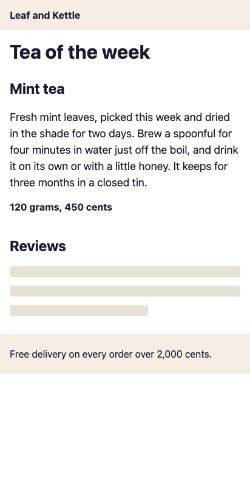
At 2,237 msThe tea: the LCP
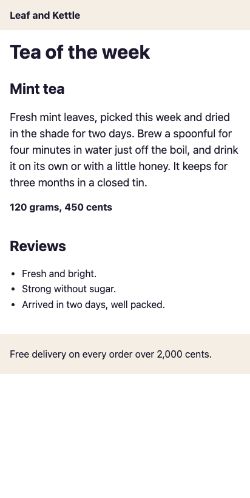
At 4,229 msThe reviews
- The tea showed at 2,236 ms. That's the LCP, 2,000 ms sooner than the skeleton version's.
- The reviews came when the server sent them, as before. They just no longer held the tea back.
- With the space kept, its CLS was 0, like the skeleton version's.
To look for yourself, download this load's trace: the full record of the load, which DevTools' Performance panel can open.
Of everything Ravi tried, this was the only change that moved the LCP, and the only one that showed real content sooner. It works for bigger pages too. Send the main content first, and let extras like reviews and chat boxes fill in later. The stage Architecture and frameworks shows how a server can even send the start of the HTML before its slow parts are ready.
When tricks backfire
Each of these tools can backfire when it's used the wrong way:
- A spinner that flashes. For a wait under a second, NN/g calls a looping animation distracting. It's gone before people can tell what it was.
- A spinner that never ends. Past about 10 seconds, people can't tell whether the page is still working or stuck. They may give up.
- A placeholder of the wrong size. If the content needs more room than was kept, it still pushes things down. web.dev also warns that "Removing the space set aside for elements can cause just as much CLS as inserting content."
- A bar that races, then stalls. That's the waiter who said one minute. The bar promised more than it kept.
- An optimistic update that fails quietly. If the tea vanishes from the cart without a word, Asha may think it's still there. Always say what failed.
- A wait added on purpose. Ryan Buell and Michael Norton found that people can value a site more when it shows its work, sometimes even over a site that answers at once. So show real work, like Checking stock. But never add a delay to look busy: if it holds back the content, LCP counts every millisecond of it.
The first problem has a common fix: show a spinner only once a wait has lasted a while. Here it is, with a pretend server:
const wait = (ms) => new Promise((resolve) => setTimeout(resolve, ms)); async function load(serverMs) { let spinner = false; const timer = setTimeout(() => { spinner = true; }, 1000); await wait(serverMs); clearTimeout(timer); console.log(`${serverMs} ms: ${spinner ? "showed a spinner" : "no spinner, just the result"}`);} load(300);load(2500);- Line 1 makes a pretend wait. Line 4 starts with no spinner.
- Line 5 starts a timer that would show the spinner after 1 second.
- Line 6 waits for the server. Then line 7 cancels the timer with
clearTimeout. If the answer came first, the timer never fired. - Line 8 prints whether the spinner showed. Lines 11 and 12 try a 300 ms wait and a 2,500 ms wait. They print
300 ms: no spinner, just the resultand2500 ms: showed a spinner.
Why it matters: a fast answer gets the chance to arrive first. Only a wait that has already lasted a second gets a spinner.
Which feedback fits the wait?
Each wait needs its own kind of feedback. For each one, ask two things. How long is the wait? And is it one part of the page, a whole page, or an action that nearly always works?
- A menu that opens in 50 ms
- Filtering a list already on the page, about 300 ms
- A product page that takes about 3 seconds to arrive
- Search results that take about 4 seconds
- Uploading a 200 MB video
- Exporting 50 invoices, one after another
- Liking a post
- Adding a tea to the cart
Sort each wait by the feedback that fits it best.
Common mix-ups
- "A skeleton makes the LCP faster." No. In the recordings, the skeleton's LCP was about the same as the blank page's. Only showing the tea sooner moved it.
- "A skeleton stops layout shifts." Only if it keeps enough space. The space stops the shift, not the grey bars.
- "Perceived performance is a trick instead of real speed." No. It's for the waits you can't remove yet. NN/g says skeleton screens "do not replace performance-optimization efforts".
- "Every wait needs a spinner." No. Under a second, a spinner would only flash.
- "Optimistic updates are always better." No. Use them for actions that nearly always work and are easy to take back. Never for a payment.
- "A good INP means people got feedback." No. INP stops at the next frame, even if that frame shows nothing new.
- "A time estimate should be as short as possible." No. Allow for extra time. Finishing early is a pleasant surprise.
Practice exercises
Answer first, then use the hints.
Asha asks for a year of receipts, and the shop needs exactly 10 seconds to build them. What does this print?
function feedbackFor(ms) {
  if (ms < 1000) return "nothing extra: just show the result";
  if (ms < 10000) return "a spinner, or a skeleton for a whole page";
  return "a percent-done bar";
}

for (const ms of [10000]) {
  console.log(`${ms} ms: ${feedbackFor(ms)}`);
}10000 ms: a percent-done bar. 10,000 isn't less than 10,000, so line 3 doesn't return. Line 4 does: from 10 seconds on, NN/g advises showing how much is done.
Nine tenths of the time has gone. How full is the speeding-up bar? What does this print?
const speedsUp = (x) => (x + (1 - x) / 2) ** 8;
console.log(Math.round(speedsUp(0.9) * 100) + "%");66%. With nine tenths of the time gone, the bar is only two thirds full. It fills the last third in the last tenth of the time. That fast finish is what made it feel quick in Harrison's test.
The first save fails and the second one works. What does the last line print?
let cart = 0;

async function addToCart(save) {
  cart += 1;
  console.log(`Cart: ${cart}, saving…`);
  try {
    await save();
    console.log(`Cart: ${cart}, saved`);
  } catch {
    cart -= 1;
    console.log(`Cart: ${cart}, couldn't add it, try again`);
  }
}

async function main() {
  await addToCart(() => Promise.reject(new Error("offline")));
  await addToCart(() => Promise.resolve());
}
main();Cart: 1, saved. The first add showed Cart: 1, then its save failed and line 10 took the tea back out. The second add showed Cart: 1 again, and this time the save worked. A failed save leaves the cart as it was, so the next add works as usual.
The answer takes 1,200 ms. What does this print?
const wait = (ms) => new Promise((resolve) => setTimeout(resolve, ms));

async function load(serverMs) {
  let spinner = false;
  const timer = setTimeout(() => { spinner = true; }, 1000);
  await wait(serverMs);
  clearTimeout(timer);
  console.log(`${serverMs} ms: ${spinner ? "showed a spinner" : "no spinner, just the result"}`);
}

load(1200);1200 ms: showed a spinner. The timer fires at 1,000 ms, before the answer comes at 1,200 ms. So the spinner showed for only 200 ms, which can look like a flash too.
The spinner version had one layout shift. Open it in DevTools: download its trace, or record a load of the page. Which elements did the shift move? Name them the way DevTools does.
footer and h2: the footer and the Reviews heading. The tea arrived with no space kept for it, so both moved down to make room. In the skeleton version, nothing moved.
NN/g's article Skeleton Screens 101 describes three kinds of skeleton screen. It advises against one of them. Which kind?
Frame-display skeleton screens. They show only the frame of the page, such as the header, the footer and an empty background, with no shapes for the content. NN/g says this is essentially the same as a spinner, because it gives no sense of the page's structure.
Check your understanding
For each question, ask: does this change how the wait feels, how long it is, or what the numbers see?
Question 1 of 8What does the second line of the what-to-show example print?
Read the code, then predictfunction feedbackFor(ms) { if (ms < 1000) return "nothing extra: just show the result"; if (ms < 10000) return "a spinner, or a skeleton for a whole page"; return "a percent-done bar"; } for (const ms of [400, 3000, 15000]) { console.log(`${ms} ms: ${feedbackFor(ms)}`); }Choose an answer to see the explanation.
Question 2 of 8In the recorded loads, the spinner and skeleton versions reached their largest contentful paint at about the same moment as the blank one. Why?
Choose an answer to see the explanation.
Question 3 of 8What did the skeleton change in the recorded loads, compared with the blank and spinner versions?
Choose an answer to see the explanation.
Question 4 of 8What does the last line of the two-adds example print?
Read the code, then predictlet cart = 0; async function addToCart(save) { cart += 1; console.log(`Cart: ${cart}, saving…`); try { await save(); console.log(`Cart: ${cart}, saved`); } catch { cart -= 1; console.log(`Cart: ${cart}, couldn't add it, try again`); } } async function main() { await addToCart(() => Promise.resolve()); await addToCart(() => Promise.reject(new Error("offline"))); } main();Choose an answer to see the explanation.
Question 5 of 8In Harrison and colleagues' 2007 experiment, every bar took the same time. Which kind felt faster?
Choose an answer to see the explanation.
Question 6 of 8Which wait did Maister propose feels longest?
Choose an answer to see the explanation.
Question 7 of 8When does a spinner do more harm than good?
Choose an answer to see the explanation.
Question 8 of 8A report usually takes about 40 seconds to build. Following NN/g's advice, what should the page say while it waits?
Choose an answer to see the explanation.
Key takeaways
- Perceived performance is how fast a page feels. Busy, explained, predictable waits feel shorter than empty ones.
- Under 1 second, show nothing extra. Up to 10 seconds, a spinner or a skeleton. From 10 seconds on, a percent-done bar.
- In the recordings, the spinner and the skeleton didn't move the LCP. The skeleton's kept space stopped the layout shift.
- Progress bars that speed up at the end feel faster than ones that stall near it. Promise a little less than you deliver.
- Optimistic updates show the result at once, and say clearly when they take it back.
- Showing each part as it arrived brought the LCP forward by 2,000 ms. Only showing content sooner changes the numbers.
Remember the one-liner.
Make the wait shorter where you can. Where you can't, fill it, explain it, and keep its space.
Sources
The facts on this page come from this research and these docs:
- The Psychology of Waiting Lines (1985), David Maister.
- Why Waiting Is Torture (2012), Alex Stone, The New York Times.
- Progress Indicators Make a Slow System Less Insufferable, Katie Sherwin, Nielsen Norman Group.
- Skeleton Screens 101, Samhita Tankala, Nielsen Norman Group.
- Largest Contentful Paint (LCP): what elements are considered, web.dev.
- Optimize Cumulative Layout Shift: reserve space for late-loading content, web.dev.
- The importance of percent-done progress indicators for computer-human interfaces (1985), Brad A. Myers.
- Rethinking the progress bar (2007), Chris Harrison, Brian Amento, Stacey Kuznetsov and Robert Bell.
- Interaction to Next Paint (INP), web.dev.
- useOptimistic, React.
- React v19, React.
- The Labor Illusion: How Operational Transparency Increases Perceived Value (2011), Ryan W. Buell and Michael I. Norton.
Coming next: From onload to user-centric metrics. It looks at why the load event stopped being enough, and how metrics came to measure what people actually see.