How much JavaScript is too much?
Set a JavaScript budget from your visitors' phones: compare with what the median page ships, measure main-thread time per device, and count the right bytes.
- 01Compare your JavaScript with the web'sRead HTTP Archive's figures for JavaScript per page, and know that they count compressed bytes.
- 02Measure what JavaScript costs on each phoneRead main-thread time, long tasks and Total Blocking Time for the same page on three devices.
- 03Set a JavaScript budget, and check itTurn a time goal into a number of KB, and write it down for a tool that counts the same bytes.
Four tea lists, four waits
Meera has new ideas for the Leaf and Kettle tea list. Reviews under each tea. A quiz that picks a tea for you. Recipes. A chat helper. Ravi builds each one in React, like the tea list in lesson 21.2. And each one adds code to app.js, the one script the page loads.
Then Asha opens the tea list on the bus, on her phone. The shop's name appears at the top. Under it, the page stays white. She waits for the teas, and for the button that shows them all. More than five seconds pass before they come.
So Ravi and Meera ask a fair question. How much JavaScript is too much? Where is the line? This lesson finds it, one step at a time.
First, the course built the tea list four times. Each one sends more JavaScript: about 60, 150, 300 and 600 KB. Then it loaded each one on a phone like Asha's. Here is what she saw on each, 3 seconds in:
At 3 seconds, the two smaller pages showed the teas. The two bigger ones still showed only the shop's name. Same page, same phone, same network. Only the amount of JavaScript changed.
A KB here is 1,024 bytes, the way HTTP Archive counts them. Every size is compressed: it's the bytes that travel over the network. The extra code is made up for the test. It holds small made-up features. Each one has a little data, three small functions, and a React component. One feature in four belongs on the tea list. The others are for the shop's other pages. Apps that put every page's code in one file work like this.
"A phone like Asha's" means Chrome 157 set up as in lessons 21.1 and 21.2: a phone's screen, DevTools' Slow 4G network, and a CPU 4 times slower. Here is when each page could answer a tap:
// Asha's phone: JavaScript sent (KB, compressed), and when the page could answer a tap (ms).const pages = [ { sent: 59, answers: 1663 }, { sent: 150, answers: 2278 }, { sent: 300, answers: 3320 }, { sent: 597, answers: 5323 },];for (const page of pages) { console.log(`${page.sent} KB: answers at ${(page.answers / 1000).toFixed(1)} s`);}- Line 1 is a comment. A millisecond (ms) is a thousandth of a second.
- Lines 3 to 6 hold the four recorded pages.
sentis the JavaScript, in KB.answersis the first moment the page could answer a tap. - That moment is when the teas appeared, or when the last long task ended, whichever came later. The main thread runs the page's JavaScript, one task at a time. A long task keeps it busy for more than 50 ms. A tap has to wait for it.
- Lines 8 to 10 print one line per page. The first is
59 KB: answers at 1.7 s. Then come150 KB: answers at 2.3 s,300 KB: answers at 3.3 sand597 KB: answers at 5.3 s.
Ten times the JavaScript, and Asha waited three times as long. Why it matters: every feature Meera adds moves the moment Asha can use the page further away.
A small plane flies from a short runway. Every bag makes it heavier, and a heavy plane needs more runway to take off. So the pilot works out a weight limit before anyone boards. A plane with a smaller engine gets a lower limit. At check-in, every bag is weighed against it.
- In real life: The bags in the hold
- In web performance: The JavaScript a page sends
- In real life: The length of the runway
- In web performance: Your time goal: when the page must answer
- In real life: A smaller engine
- In web performance: A slower phone's CPU
- In real life: Weighing each bag at check-in
- In web performance: A budget that every build checks
A JavaScript budget is the most JavaScript a page may send and still answer a tap in time, on the phone and network you design for. Each KB costs time twice: once to download, and once on the phone's main thread.
Lesson 6.4 took a script's cost apart. This lesson turns that cost into one number Ravi can check. It goes one question at a time:
- What does the web send today? What the median page ships.
- What does each KB cost on each phone? Main-thread time per device.
- So where is the line for Leaf and Kettle? Setting a budget.
- Which bytes count? Compressed and uncompressed size.
What the median page ships
Before he picks a number, Ravi checks what other sites send. HTTP Archive is a project that loads millions of websites each month. It records every file they download, and it publishes the totals.
Its latest report gives the JavaScript on mobile home pages. Line all the pages up, from least JavaScript to most:
- The page in the middle, the median, sends 688 KB.
- The page three quarters along, the 75th percentile, sends 1,339 KB.
- The page nine tenths along sends 2,173 KB.
These are compressed bytes. The Web Almanac, HTTP Archive's yearly study, says its figures are "bytes for compressed JavaScript files." And the number keeps growing. In July 2016, the median mobile home page sent 290 KB.
A café makes its plates a little bigger every year. Nobody notices one year's change. After ten years, a normal plate is twice what it was. So "a normal plate" tells you what cafés serve. It doesn't tell you how much you need.
- In real life: The plate a café serves today
- In web performance: The median page's JavaScript: 688 KB
- In real life: The same café's plate years ago
- In web performance: 290 KB in July 2016
- In real life: What you need to eat
- In web performance: Your budget, from your visitors' phones
How do the four tea lists compare with the median page?
// JavaScript on HTTP Archive's median mobile home page, compressed, in KB.const median = 688;const pages = [59, 150, 300, 597];for (const sent of pages) { console.log(`${sent} KB is ${Math.round((sent / median) * 100)}% of the median`);}- Line 2 is HTTP Archive's median, in KB.
- Line 3 lists the JavaScript each tea list sent.
- Lines 4 to 6 print each one as a share of the median. The first is
59 KB is 9% of the median. Then come150 KB is 22% of the median,300 KB is 44% of the medianand597 KB is 87% of the median.
Look at the last line. The page that kept Asha waiting 5.3 seconds sent less JavaScript than the median page. So being smaller than the median proves nothing.
The Web Almanac adds two more facts. The median mobile page asked for 22 JavaScript files. And at the median, Lighthouse, Google's test tool, found 251 KB of JavaScript unused while the page loaded. That's code downloaded, but not run, counted after unpacking.
Why it matters: the median page is a picture of the web, not a target. In lesson 1.3, the median page kept a phone's main thread blocked for nearly two seconds. A budget has to come from your own visitors.
Main-thread time on three devices
Asha's phone is only one phone. Some of Leaf and Kettle's visitors have faster ones, and some have slower ones. You can't carry every phone. So DevTools can slow your own computer's CPU down, as lesson 6.4 showed. This is called CPU throttling. The course loaded every tea list three ways:
- No slowdown, for a fast laptop. This was the recording computer, an Apple M1 Pro.
- 4 times slower, for a mid-tier phone like Asha's. DevTools has a preset for this exact setup, called "Mid-tier mobile": Slow 4G, and a CPU 4 times slower. Lighthouse slows the CPU 4 times too.
- 6 times slower, for a low-tier phone. DevTools' "Low-tier mobile" preset uses this slowdown, with a slower network as well.
The course kept Slow 4G every time, so only the CPU changed. And these are stand-ins, not real phones. Lighthouse's docs suggest 10 times slower to stand in for a low-end phone on a fast desktop. So a real cheap phone may be slower still.
Start with the 300 KB page. Its app.js arrived at almost the same moment on all three, just before 2.9 seconds. Then V8, Chrome's JavaScript engine, went to work on the main thread. It had to parse the code, which means read it. It had to compile it into steps it can follow. Then it ran it. Here is how long that took:
// The 300 KB page: JavaScript on the main thread, in ms, on three devices.const laptop = 71.9;const midTier = 340.5;const lowTier = 510.2;console.log(`Mid-tier phone: ${(midTier / laptop).toFixed(1)} times the laptop`);console.log(`Low-tier phone: ${(lowTier / laptop).toFixed(1)} times the laptop`);- Lines 2 to 4 hold the recorded JavaScript time on the main thread, in ms, for each device.
- Lines 5 and 6 divide each phone's time by the laptop's. They print
Mid-tier phone: 4.7 times the laptopandLow-tier phone: 7.1 times the laptop.
Same bytes, same network, very different work. Here are the three loads on one timeline:
A corner shop has one till. A customer with a full trolley is being served. Asha only wants to pay for one packet of tea, but she has to wait until the trolley is done. With a slower cashier, every trolley takes longer, and Asha waits longer.
- In real life: The one till
- In web performance: The main thread
- In real life: A customer with a full trolley
- In web performance: A long task, such as running app.js
- In real life: Asha, holding one packet of tea
- In web performance: A tap, waiting to be answered
- In real life: A slower cashier
- In web performance: A slower CPU: every trolley takes longer
Lesson 3.2 put a number on that wait. Total Blocking Time, or TBT, adds up the part of each long task past 50 ms, from the first contentful paint on. web.dev, Google's guide to web performance, says sites "should strive to have a Total Blocking Time of less than 200 milliseconds when tested on average mobile hardware." Here is TBT for each page on Asha's phone:
// Asha's phone: Total Blocking Time for each page, in ms.const tbt = { 59: 40.3, 150: 90.8, 300: 225.3, 597: 530.9 };for (const [sent, ms] of Object.entries(tbt)) { console.log(`${sent} KB: ${ms} ms, ${ms < 200 ? "under" : "over"} 200`);}- Line 2 holds each page's recorded TBT, in ms, keyed by the KB it sent.
- Lines 3 to 5 print each one, and whether it's under 200. The first is
59 KB: 40.3 ms, under 200. Then come150 KB: 90.8 ms, under 200,300 KB: 225.3 ms, over 200and597 KB: 530.9 ms, over 200.
The two smaller pages stayed under 200 ms. The 300 KB page went over: its first long task alone ran 242 ms. And on the laptop? Even the 597 KB page had a TBT of 37.8 ms. Why it matters: a fast laptop hides the problem. Test with the phone you design for.
How much does each extra KB cost once it has arrived? Compare the smallest page with the biggest. Count from the last byte of app.js to the moment the page could answer:
// From app.js's last byte to the first moment the page could answer, in ms: the 59 KB and the 597 KB page.const devices = { "Fast laptop": [36.1, 178.6], "Mid-tier phone": [143.2, 759.1], "Low-tier phone": [216.2, 1246.4],};for (const [device, [small, big]] of Object.entries(devices)) { console.log(`${device}: ${((big - small) / (597 - 59)).toFixed(2)} ms for each extra KB`);}- Lines 3 to 5 hold that wait for the 59 KB and the 597 KB page on each device, in ms.
- Line 8 divides the extra wait by the extra KB: 597 minus 59.
- It prints
Fast laptop: 0.26 ms for each extra KB,Mid-tier phone: 1.14 ms for each extra KBandLow-tier phone: 1.91 ms for each extra KB.
On the low-tier phone, each KB cost about seven times what it cost on the laptop. Compare all four pages on all three devices yourself:
 661 ms: the name only
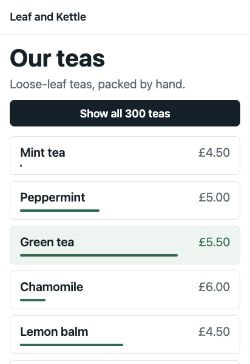 3,324 ms: the teas
- app.js sent, compressed306,920 bytes (300 KB)
- Features in the file, and on the tea list448, 112
- Fast laptop: app.js arrived2,860 ms
- Fast laptop: JavaScript on the main thread71.9 ms (parse 44.2, compile 9.1, run 16.5)
- Fast laptop: long tasks, and Total Blocking Time1, 2.9 ms
- Fast laptop: answers a tap from2,968 ms
- Mid-tier phone: app.js arrived2,887 ms
- Mid-tier phone: JavaScript on the main thread340.5 ms (parse 208.2, compile 46.1, run 81.6)
- Mid-tier phone: long tasks, and Total Blocking Time3, 225.3 ms
- Mid-tier phone: answers a tap from3,320 ms
- Low-tier phone: app.js arrived2,899 ms
- Low-tier phone: JavaScript on the main thread510.2 ms (parse 302.3, compile 74.2, run 126.9)
- Low-tier phone: long tasks, and Total Blocking Time4, 418.8 ms
- Low-tier phone: answers a tap from3,543 ms
The frames are what Asha saw on her mid-tier phone. The rows come from the load in the middle of three on each device. They give when app.js arrived, the main thread's JavaScript, and the long tasks after it arrived. The last row is when the page could first answer a tap.
Lighthouse used to report a similar moment, called Time to Interactive. web.dev says it "helps identify cases where a page looks interactive but actually isn't." Lighthouse 10 stopped showing it, and kept TBT.
Setting a budget for Leaf and Kettle
Now Ravi can find the line. A performance budget is a limit you set in advance. In lesson 21.2, he set one for CSS. For JavaScript, he needs three things:
- A phone and a network to design for. Ravi picks Asha's: a mid-tier phone on Slow 4G.
- A time goal. Ravi picks two. The tea list answers a tap within 3 seconds. And its TBT stays under 200 ms, web.dev's target.
- What each KB costs on that phone. The recordings give him that.
Your pay comes in at the start of the month. The rent goes out first, whatever you do. What's left is for everything else. Divide it by the price of what you want, and you know how many you can buy.
- In real life: Your pay for the month
- In web performance: The time goal: 3,000 ms
- In real life: Rent, paid first
- In web performance: The time the page needs before any JavaScript
- In real life: The price of one thing you want
- In web performance: What each KB costs: download and main thread
- In real life: How many things you can buy
- In web performance: The budget, in KB
Ravi does the same sum. On Asha's phone, the four recorded pages lie close to a straight line. So he draws one through the smallest and the biggest page:
// Asha's phone: when the smallest and the biggest page could answer a tap.const small = { sent: 59, answers: 1663 };const big = { sent: 597, answers: 5323 };const perKb = (big.answers - small.answers) / (big.sent - small.sent);const start = small.answers - small.sent * perKb;const goal = 3000;console.log(`Each KB: ${perKb.toFixed(1)} ms. With no JavaScript: ${Math.round(start)} ms.`);console.log(`Budget for ${goal} ms: ${Math.floor((goal - start) / perKb)} KB`);- Lines 2 and 3 hold two recorded pages: the KB each sent, and when each could answer.
- Line 4 works out what each extra KB cost: the extra wait, divided by the extra KB.
- Line 5 follows the line back to no JavaScript at all. That's the rent: time the page needs anyway.
- Line 7 prints
Each KB: 6.8 ms. With no JavaScript: 1262 ms. - Line 8 takes the rent off the goal, divides the rest by the price of a KB, and rounds down. It prints
Budget for 3000 ms: 255 KB.
Where did Asha's 6.8 ms per KB go? About 5.7 ms was the download on Slow 4G. The other 1.1 ms was the main thread. So on a slow network, most of each KB's cost is the trip. On the low-tier phone, the main thread's share grows to 1.9 ms.
Then Ravi checks the second goal, TBT under 200 ms. On Asha's phone, TBT crossed 200 ms between the 150 KB and the 300 KB page, at about 271 KB. So 255 KB passes both. Ravi rounds down, and writes down 250 KB.
Is 250 KB enough? React and the tea list alone sent 59 KB of it. React by itself, drawing an empty page, was 58 KB. That leaves about 190 KB for Meera's features.
And if many visitors have low-tier phones? The same sum there gives 225 KB. And TBT crossed 200 ms at about 146 KB. So the budget would have to shrink to about 150 KB. Your own visitors' phones decide.
Move the goal, and watch the budget change on each device:
- Budget on a fast laptop305 KB
- Budget on a mid-tier phone255 KB
- Budget on a low-tier phone225 KB
- The 59 KB page on Asha's phoneanswered at 1,663 ms: fits
- The 150 KB page on Asha's phoneanswered at 2,278 ms: fits
- The 300 KB page on Asha's phoneanswered at 3,320 ms: 320 ms late
- The 597 KB page on Asha's phoneanswered at 5,323 ms: 2,323 ms late
For each device, the panel draws a straight line through the 59 KB and the 597 KB page. It takes the time before any JavaScript off your goal, and divides what's left by the cost of each KB. Below, the four recorded pages on Asha's phone.
Other people's budgets come out differently, because they start from different phones and networks:
- Alex Russell's 2026 budgets, from lesson 1.3, allow 0.3 to 0.62 MiB of JavaScript in 3 seconds. That's about 307 to 635 KB. They're bigger, because his network is faster: 9 Mbps, against Slow 4G's 1.44.
- An older web.dev guide suggests 200 KB of JavaScript for Slow 4G and a Moto G4, a mid-tier phone of its day. Its goal was a page you can use in 3 seconds.
Writing the budget down
A budget only helps if something checks it. size-limit is a tool that its docs call "a performance budget tool for JavaScript." By default, it checks a file's Brotli size. So it counts the same bytes as this lesson. Ravi adds it to package.json:
{ "size-limit": [ { "path": "dist/app.js", "limit": "250 KiB" } ]}- Line 4 names the file to check:
dist/app.js, the built script. - Line 5 is the limit. size-limit reads
kBas 1,000 bytes andKiBas 1,024. Ravi's KB are 1,024 bytes, so he writesKiB.
Lighthouse CI, which runs Lighthouse on every build, can check a page's scripts too. Its check is called resource-summary:script:size. Lesson 21.2 used the same kind of check for CSS. One warning: Lighthouse itself once had its own budget file. Lighthouse 12 removed it, so old guides that use one no longer work.
Why it matters: a budget is a sum you can redo. Pick the phone, pick the goal, measure the cost of a KB, and divide. Then let the build check it.
Compressed and uncompressed size
One question is left. Which bytes does the budget count? Every script has two sizes. The compressed size is what the server sends, after Brotli or gzip has packed it. The uncompressed size is what the phone has after unpacking it. Lesson 16.1 showed how Brotli and gzip pack text.
A new duvet arrives vacuum-packed, flat and small. You pay postage on the small parcel. Then you open it, and it puffs up to full size. Making the bed takes the same work as with any other duvet that size.
- In real life: The flat, vacuum-packed parcel
- In web performance: The compressed script the server sends
- In real life: The postage, paid on the parcel's size
- In web performance: The download time
- In real life: The duvet once you open it
- In web performance: The uncompressed script
- In real life: Making the bed with the whole duvet
- In web performance: Parsing, compiling and running every byte
Here are both sizes for each tea list's app.js:
// app.js for each page, in bytes: as built, and as sent with Brotli.const pages = [ { built: 241250, sent: 60828 }, { built: 614401, sent: 153643 }, { built: 1294767, sent: 306920 }, { built: 2695594, sent: 611749 },];for (const { built, sent } of pages) { console.log(`${Math.round(sent / 1024)} KB sent, ${Math.round(built / 1024)} KB to read: ${(built / sent).toFixed(1)} times`);}- Lines 3 to 6 hold each file's recorded sizes.
builtis the file as the build wrote it.sentis the same file after Brotli. - Lines 8 to 10 print both sizes in KB, and how many times bigger the unpacked file is. The first is
59 KB sent, 236 KB to read: 4.0 times. Then come150 KB sent, 600 KB to read: 4.0 times,300 KB sent, 1264 KB to read: 4.2 timesand597 KB sent, 2632 KB to read: 4.4 times.
Every file unpacked to about four times its size. The network carried 150 KB of the 150 KB page. V8 had to read 600 KB. As lesson 6.4 showed, compression shrinks the download, not the work.
Real sites look the same. The Web Almanac's example: amazon.co.uk "downloads 423 KB of JavaScript, but when it's uncompressed that's 1,721 KB."
A page can read both sizes of its own files. Resource Timing is the browser's list of every file a page loaded, with times and sizes:
const app = performance .getEntriesByType("resource") .find((entry) => entry.name.endsWith("/app.js"));console.log(`Sent: ${app.encodedBodySize} bytes`);console.log(`Unpacked: ${app.decodedBodySize} bytes`);- Lines 1 to 3 find the entry for
app.jsamong the page's resources. - Line 4 prints
encodedBodySize: the body as it came over the network. - Line 5 prints
decodedBodySize: the body after unpacking. - On the 300 KB page, they were 306,920 and 1,294,767 bytes.
The compressed size also depends on how the server packs the file. The 150 KB page's app.js was 153,643 bytes with Brotli, and 181,495 bytes with gzip. The Web Almanac 2024 looked at JavaScript requests on phones. 45% came with Brotli, and 41% with gzip. 12% came with no compression at all.
Read this table across. Each row compares the two sizes of one file:
| Compressed: sent | Uncompressed: unpacked | |
|---|---|---|
| What it is | The bytes the server sends, after Brotli or gzip. | The bytes the phone has after unpacking them. |
| Who pays for it | The network: each byte takes time to arrive, and costs data. | The CPU: V8 parses, compiles and runs every byte. |
| What Resource Timing calls it | encodedBodySize | decodedBodySize |
| The 300 KB page's app.js | 306,920 bytes. | 1,294,767 bytes. |
Your browser can compress text too. Try it on the shop's real app.js, and on three other texts:
- Compressed with gzipCompressing...
The panel packs the text with gzip, using the browser's own CompressionStream, and counts the bytes before and after. The 150 KB page's app.js is fetched from this site the first time you pick it.
Why it matters: write the budget in compressed bytes. That's what the network pays for, and what HTTP Archive and most tools count. Then keep an eye on the unpacked size too, because that's what the phone's CPU pays for. And always say which one you mean.
Which size does it count?
Each number below comes from a tool or a report. Some count bytes sent, some count bytes unpacked, and some count time. Sort each one:
- HTTP Archive's JavaScript bytes per page
- Lighthouse CI's
resource-summary:script:size - size-limit, with no options
- webpack's
performance.maxAssetSize - Resource Timing's
decodedBodySize - Total Blocking Time
- Lighthouse's "JavaScript execution time" audit
Sort each check by what it measures.
Common mix-ups
- "My page sends less than the median, so it's fine." No. The 600 KB tea list sent less than the median page, and Asha waited 5.3 seconds.
- "A 150 KB script is 150 KB of work." No. It unpacked to 600 KB, and V8 read all of it.
- "If it's fast on my laptop, it's fast." No. The 597 KB page had a TBT of 37.8 ms on the laptop, and 530.9 ms on Asha's phone.
- "6 times slower is a low-end phone." No. It's a stand-in. Lighthouse's docs suggest 10 times slower for a low-end phone, from a fast desktop.
- "kB and KB always mean the same." No. size-limit reads kB as 1,000 bytes. HTTP Archive divides by 1,024.
- "One budget fits every site." No. The same 3-second goal gave 255 KB on Asha's phone and 225 KB on a low-tier phone. A faster network gives more.
Practice exercises
Answer each one first, then open the hints if you need them.
Ravi tries a looser goal: 4 seconds. What does the last line print?
// Asha's phone: when the smallest and the biggest page could answer a tap.
const small = { sent: 59, answers: 1663 };
const big = { sent: 597, answers: 5323 };
const perKb = (big.answers - small.answers) / (big.sent - small.sent);
const start = small.answers - small.sent * perKb;
const goal = 4000;
console.log(`Each KB: ${perKb.toFixed(1)} ms. With no JavaScript: ${Math.round(start)} ms.`);
console.log(`Budget for ${goal} ms: ${Math.floor((goal - start) / perKb)} KB`);Budget for 4000 ms: 402 KB. One more second for the goal buys about 147 more KB, because each KB costs Asha 6.8 ms.
The same app.js, packed two ways. What does this print?
// app.js of the 150 KB page, in bytes, compressed two ways.
const gzip = 181495;
const brotli = 153643;
console.log(`Brotli sends ${Math.round((1 - brotli / gzip) * 100)}% fewer bytes than gzip`);Brotli sends 15% fewer bytes than gzip. Same file, same content: only the packing differs.
What was the 600 KB page's Total Blocking Time on the low-tier phone, in ms?
1,005.2 ms. That's about five times web.dev's 200 ms target, on a page that sends less than the median.
Ravi's server sends gzip, not Brotli. Which option makes a size-limit check count gzip bytes?
{
  "size-limit": [
    {
      "path": "dist/app.js",
      "limit": "250 KiB",
      "gzip": true
    }
  ]
}
gzip: true. Then size-limit counts gzip bytes instead of Brotli ones. gzip packs less tightly, so the same file counts as more bytes, which is what your visitors really download.
Open the copy of the 150 KB tea list. Open DevTools' Network panel and reload. Find the page's own HTML, the row named page. What size does DevTools show for it once it's unpacked?
1.8 kB. That's 1,759 bytes: DevTools counts a kB as 1,000 bytes. The first number, what was transferred, depends on how the site's server compressed it. On the same page, app.js shows 614 kB: the 614,401 bytes from the sizes example.
Lighthouse's "Reduce JavaScript execution time" audit fails above how many seconds of JavaScript?
3.5 seconds. The audit adds up parsing, compiling and running each script, on Lighthouse's slowed-down CPU. It fails above 3.5 seconds.
Check your understanding
For each question, ask: which phone, which network, and which bytes?
Question 1 of 7What does this budget for a 2-second goal print?
Read the code, then predictconst perKb = 6.8; const start = 1262; const goal = 2000; console.log(Math.floor((goal - start) / perKb));Choose an answer to see the explanation.
Question 2 of 7HTTP Archive says how much JavaScript the median page sends. Which bytes does it count?
Choose an answer to see the explanation.
Question 3 of 7A tea list's app.js arrived at about the same moment on the laptop and on both phones. Why?
Choose an answer to see the explanation.
Question 4 of 7A tap lands in the middle of a long task. When can the page start to answer it?
Choose an answer to see the explanation.
Question 5 of 7Why did the same 3-second goal give a smaller budget on the low-tier phone?
Choose an answer to see the explanation.
Question 6 of 7A size-limit check says "limit": "250 kB". How many bytes is that limit?
Choose an answer to see the explanation.
Question 7 of 7Ravi's app.js is well under the median page's JavaScript. Does that mean it's within a good budget?
Choose an answer to see the explanation.
Key takeaways
- The median mobile home page sends 688 KB of JavaScript, compressed. It's a picture of the web, not a target.
- Each KB costs time twice: the download, then parsing, compiling and running on the main thread.
- The same file costs a slower phone more: 4.7 and 7.1 times the laptop's main-thread time, on the 300 KB page.
- A budget starts from a phone, a network and a time goal. Divide the time you can spare by what each KB costs.
- Asha's phone could afford about 250 KB for a 3-second answer. A low-tier phone, about 150 KB.
- Budgets count compressed bytes. The phone reads about four times as many. Say which size you mean.
Remember the one-liner.
A JavaScript budget is the time you can spare, divided by what each KB costs on your visitors' phones.
Sources
The facts on this page come from these reports, docs and source code:
- State of the Web: Page Weight, JavaScript bytes (crawl of October 1, 2026), HTTP Archive.
- Web Almanac 2025: Page Weight, HTTP Archive.
- Web Almanac 2024: JavaScript, the latest edition with a JavaScript chapter, HTTP Archive.
- Chrome DevTools: CPUThrottlingOption.ts, the CPU slowdown presets, the Chromium authors.
- Chrome DevTools: ThrottlingPresets.ts, the Mid-tier and Low-tier mobile presets, the Chromium authors.
- Lighthouse 13.6.0: Throttling, CPU throttling, Google Chrome.
- Total Blocking Time (TBT), web.dev.
- Time to Interactive (TTI), web.dev.
- The Performance Inequality Gap, 2026, Alex Russell.
- Your first performance budget, web.dev.
- Size Limit 14.3.0: README, Andrey Sitnik and contributors.
- Size Limit 14.3.0: bytes.js, how a limit is read, Andrey Sitnik and contributors.
- Lighthouse CI 0.16.0: configuration, budgets as assertions, Google Chrome.
- Lighthouse 13.6.0: resource-summary.js, sizes as transfer sizes, Google Chrome.
- Lighthouse 12.0.0 release notes: budgets removed, Google Chrome.
- PerformanceResourceTiming: encodedBodySize, MDN.
- PerformanceResourceTiming: decodedBodySize, MDN.
- CompressionStream, MDN.
- Network features reference: view the uncompressed size of a resource, Chrome for Developers.
- Performance: maxAssetSize, webpack.
- Reduce JavaScript execution time, Chrome for Developers.
Coming next: Analyzing your bundles. Ravi's app.js is over budget. Next, open it up and see which parts make it big.