Governing third parties
Keep tags from piling up. List each third party and its owner, give each a budget, and let a Content Security Policy report or block the rest.
- 01Build a third-party inventoryList every third party a real load asks for, which script added it, what it costs, and who owns it.
- 02Give each tag an owner and a budgetWrite the limits down, and check the live page against them every night, not only on each code change.
- 03Use a Content Security Policy as a guardrailReport first, then enforce, read the reports the browser sends, and review the list on a schedule.
Three months on, new tags nobody owns
Three months have passed since lesson 24.2. Ravi's page was fast, and Meera kept every tag she needed. Then, on Friday, Asha writes again. "When I say yes to cookies, the page freezes for a moment. Then a box pops up and asks how I found you."
Ravi opens the page on his phone and taps Accept all. A purple card appears at the bottom. A yellow badge of stars appears under the title. He didn't build either of them.
A tag is a small piece of another company's code that runs on the page. A tag manager lets Meera add tags from a website, a dashboard, without asking Ravi. Its one script on the page, the container, adds every tag she has set up there.
In the summer, Meera asked for the tag manager back. She wanted a reviews widget, and a widget has to run on the page. So Ravi added lesson 24.2's few lines that load the container after Asha's yes. Since then, people have added tags from the dashboard. The shop's code never changed, so nothing ever reached Ravi.
So Ravi asks two questions. What is on the page now, and who owns it? And how does he keep this from happening again?
The course loaded two pages: the page from three months ago, and today's. It loaded each three times on "Asha's phone", as in lesson 24.2. That's Chrome 157 on a phone's screen, with a CPU 4 times slower, on the Slow 4G network from lesson 16.3. The recorder tapped Accept all 5 seconds after asking for the page. The tags are the course's own stand-ins again, on made-up sites like heatmap.example. As in lesson 24.1, each keeps the phone busy about as long as a well-known service of its kind. Here is what Asha saw:
Before her yes, the two pages looked the same. After it, today's page grew a survey card at 7.9 seconds, and the stars at 8.1 seconds. Here are the numbers behind those screens:
// Asha's phone: the median of three loads of each page. She says yes at 5 seconds.const ago = { blocking: 501, freeFrom: 2146, kb: 73.8, sites: 0 };const today = { blocking: 1861, freeFrom: 8079, kb: 241.3, sites: 4 }; console.log(`Blocking time: ${ago.blocking} ms, now ${today.blocking} ms`);console.log(`Phone free from: ${ago.freeFrom} ms, now ${today.freeFrom} ms`);console.log(`Downloaded: ${ago.kb} KB, now ${today.kb} KB`);console.log(`Third-party sites: ${ago.sites}, now ${today.sites}`);- Line 1 is a comment. Each number is a median of three loads: the middle one, once they're sorted.
- Line 2 holds the page three months ago. Times are in milliseconds (ms), and sizes in kilobytes (KB).
blockingis the blocking time from lesson 24.1: how long the phone was too busy to answer a tap, after the first paint. freeFromis when the last long task ended. A long task holds the main thread, where the page's scripts run, for more than 50 ms.kbis everything the phone downloaded.sitescounts the other companies' sites the phone itself connected to.- Line 3 holds today's page.
- Line 5 prints
Blocking time: 501 ms, now 1861 ms. Line 6 printsPhone free from: 2146 ms, now 8079 ms. - Line 7 prints
Downloaded: 73.8 KB, now 241.3 KB. Line 8 printsThird-party sites: 0, now 4.
Blocking time more than tripled. The phone stayed busy 5.9 seconds longer. It downloaded more than three times the bytes. And it now talks to four other companies' sites. Why it matters: nobody made the page slow on purpose. Each tag was one small yes, and nobody added them up.
Four friends share a fridge. Jars and boxes pile up. Nobody knows whose old soup it is, so nobody dares throw it out. So they agree on three rules. Write your name and a date on everything. Each person gets one shelf. Every Sunday, anything without a name goes.
- In real life: The shared fridge
- In web performance: The page every tag runs on
- In real life: A jar with no name
- In web performance: A tag nobody owns, like the heatmap
- In real life: A name and a date on every lid
- In web performance: An owner for each tag, and when it should end
- In real life: One shelf each
- In web performance: A budget for each tag
- In real life: The Sunday clear-out
- In web performance: A regular review
Governing third parties means knowing every tag on the page, giving each one an owner and a budget, and checking them again on a schedule. The browser can help too. A policy sent with the page can report, or block, any site you didn't approve.
Lesson 24.1 measured what each third party costs. Lesson 24.2 loaded each one well. Lesson 22.1 set a budget for the shop's own JavaScript. Here, you'll answer four questions:
- What is on the page, and who added it? A third-party inventory.
- Who answers for each tag, and how much may it cost? Budgets and owners.
- Can the browser stop a tag nobody approved? Content Security Policy as a guardrail.
- How do you keep the list true? Regular reviews.
A third-party inventory
A third party is another company whose code or files the page uses. An inventory is a list of every third party on the page. For each one, it says who added it, what it costs and who owns it. Ravi starts where lesson 24.1 did: with the HTML.
Today's HTML names two other sites. One is tags.example: the container, loaded after Asha's yes. The other is chat.example. The chat's facade, lesson 24.2's look-alike button, loads the real chat from it only on a tap. But the load reached four other sites. Lesson 24.1 found why: a tag manager adds tags the HTML never names.
Who added each one?
DevTools' Network panel can tell. Its Initiator column says what asked for each request: the HTML parser, a script, or something else. For a script, hover over it to see the stack, the chain of calls that made the request. Hold Shift and hover over a row, and DevTools colours what started it green.
That works for one visit. Ravi wants a list he can make again every night, so he writes it as a script. Playwright is a library that drives Chrome from code. It can talk to Chrome through the DevTools protocol, the same one DevTools uses:
const cdp = await page.context().newCDPSession(page);await cdp.send("Debugger.enable");await cdp.send("Network.enable");cdp.on("Network.requestWillBeSent", ({ request, initiator }) => { const by = initiator.stack?.callFrames[0]?.url || initiator.url || "the browser"; console.log(new URL(request.url).host, "asked for by", by);});await page.goto("https://shop.example/");- Line 1 opens a session on the DevTools protocol for the page.
- Line 2 turns on the protocol's Debugger part. Its docs say Chrome fills in a script's stack only when it's on.
- Line 3 turns on its network events. Lines 4 to 7 then run for every request.
- Line 5 picks who asked. That's the script at the top of the stack, or else the address the initiator names, such as the HTML's. With neither, it says "the browser".
- Line 6 prints the site, and who asked. Line 8 loads the page.
The course's recorder did the same on each load. Here is who asked for each third-party script on today's page:
The page's own script asked for container.js, as lesson 24.2 wrote it. The container asked for stars.js, record.js and survey.js. Those then sent requests of their own. stars.js fetched the rating, and record.js sent what it recorded. Why it matters: "asked for by the container" tells Ravi where to look. The tag manager is where these tags were added, and where they can go.
Costs and owners
Next, Ravi adds each one's cost. The Performance panel's 3rd parties insight, from lesson 24.1, gives each site's download and main-thread time. Then he adds the column no tool can fill: the owner. That's the person who asked for the tag, and who can say if it's still needed. He asks Meera. Read each row across:
| Third party | Who added it | Downloaded | Main-thread time | Owner |
|---|---|---|---|---|
| tags.example | The page's own script, after Asha's yes | 39.7 KB | 147 ms | Meera |
| reviews.example | The tag manager's container | 35.8 KB | 507 ms | Meera |
| heatmap.example | The tag manager's container | 53.2 KB | 737 ms | Nobody knows |
| survey.example | The tag manager's container | 22.6 KB | 309 ms | Nobody knows |
The heatmap ran the longest: 737 ms on Asha's phone. Yet nobody knows who added it, or why. Nobody owns the survey either. So half the tags on the page have no owner. Why it matters: a tag without an owner never leaves. web.dev's guide to tag managers warns that a forgotten owner leads to "fear of removal in case it breaks something".
An office keeps a book at the front desk. Every visitor writes their name, who invited them, and the time. So the desk always knows who is in the building. And when a line has no host, someone goes to ask why.
- In real life: The visitors' book
- In web performance: The inventory
- In real life: The visitor's name
- In web performance: The third party's site
- In real life: Who invited them
- In web performance: Who asked for it: the page, or the container
- In real life: A line with no host
- In web performance: A tag with no owner
What a load can't show
The load found four third parties. Ravi's list needs a few more lines:
- The A/B test and the banner. Lesson 24.2 copied them onto the shop's own site. So DevTools counts their time with the shop's own: 1,052 ms under shop.example, in all.
- Analytics and ads. The shop's server reaches them from /metrics, as in lesson 24.2. The phone never talks to them, yet they got 13 requests on each load.
- The chat widget. It loads only when a visitor taps the bubble.
Why it matters: an inventory has three sources. The live page shows what loads. The tag manager shows what can load. And the shop's own notes show what was copied, or moved to the server. Keep all three in one list.
Budgets and owners
Meera asks around. The survey belongs to customer care. They read its answers every week, so it stays. The heatmap came from the agency that ran the June sale. Its contract has ended, and nobody has opened its reports since. So Meera removes it, and publishes version 15 of the container.
The page's HTML didn't change. Yet the course measured a different page:
- Blocking time fell from 1,861 ms to 1,209 ms.
- The phone downloaded 181.5 KB, 59.8 KB less.
- It was free from 7,550 ms, 529 ms sooner.
The survey came 0.7 seconds sooner, and the stars 0.5 seconds sooner. Why it matters: removing a tag nobody uses is the cheapest fix there is. It needs no code at all.
Asha feels the difference in her taps. Move her tap after the yes, and see what it meets on each page:
- Three months agoNo long task. The tap gets an answer quickly.
- TodayNo long task. The tap gets an answer quickly.
- After the reviewNo long task. The tap gets an answer quickly.
Worked out from each page's recorded long tasks, on the middle of three loads. A tap that lands in a long task waits at least until that task ends.
One limit for each tag
A budget, from lesson 22.1, is a limit you set in advance. Tim Kadlec calls it a limit the team "agrees not to exceed". So Ravi writes one line for each tag. Each line has an owner and two limits: how many KB it may download, and how many ms it may use on the main thread.
He starts from what each tag costs after the review. He adds a tenth, then rounds up to the next 10 KB and the next 50 ms. That leaves a little room, so normal noise doesn't fail the check.
A family keeps its spending money in envelopes. Each envelope has a name and an amount. When one runs out, everyone knows whose it was. And nobody spends money that isn't in an envelope.
- In real life: One envelope per person
- In web performance: One budget per tag
- In real life: The name on it
- In web performance: The tag's owner
- In real life: The amount on it
- In web performance: Its limits, in KB and ms
- In real life: Spending with no envelope
- In web performance: A tag with no budget: the check fails it
Then Ravi writes the check:
// Each tag's owner, and the most it may cost on Asha's phone.const budgets = { "tags.example": { owner: "Meera", kb: 50, ms: 150 }, "reviews.example": { owner: "Meera", kb: 40, ms: 600 }, "survey.example": { owner: "Customer care", kb: 30, ms: 350 },}; const check = (site, kb, ms) => { const budget = budgets[site]; if (!budget) return `FAIL ${site}: no owner, no budget`; if (kb > budget.kb || ms > budget.ms) return `FAIL ${site}: ${kb} KB, ${ms} ms. Ask ${budget.owner}.`; return `ok ${site} (${budget.owner})`;}; console.log(check("tags.example", 39.8, 146));console.log(check("survey.example", 22.6, 308));console.log(check("spin.example", 33.1, 480));- Lines 2 to 6 hold the budgets: one line per site, with its owner and its limits.
- Lines 8 to 13 make
check. It takes a site, and what it cost on the page. - Line 10 fails a site with no budget at all. Line 11 fails a site over either limit, and names who to ask. Line 12 passes the rest.
- Lines 15 to 17 check three sites, with numbers from the page Ravi meets next. They print
ok tags.example (Meera),ok survey.example (Customer care)andFAIL spin.example: no owner, no budget.
Two weeks later, the check fails. Someone has published version 16 of the container. It adds a new tag: a pop-up from spin.example, with a wheel to spin for a discount. It ran for 480 ms on Asha's phone, and nobody gave it an owner.
The three tags with budgets stayed under their limits. The container grew by one tag, to 146 ms, still under its 150. Why it matters: the check doesn't need to know what a new tag is. Having no owner is enough to fail.
Where the check runs
Lesson 22.1 checked its budget on every build. That isn't enough here. Version 16 never went through the shop's code, so no build ever saw it. So Ravi runs the check against the live page, every night. web.dev's guide says first-party code goes through review and testing, and adds: "Treat your tags the same."
Lighthouse CI, from lesson 22.1, can help a little. Its resource-summary:third-party:count check fails when a page sends more requests to third parties than you allow. Its third-parties-insight audit has one row per third party, so a maxLength check can cap how many there are. But neither has a line per tag, or an owner. That's why Ravi keeps his own short script.
Run Ravi's check on each page:
- tags.example: 39.7 KB, 147 msok tags.example (Meera)
- reviews.example: 35.8 KB, 507 msok reviews.example (Meera)
- heatmap.example: 53.2 KB, 737 msFAIL heatmap.example: no owner, no budget
- survey.example: 22.6 KB, 309 msok survey.example (Customer care)
Every third party the page asked for, with its median download and main-thread time over three loads, and what the check says against the budgets above.
Content Security Policy as a guardrail
The check runs once a night, on one test phone. A new tag can reach real visitors hours before that. Can each visitor's own browser catch it?
It can. A Content Security Policy, or CSP, is a header the server sends with the page. It lists where the page may load things from. The browser checks every script, image and request against it. The header comes from the shop's own server, so nobody can change it from the tag manager's dashboard.
A party has a guest list at the door. In the first week, the doorman only writes down anyone who isn't on it, and lets them in. The host reads his notes and fixes the list. After that, the doorman turns strangers away.
- In real life: The guest list
- In web performance: The policy's list of sites
- In real life: Writing down strangers, but letting them in
- In web performance: Report-only mode
- In real life: Turning strangers away
- In web performance: Enforcing the policy
- In real life: The doorman's notes to the host
- In web performance: The violation reports
Ravi's list of sites
Ravi turns the inventory into a policy. He sends it in report-only mode first:
Reporting-Endpoints: csp="https://shop.example/csp-reports"Content-Security-Policy-Report-Only: script-src 'self' 'nonce-{nonce}' https://tags.example https://reviews.example https://survey.example https://chat.example; connect-src 'self' https://reviews.example https://chat.example; img-src 'self' https://survey.example; report-to csp- Line 1 is the
Reporting-Endpointsheader. An endpoint is an address that collects reports. This one is namedcsp, at the shop's own /csp-reports. The Reporting API's spec says it must be a secure address, such as HTTPS. - Line 2 is
Content-Security-Policy-Report-Only. With it, the browser checks every rule but blocks nothing. A real header keeps the policy on one line. Here, each rule has its own line. - Line 3 is
script-src: where scripts may come from.'self'means the shop's own site. Then come the four approved sites. - Line 4 is
connect-src: wherefetch()and beacons may go. Line 5 isimg-src: where images, and so pixels, may come from. - Line 6,
report-to csp, sends each report to the endpoint from line 1.
Line 3 also holds a nonce: a random value, used once. The page has inline scripts of its own, like the one that loads the container. A list of sites can't vouch for those. So the server makes a new nonce for every response. It writes it in the header, and on each of its own inline scripts:
<script nonce="{nonce}">
  consent.whenGranted(() => { /* add the tag manager's container */ });
</script>- Line 1 opens the script with a
nonceattribute. On a real page, it holds this response's random value. - Line 2 is the page's own code from lesson 24.2: after a yes, it adds the container.
An inline script whose nonce matches may run. Others can't. Look at chat.example in line 3, too. The chat loads only on a tap, so no load ever showed it. A policy built from the load alone would block the chat for the first visitor who tapped. That's why the inventory needed the shop's own notes.
Firefox reads report-to only from version 149. So MDN's report-only example adds the older report-uri directive too, which names the address itself. The spec says a browser that knows report-to ignores report-uri.
Report-only: everything runs, and Chrome notes it
Each time something breaks one of the policy's rules, that's a violation. The course loaded version 16 with this header. Asha still saw the pop-up: it covered the page at 7.6 seconds. Report-only blocks nothing. But Chrome's console said what it saw. For the wheel's script, it ended: "The policy is report-only, so the violation has been logged but no further action has been taken."
The page can watch too. When something breaks the policy, the browser fires a securitypolicyviolation event on the page:
document.addEventListener("securitypolicyviolation", (event) => {
  console.log(event.effectiveDirective, event.blockedURI, event.sourceFile, event.lineNumber);
});- Line 1 listens for the event on the whole document.
- Line 2 prints four of its fields: the rule that was broken, what it stopped, the file that asked, and the line.
On the report-only page, the event fired three times:
- At 0.6 seconds,
img-src data https://shop.example/ 7. That was Ravi's own page! Line 7 of the HTML is the page's icon,<link rel="icon" href="data:,">. Its address is adata:URL, and img-src didn't listdata:. - At 5.9 seconds,
script-src-elem https://spin.example/wheel.js https://tags.example/container.js 13. The rule is script-src-elem, which falls back to script-src. Chrome named the file and the line that added the script: line 13 of the container. - At 7.6 seconds, the wheel's pixel to spin.example broke img-src.
Why it matters: the browser didn't only say "something new". It said the tag manager added it, so Ravi knows where to look. And report-only caught his own mistake, the icon, before anything was blocked.
The reports Chrome sent
Chrome also sent a report to /csp-reports, less than 100 ms after the icon's violation. The request's type was application/reports+json. Here is its body, shortened:
[ { "type": "csp-violation", "url": "https://shop.example/", "body": { "effectiveDirective": "img-src", "blockedURL": "data", "disposition": "report", "sourceFile": "https://shop.example/", "lineNumber": 7, "originalPolicy": "script-src 'self' 'nonce-rP0uzQSBU6wdQVdpN4J02g==' https://tags.example …" } }]- The body is a list of reports. This one held a single report. Line 3 gives its type, and line 4 the page.
- Line 6 is the rule that was broken. Line 7 is what it stopped. For an address that isn't HTTP or HTTPS, the spec keeps only the scheme, so Chrome wrote
data. - Line 8 says the policy only reported. Under an enforced policy, it says
enforce. - Lines 9 and 10 point at line 7 of the page. Line 11 holds the policy, with this response's nonce.
The reports about the wheel never reached the shop. Chromium's code shows why. When a report is waiting, Chrome sends it at once, but only if no round of sending has started in the last minute. Otherwise it waits for the next round. The icon's report started a round, so the wheel's two reports had to wait a minute. The recorder closed each page about 15 seconds after asking for it, and they never arrived.
The Reporting API's spec warns about this: delivery "is not, however, guaranteed in any way". Why it matters: reports are a sample, not a full log. With many visitors, a new tag still shows up in some of them. One test visit can miss it.
Enforced: Chrome blocks the new tag
Next, Ravi switches the header's name to Content-Security-Policy. Now Chrome enforces it. The course loaded version 16 again, with the same list:
Chrome blocked wheel.js, and its console said: "The action has been blocked." DevTools' Network panel shows such a request as (blocked:csp). The container carried on, and so did the page. The survey came at 7.1 seconds, and the stars at 7.5. The list still lacked data:, so Chrome blocked the icon too. On the real shop, Ravi adds data: to img-src first.
Read each row across: what happened on the page with each policy.
| What happened | Report-only | Enforced |
|---|---|---|
| Did the pop-up show? | Yes, at 7.6 s. | No. Chrome blocked wheel.js. |
| Violations Chrome logged | 3: the icon, wheel.js and its pixel. | 2: the icon and wheel.js. |
| Reports that reached the shop | 1, about the icon. | 1, about the icon. |
| Blocking time | 1,613 ms | 1,220 ms |
| Downloaded | 221.6 KB | 185.3 KB |
Enforced, the page cost about what it did after the review: 1,220 ms of blocking time, against 1,209. Why it matters: a policy doesn't make the approved tags cheaper. It keeps the others from costing anything at all.
Two things a list of sites can't do
Against attacks that slip code into the page, web.dev recommends a different policy: a strict CSP. It uses a nonce and 'strict-dynamic'. With 'strict-dynamic', any script that a trusted script adds is trusted too, and the list of sites is ignored for scripts. That stops injected code without a list. But it lets the tag manager add any script it likes. Google Tag Manager's CSP guide says it passes the nonce on to every script it adds. The list in connect-src and img-src still holds, though: it decides where tags may send data.
And a list knows nothing about size or time. A tag on the list can double, and the policy won't mind. That's the budget's job. The system design lesson Third-party scripts and supply chain covers the security side.
Move through both pages, and watch the violations and the reports:
- New tag, report-only policy
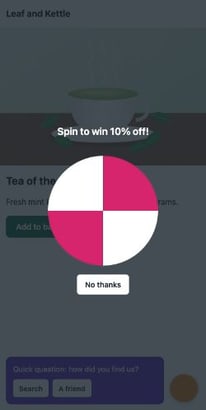 the pop-up covers the page3 violations so far, the last: img-src: https://spin.example/px?shown=11 report at the shop, the first at 658 ms.
- New tag, enforced policy
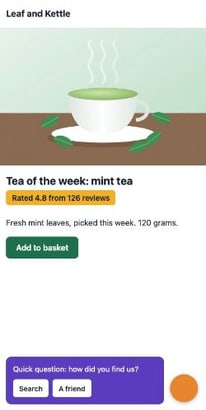 page, stars and survey2 violations so far, the last: script-src-elem: https://spin.example/wheel.js1 report at the shop, the first at 622 ms.
Move the slider. Each frame is the last one Chrome had drawn by then, on the middle of three loads. Under it: the policy's violations so far, and the reports that had reached the shop.
Regular reviews
The inventory, the budgets and the policy all go stale. Contracts end. Campaigns finish. Vendors ship bigger files. web.dev's guide says tags "tend to accumulate over time: tags get added but are rarely removed". The fix is a review: going through the list, tag by tag, with each owner, on a schedule.
Every few months, you read your bank statement line by line. There's the music app you use every day. And there's a gym you stopped going to in spring, still taking money each month. Nobody else will notice it. So you cancel it.
- In real life: The statement
- In web performance: The inventory, from last night's load
- In real life: A line you use every day
- In web performance: A tag whose owner still uses it
- In real life: The gym you stopped going to
- In web performance: A tag whose campaign or contract ended
- In real life: Cancelling it
- In web performance: Removing it from the container
For each tag, Ravi and its owner answer five questions:
- Is it still used? Who last looked at what it collects?
- Does its contract still run?
- Is it within its budget? If it grew, why?
- Does it still need the page, or could the shop's server send its data, as in lesson 24.2?
- Is the policy's list still right for it?
The second question matters more than it looks. Andy Davies found that when a subscription ends, many providers "carry on serving their full script". He tells of an airline that audited its tags. For around a third of them, the subscription had expired. And nobody could be found who used some of the others.
Help from the tag manager
Google Tag Manager has tools for this. Most tag managers have something like them:
- Versions. Every publish records a version. Its help pages say you can see "when versions were live and who published them". Ravi can find who published version 16.
- Permissions. Each person gets a level for each container. Someone with Edit can make changes, but can't publish them. So an agency gets Edit, and only Meera and Ravi publish.
- End dates. A tag can have a custom firing schedule, with a start date and an end date. A tag for a two-week sale then stops by itself.
- Owners on tags. web.dev recommends labelling each tag with its owner, in the tag manager itself.
When a tag goes, remove it. Don't just stop it from firing. web.dev explains why: "Pausing or removing a tag removes the code from the container; blocking does not."
How often? web.dev says it "depends on how often your site's tags are updated". Leaf and Kettle's tags change every few weeks. So Ravi books a review every three months, and lets the check and the reports watch in between. Why it matters: each guardrail catches something different. The check catches growth. The policy catches strangers. The review catches tags nobody needs.
Which guardrail catches it?
Each problem below is caught first by one of Ravi's three guardrails. Sort each one:
- survey.js grows from 22.6 KB to 45 KB in the vendor's new release
- The tag manager's own code starts running twice as long
- A pop-up from a site nobody approved, on a real visitor's phone
- An approved tag starts sending pixels to a new site
- The heatmap from a sale that ended months ago
- A tag whose contract ran out, but whose script still loads
Sort each problem by the guardrail that catches it first.
Common mix-ups
- "If the HTML didn't change, the page didn't change." No. Today's page and the page after the review had the same HTML. The tag manager served a different version.
- "One load shows every third party you use." No. Copies on your own site count as yours, vendors reached by your server never show, and the chat waited for a tap.
- "A report-only policy protects visitors." No. It blocks nothing. The pop-up still covered Asha's page.
- "Chrome reports every violation at once." No. It sent the icon's report at once, then held the wheel's for its next round, a minute later.
- "A strict CSP keeps unknown tags out." No. With
'strict-dynamic', a trusted script, like a tag manager, can add scripts from any site. - "If nobody knows what a tag does, it's safer to leave it." No. The heatmap nobody used cost Asha 737 ms of main-thread time on every visit.
Practice exercises
Answer each one first. Then open the hints if you need them.
The survey's vendor ships a new release. What does the last line print?
const budgets = {
  "survey.example": { owner: "Customer care", kb: 30, ms: 350 },
};
const check = (site, kb, ms) => {
  const budget = budgets[site];
  if (!budget) return `FAIL ${site}: no owner, no budget`;
  if (kb > budget.kb || ms > budget.ms) return `FAIL ${site}: ${kb} KB, ${ms} ms. Ask ${budget.owner}.`;
  return `ok ${site} (${budget.owner})`;
};
console.log(check("survey.example", 22.6, 309));
console.log(check("survey.example", 45.2, 309));FAIL survey.example: 45.2 KB, 309 ms. Ask Customer care. The time is fine, but 45.2 KB is over the 30 KB limit. The first line prints ok survey.example (Customer care).
Run Ravi's check on today's page, with the heatmap still in it. How many lines say FAIL?
One: heatmap.example, with no owner and no budget. The other three were within their limits, so the check would have flagged the heatmap the first night it ran.
Asha taps Add to cart at 7,000 ms. On today's page, how long does her tap wait?
248 ms. A long task ran until 7,248 ms on today's page. After the review, the same tap waits 17 ms, and three months ago it met no long task at all.
On the report-only page, when did the first report reach /csp-reports, in ms?
At 658 ms, on the middle load. It was the icon's report. Chrome sent it at once, because no round of sending had started yet.
Open the course's trace of today's page in Chrome's Performance panel. survey.js sends one request of its own. What is its address?
https://survey.example/seen, a pixel: an image request that carries a report. That's why Ravi's policy lists survey.example under img-src.
Which Google Tag Manager container permission lets someone create versions, but not publish them?
Approve. Its holder can create versions, workspaces and edits, but can't publish. Approval requests themselves are a Tag Manager 360 feature.
Check your understanding
For each question, ask which guardrail it's about: the list, the budget, the policy or the review.
Question 1 of 7Ravi reviews every change to the shop's code. Why did he never see the heatmap arrive?
Choose an answer to see the explanation.
Question 2 of 7What does this check print?
Read the code, then predictconst budgets = { "tags.example": { owner: "Meera", kb: 50, ms: 150 }, "reviews.example": { owner: "Meera", kb: 40, ms: 600 }, }; const check = (site, kb, ms) => { const budget = budgets[site]; if (!budget) return `FAIL ${site}: no owner, no budget`; if (kb > budget.kb || ms > budget.ms) return `FAIL ${site}: ${kb} KB, ${ms} ms. Ask ${budget.owner}.`; return `ok ${site} (${budget.owner})`; }; console.log(check("heatmap.example", 53.2, 737));Choose an answer to see the explanation.
Question 3 of 7On the page with the report-only policy, what happened to the new pop-up?
Choose an answer to see the explanation.
Question 4 of 7Which directive stops a tag from sending a tracking pixel to a new site?
Choose an answer to see the explanation.
Question 5 of 7Why did the reports about the pop-up never reach the shop in the course's recordings?
Choose an answer to see the explanation.
Question 6 of 7web.dev recommends a strict policy, with a nonce and 'strict-dynamic'. Why doesn't that stop the tag manager adding a script from a new site?
Choose an answer to see the explanation.
Question 7 of 7Meera adds a tag for a two-week sale. What helps the most at the next review?
Choose an answer to see the explanation.
Key takeaways
- Tags pile up through the tag manager, without any change to your code.
- An inventory lists each third party, who added it, what it costs and who owns it. Build it from a real load, the tag manager and your own notes.
- Every tag gets an owner and a budget. A tag with neither fails the check.
- Run the check on the live page every night: tags skip your builds.
- A Content Security Policy lists the approved sites. Report-only shows what would break. Enforced, the browser blocks the rest.
- Chrome sends the first report at once, then waits a minute for the next round. Reports are a sample.
- Review the list with each owner on a schedule, and remove what nobody uses.
Remember the one-liner.
Know every tag, give each an owner and a budget, let the browser guard the door, and clear out the rest.
Sources
The facts on this page come from these docs, specs and source code:
- Network features reference: initiators and dependencies, Chrome for Developers.
- Chrome DevTools Protocol: Network.Initiator, Chrome DevTools Protocol.
- Third Party Web: Average Impact by category (the commit lesson 24.1 used), Patrick Hulce.
- Best practices for tags and tag managers, web.dev.
- Performance budgets that stick, Tim Kadlec.
- Lighthouse CI: configuration, assertions and budgets (v0.16.1), Lighthouse CI docs.
- third-parties-insight.js: one row per third party (Lighthouse v13.6.0), Lighthouse source.
- Content Security Policy Level 3, W3C.
- Content-Security-Policy-Report-Only header, MDN.
- Reporting-Endpoints header, MDN.
- CSP: report-to directive, MDN.
- Reporting API, W3C.
- reporting_delivery_agent.cc: send at once, then wait for the next round (Chromium 157.0.8103.52), Chromium source.
- reporting_policy.h: delivery_interval of one minute (Chromium 157.0.8103.52), Chromium source.
- Mitigate cross-site scripting (XSS) with a strict CSP, web.dev.
- Using Google Tag Manager with a Content Security Policy, Google tag platform docs.
- Publishing, versions, and approvals, Tag Manager Help.
- Managing users and permissions, Tag Manager Help.
- Prioritization: custom tag firing schedule, Tag Manager Help.
- Reducing the site-speed impact of third-party tags, Andy Davies.
- Browser compatibility data 8.1.8, MDN.
Coming next: Service workers and performance. You've kept other companies' code in check. Next, a script of your own that sits between the page and the network.