Shipping less CSS
Find unused CSS with DevTools Coverage, remove it safely with PurgeCSS, measure runtime CSS-in-JS against static extraction, and keep CSS small with budgets.
- 01Find CSS a page doesn't use, and read it rightUse DevTools' Coverage panel, and tell CSS that no page uses from CSS another page or a later click needs.
- 02Remove unused CSS without breaking the pageRun PurgeCSS over every page, and write class names in full so it keeps the ones your code adds.
- 03Choose how to write styles, and keep them smallWeigh runtime CSS-in-JS against static extraction and utility classes, and set a budget the build checks.
A file the page barely uses
Ravi's mint tea page now paints fast. Lesson 21.1 put the first screen's rules in the HTML, and loads the rest of site.css later. But site.css is still 360 KB. Every new visitor downloads all of it once.
So Ravi opens DevTools' Coverage panel. Lesson 7.5 met it. It shows how much of each file a page really used. Ravi reloads the page and reads the two rows for CSS:
// What Coverage showed for the mint tea page, in bytes.const sheets = { "site.css": { total: 360335, unused: 358592 }, "the style tag": { total: 1592, unused: 310 },}; for (const [name, sheet] of Object.entries(sheets)) { const share = (sheet.unused / sheet.total) * 100; console.log(`${name}: ${share.toFixed(1)}% unused`);}- Line 1 is a comment. Coverage counts bytes. In a CSS file, one byte is one letter or symbol.
- Line 3 is
site.css.totalis its size.unusedis the part the page never used. - Line 4 is the style tag in the HTML. It holds the critical CSS from lesson 21.1: the rules the first screen needs.
- Lines 7 to 10 work out each unused share and print it:
site.css: 99.5% unusedandthe style tag: 19.5% unused.
A CSS file is a list of rules. Each rule is a selector, like .price, and the styles for what it selects. The page's own rules used 1,743 bytes of site.css. That's about one byte in every two hundred. Here is what Asha saw, and what Ravi saw in DevTools:
So Ravi wonders. Can he just delete the unused part? And how does he stop the file from growing back? The rest of this lesson answers both questions, one step at a time.
Ravi wants to clear out the shop's kitchen cupboard. For a week, he notes every jar he opens. Most jars stay shut. But the cinnamon is for the winter menu. The cake sprinkles are for birthdays. Only a few jars are for dishes the shop stopped making. Those are the ones to throw out.
- In real life: A jar Ravi opened this week
- In CSS: A rule the page used while Coverage watched
- In real life: Jars nobody opened
- In CSS: The bytes Coverage counts as unused
- In real life: Cinnamon for the winter menu
- In CSS: Rules for other pages, or for later clicks
- In real life: Jars for dishes the shop stopped making
- In CSS: Dead CSS: rules no page uses any more
Unused on one page isn't the same as unused everywhere. Find the CSS no page needs, and remove it safely. Then add a check, so the file can't quietly grow back.
The lesson takes Ravi's question one step at a time:
- Which bytes went unused, and why? Reading Coverage for CSS.
- Which rules can go? PurgeCSS, and the trap it sets.
- Do styles written in JavaScript cost more? Runtime CSS-in-JS against static extraction.
- What about utility classes? How Tailwind's file grows.
- How does the file stay small? A budget the build checks.
Finding unused CSS with Coverage
Open Coverage from the Command Menu (Ctrl+Shift+P, or Cmd+Shift+P on a Mac): type coverage, and pick Show Coverage. It opens in the Drawer, below the other panels. Press its reload button. DevTools reloads the page, and keeps recording while you use it.
For CSS, Chrome watches each rule. A rule is used once its selector has matched an element on the page. Coverage adds up the bytes of the rules that matched. Everything else in the file counts as unused.
So Coverage is a record of what happened, like a till receipt. It lists what you bought today, not what you'll need next week. The course tapped Add to cart on the mint tea page, and read Coverage again:
// The bytes of site.css that Coverage counted as used on the mint tea page.const afterLoad = 1743; // 28 rulesconst afterClick = 1885; // 29 rules, once Asha tapped Add to cart console.log(`The click used ${afterClick - afterLoad} more bytes`);- Line 2 holds the used bytes of
site.cssonce the page had loaded. 28 rules had matched. - Line 3 holds them again after the tap. One more rule had matched.
- Line 5 prints
The click used 142 more bytes.
Those 142 bytes are one rule, .cart-added. Ravi added it this week. When Asha taps Add to cart, a small script called cart.js puts a green note under the button. Before the tap, no element had that class. So Coverage counted the rule as unused.
Why it matters: a rule can look unused only because nobody has clicked yet.
Other pages, other screens, other moments
The rest of the unused bytes fall into three groups. None of them are safe to delete just because Coverage marks them:
- Other pages: the cart, the checkout, the blog and the rest. That's most of
site.css. - Other screens: the wide layout and the print styles. On a phone 412 px wide, they never apply.
- Other moments: hover styles, error messages, and notes like the cart's.
One more case hides in the style tag. Look at its 310 unused bytes. They are its two @font-face rules, plus the line breaks between rules. An @font-face rule tells the browser where to find a font. It has no selector, so it never matches an element. Coverage counted both as unused, though the heading used Caveat the whole time.
Why it matters: Coverage tells you where to look. It can't tell you what to delete.
Removing unused CSS with PurgeCSS
To find CSS that no page needs, you have to look at every page, not one. PurgeCSS is a tool that does this when you build the site. You give it your CSS, and your content: the pages and scripts. Its docs say it "matches the selectors used in your files with the one in your content files". It keeps the rules whose names it finds, and removes the rest.
Leaf and Kettle took down two kinds of page this year: the summer sale, and tea subscriptions. Their styles are still in site.css. Nobody dared to delete them. So Ravi runs PurgeCSS over the shop's 16 pages and cart.js:
import { PurgeCSS } from "purgecss"; const [result] = await new PurgeCSS().purge({ content: ["pages/*.html", "cart.js"], css: ["site.css"],});console.log(result.css.length);- Line 1 loads PurgeCSS.
- Lines 3 to 6 run it.
contentlists the files it reads.cssis the file it cleans. - Line 7 prints the size of the cleaned CSS.
The course ran PurgeCSS 9.1.0 the same way. Then it loaded the mint tea page again, with Coverage:
// site.css before and after PurgeCSS read the shop's 16 pages and cart.js, in bytes.const before = 360335;const after = 297911;const usedOnThisPage = 1743; console.log(`PurgeCSS removed ${before - after} bytes`);console.log(`Still unused on the mint tea page: ${(((after - usedOnThisPage) / after) * 100).toFixed(1)}%`);- Lines 2 and 3 are the sizes of site.css before and after. Line 4 is the part the mint tea page used.
- Line 6 prints
PurgeCSS removed 62424 bytes. - Line 7 prints
Still unused on the mint tea page: 99.4%.
PurgeCSS removed 460 selectors, about a sixth of the file. Most of them were the two old pages'. Most of the rest were parts that no page used any more. Rules that no page uses are called dead CSS. Why it matters: dead CSS costs every new visitor bytes, and shows nothing.
But the mint tea page still left 99.4% unused. That's the CSS other pages need, and PurgeCSS rightly kept it. Only splitting the file per page shrinks it further. Lesson 21.1 showed what that costs: a trip to the server for each new kind of page.
The note that lost its colour
Then Ravi taps Add to cart on the purged page. The note appears, but as plain text. Here is what Asha would see, both ways:
The rule .cart-added was gone. Look at how cart.js makes the note:
// cart.js: show a note when Asha adds the tea to her cartconst button = document.querySelector("#add");button.addEventListener("click", () => { const note = document.createElement("p"); const state = "added"; note.className = "cart-" + state; note.textContent = "Added to your cart"; button.after(note);});- Line 2 finds the Add to cart button. Line 3 runs the rest when Asha taps it.
- Line 4 makes a new paragraph for the note.
- Lines 5 and 6 build the class name from two pieces:
"cart-"and"added". - Lines 7 and 8 set the note's text and put it under the button.
The browser joins the two pieces when the code runs. But PurgeCSS never runs your code. Its docs say it "reads your content files as text". It cuts each file into words with its extractor. Here is its default one:
// PurgeCSS's default extractor: every run of letters, digits, _ and -.const extract = (text) => text.match(/[A-Za-z0-9_-]+/g) || []; const words = extract(`note.className = "cart-" + state;`);console.log(words.join(", "));console.log(`Finds cart-added: ${words.includes("cart-added")}`);- Line 2 is PurgeCSS's default extractor. It keeps every run of letters, digits,
_and-. - Line 4 cuts line 6 of
cart.jsinto words. - Line 5 prints
note, className, cart-, state. Line 6 printsFinds cart-added: false.
PurgeCSS never saw the whole name, so it removed the rule.
Ravi asks a helper to clear the cupboard. "Keep every jar that a recipe card names," he says. The helper reads each card, word by word, and checks the labels. One card says "add the jar for today's special". No label matches that. So she throws out the saffron, which today's special needs.
- In real life: The shop's recipe cards
- In CSS: Your pages and scripts: PurgeCSS's content
- In real life: Reading each card word by word
- In CSS: The extractor, cutting files into words
- In real life: A jar's label, written on a card
- In CSS: A class name written in full
- In real life: "The jar for today's special"
- In CSS: "cart-" + state, joined only when the code runs
The fix is to write the whole name. Ravi changes line 6 to note.className = "cart-added";. With that, PurgeCSS kept the rule, and the note was green again. When you can't write the names out, PurgeCSS has a safelist: names, or patterns, that it always keeps.
Try it. Type a line of cart.js, or pick one, and see which words PurgeCSS finds:
- Words PurgeCSS findsnote, className, cart-, state
- Finds cart-addedno
- .cart-added { … } in site.cssremoved, unless another file names it
This is the same regular expression PurgeCSS 9.1.0 uses when you don't give it an extractor. It runs in your browser. PurgeCSS keeps .cart-added only if one of your files gives it the whole word.
Purging for one page
What if PurgeCSS reads only the mint tea page and cart.js? Then site.css shrinks to the page's own rules: 3,371 bytes, or 970 compressed. Even so, Coverage counted 44% of it as unused after the tap. Those bytes are the wide layout, the print styles and the font faces. They belong to this page, just not to a phone's screen.
Compare the four versions of site.css. Each one shows the page right after the tap:
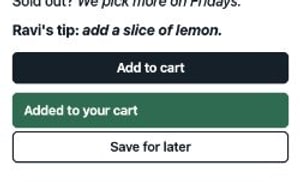 Add to cart, just tapped
- site.css360,335 bytes
- Unused after the load358,592 bytes (99.5%)
- Rules used after the load28
- Unused after tapping Add to cart358,450 bytes (99.5%)
- Rules used after tapping29
- The cart notegreen, with its own rule
Each row is what Chrome's coverage reported for site.css on the mint tea page: once the page had loaded, and again after a tap on Add to cart. The picture is the page right after the tap.
Why it matters: purge against every file that can name a class. Run it on every build. Then tap through the pages before you ship.
Runtime CSS-in-JS against static extraction
Ravi is building the tea list again, as a small React app. Meera wants a bar under each tea that shows how strong it is. The shop has 300 teas. The list shows 8, and a button shows the rest.
A friend suggests writing the styles in JavaScript. That's called CSS-in-JS. React's docs list three ways to do it:
- Static extraction: a tool turns the styles into a CSS file when you build the app.
- Inline styles: a
styleattribute on the element itself. - Runtime injection: a library makes the CSS in the browser, and adds it to a style tag on the page.
styled-components is a runtime library. Here is the strength bar, written with it:
const Strength = styled.span` grid-column: 1 / -1; height: 4px; border-radius: 2px; background: #2f6b4f; width: ${(props) => props.$level}%;`; <Strength $level={tea.strength} />- Lines 1 to 4 make a styled
span. Its CSS sits between the backticks. - Line 3 is the part that changes. It reads
$level, so each strength gets its own width. - Line 6 draws the bar for one tea, with that tea's strength.
styled-components 6.6.0 works out this CSS while React renders the component. Each new width becomes a new class, and a new rule in its style tag. It adds each rule with the browser's insertRule().
Static extraction does the same work once, when the app is built. vanilla-extract is one tool for it. Its home page promises "Zero-runtime Stylesheets in TypeScript". Here is the same bar:
// tea.css.ts: turned into a plain CSS file when the app is builtexport const strength = style({ gridColumn: "1 / -1", height: 4, borderRadius: 2, background: "#2f6b4f" }); // TeaList.jsx: the value that changes goes in an inline style<span className={styles.strength} style={{ width: `${tea.strength}%` }} />- Line 2 is the bar's style. When the app is built, it becomes a rule in a plain CSS file.
- Line 5 gives the bar that class. The width, the one value that changes, goes in an inline style.
A shirt shop can work two ways. It can sew each shirt at the counter while the customer waits. Then it needs a tailor at the counter all day. Or it can sew the shirts the night before, and hang them on a rail. For a longer sleeve, it pins the length on the spot.
- In real life: Sewing each shirt at the counter
- In CSS: Runtime CSS-in-JS: CSS made in the browser
- In real life: Paying a tailor to sit at the counter
- In CSS: The library's JavaScript, which every visitor downloads
- In real life: Shirts sewn the night before
- In CSS: Static extraction: a CSS file made when you build
- In real life: Pinning the sleeve length
- In CSS: An inline style for the one value that changes
What the runtime cost on Asha's phone
The course built the tea list three ways, with the same React 19 app: styled-components, vanilla-extract, and Tailwind, which the next section covers. It loaded each one five times in Chrome 157, set up like Asha's phone. That means DevTools' Slow 4G and a CPU 4 times slower, as in lesson 21.1.
// The tea list on Asha's phone, three ways: compressed bytes, and medians of five loads.const ways = { "styled-components": { js: 70563, css: 0, firstPaint: 1780 }, "vanilla-extract": { js: 60837, css: 198, firstPaint: 1708 }, Tailwind: { js: 60864, css: 703, firstPaint: 1704 },}; for (const [name, way] of Object.entries(ways)) { console.log(`${name}: ${way.js + way.css} bytes, first paint at ${way.firstPaint} ms`);}- Line 1 is a comment. Bytes are compressed, as the server sent them. Each first paint is a median: the middle one of the five loads.
- Lines 3 to 5 hold one way each: its JavaScript, its own CSS file, and its first paint in ms.
- Lines 8 to 10 print one line per way. The first is
styled-components: 70563 bytes, first paint at 1780 ms. Then comevanilla-extract: 61035 bytes, first paint at 1708 msandTailwind: 61567 bytes, first paint at 1704 ms.
The styled-components page sent 9,726 more bytes of JavaScript. That's the library that makes CSS in the browser. On Slow 4G, those bytes take about 54 ms to arrive. Then the phone has to run them. The page painted last in all five rounds.
Why it matters: with runtime CSS-in-JS, every visitor downloads and runs a styling engine before they see any styles.
The tap that shows 300 teas
Next, the course tapped "Show all 300 teas", once per load. React drew 292 more teas:
// Tapping "Show all 300 teas": medians of five clicks, in ms.const click = { "styled-components": { code: 41.8, styles: 4.4 }, "vanilla-extract": { code: 22.6, styles: 4.5 }, Tailwind: { code: 25.5, styles: 5 },}; for (const [name, work] of Object.entries(click)) { console.log(`${name}: ${work.code} ms running code, ${work.styles} ms on styles`);}- Lines 3 to 5 hold medians of five taps.
codeis how long the page's code ran for the tap, from Event Timing (lesson 11.4).stylesis the time Chrome spent recalculating styles, from the trace. - Lines 8 to 10 print one line per way. The first is
styled-components: 41.8 ms running code, 4.4 ms on styles. Then comevanilla-extract: 22.6 ms running code, 4.5 ms on stylesandTailwind: 25.5 ms running code, 5 ms on styles.
styled-components ran about 19 ms more code than vanilla-extract. During the tap, it wrote 92 new rules into its style tag. That's one for each new strength value.
Styles took about the same time all three ways, 4 to 5 ms. Lesson 6.3 met this step, style recalculation: working out each element's final styles. Here React drew the list in one go. So Chrome recalculated styles twice per tap, all three ways.
React's docs warn about a worse case. A non-blocking update is one React can pause, to let the browser run in between. If styles are added during one, "the browser will recalculate the styles every single frame while rendering a component tree, which can be extremely slow." React's working group explains why. When you add a rule, "you more or less have to reapply all rules that already existed to all nodes that already existed."
So React's docs recommend CSS files for styles that don't change, and inline styles for values that do. They don't recommend adding style tags at run time. styled-components agrees in its own way. In development, it warns once a component has made 200 classes. The warning suggests a style object for values that change often.
Compare the three ways yourself:
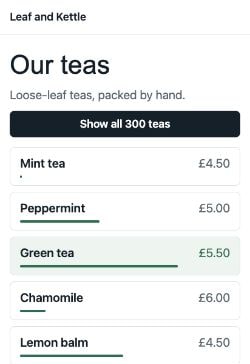 1,782 ms
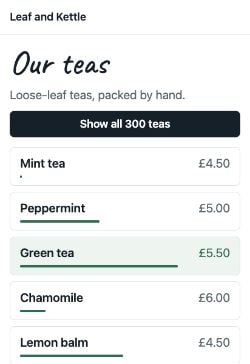 2,773 ms
- app.js, sent70,563 bytes
- app.css, sentno file: the styles are in app.js
- First paint (median)1,780 ms
- JavaScript before the first paint (median)122.3 ms
- The click: code running (median)41.8 ms
- The click: styles (median)4.4 ms
- The click: tap to next paint (median)144 ms
- Rules in styled-components' style tag14 after the load, 106 after the click
The frames are what Asha saw from the first paint, in the load in the middle. The rows give the bytes, then medians of all the loads, and of the taps on "Show all 300 teas".
Why it matters: when a style depends on data, like a width per tea, put that value in an inline style. Turn everything else into a CSS file when you build.
Runtime libraries need extra setup on a server, too. In Next.js, styled-components needs a style registry, which collects all the CSS rules in a render. The Next.js docs list it as supported in Client Components, the ones that run in the browser.
Utility classes and file size
Tailwind takes another path. You style each element with small classes that each do one thing. A utility class like font-semibold sets one property. Here is the price line both ways:
<!-- With its own class, styled in site.css --><p class="price">£4.50 <em>for 120 grams</em></p> <!-- With utility classes --><p class="mb-3 text-xl/[1.4] font-semibold">£4.50 <em>for 120 grams</em></p>- Line 2 uses the page's own class,
price. Its rule lives insite.css. - Line 5 uses three utility classes: a margin, a text size with its line height, and a weight.
Tailwind writes CSS only for the classes it finds. Its docs say it works "by scanning your project for utility classes, then generating all of the necessary CSS based on the classes you've actually used." Ravi tells it where to look:
@import "tailwindcss" source(none);
@source "./pages";- Line 1 loads Tailwind, and turns off its own search for files.
- Line 2 tells it to read the pages folder.
Like PurgeCSS, Tailwind reads files as plain text. So the same rule applies. Its docs put it plainly: "Don't construct class names dynamically."
The course rewrote the mint tea page and the tea list with utility classes. Then it built them with Tailwind 4.3.5:
// What Tailwind wrote, and the page's HTML body: [bytes, bytes sent compressed].const css = { onePage: [8100, 2227], twoPages: [8344, 2265] };const body = { ownClasses: [1446, 526], utilities: [3030, 837] }; console.log(`The tea list added ${css.twoPages[1] - css.onePage[1]} bytes of CSS to send`);console.log(`Utility classes added ${body.utilities[1] - body.ownClasses[1]} bytes of HTML to send`);- Line 2 holds Tailwind's CSS for the mint tea page alone, and for both pages. Each pair is the bytes, then the bytes sent.
- Line 3 holds the mint tea page's HTML body, with its own classes and with utility classes.
- Line 5 prints
The tea list added 38 bytes of CSS to send. - Line 6 prints
Utility classes added 311 bytes of HTML to send.
A sign shop could carve a new rubber stamp for every sign it makes. After a year, the drawers would be full. Or it could buy one box of letter stamps, and spell each sign out. The box stays the same size, however many signs it makes. Each sign just takes a little longer to set up.
- In real life: A new stamp for every sign
- In CSS: A new class and rule for each part of each page
- In real life: One box of letter stamps
- In CSS: Tailwind's CSS: one small rule per utility class
- In real life: Spelling each sign from letters
- In CSS: Several utility classes on each element
- In real life: A sign that takes longer to set up
- In CSS: Longer class lists in the HTML
The tea list needed almost no new CSS. It reused classes the mint tea page already had. So Tailwind's CSS grows with the number of different classes, not with the number of pages. The cost moves into the HTML, which carries longer class lists. Compression hides much of it. The body grew by 1,584 bytes, but only 311 more were sent.
For one page, Tailwind's file was still bigger than PurgeCSS's: 2,227 bytes sent against 970. Part of that is Preflight, a set of base styles Tailwind adds whenever you import it. It also needs newer browsers. Its docs list Chrome 111, Safari 16.4 and Firefox 128 as the versions it depends on. Its CSS uses newer features, such as cascade layers. Written @layer, they sort rules into groups that win in a set order.
Why it matters: utility CSS keeps the stylesheet small as the site grows. Watch the HTML instead, and write every class name in full.
Three tools now decide what's used: Coverage, PurgeCSS and Tailwind. Read each row across: the tool, what it reads, and what it can miss.
| Tool | What it reads | What it can miss |
|---|---|---|
| DevTools Coverage | One page, in a real browser, while you use it. | Rules for other pages, other screens, or clicks you didn't make. |
| PurgeCSS | Your pages and scripts, as plain text, when you build. | Class names your code puts together from pieces. |
| Tailwind | Your pages and scripts, as plain text, when you build. | The same: it never writes CSS for a name it can't find. |
A budget that keeps CSS small
Cleaning up once is good. Staying clean is harder. Every new page, sale or note adds CSS. A performance budget stops it piling up. web.dev calls it "a set of limits imposed on metrics that affect site performance."
An airline lets you take a 20 kg suitcase. You don't weigh every shirt. You weigh the case at home, before you leave. If it's too heavy, you take something out, or leave the new shoes behind.
- In real life: The airline's 20 kg limit
- In CSS: The budget: say, 20,000 bytes of CSS a page
- In real life: Weighing the case at home
- In CSS: A check that runs on every build
- In real life: The scale showing too much
- In CSS: The build fails, before the site goes live
- In real life: Taking something out
- In CSS: Removing CSS, or leaving a feature out
For CSS, a size budget is the simplest kind. Ravi picks one: no page may download more than 20,000 bytes of CSS, compressed. Then he checks two of his files against it:
// Ravi's budget: the CSS one page may download, compressed, in bytes.const budget = 20000;const pages = { "site.css": 40363, "purged for the page": 970 }; for (const [name, bytes] of Object.entries(pages)) { const verdict = bytes <= budget ? "within budget" : `over by ${bytes - budget}`; console.log(`${name}: ${verdict}`);}- Line 2 is the budget, in bytes.
- Line 3 holds two recorded sizes, compressed: all of
site.css, and the file purged for the mint tea page. - Lines 5 to 8 compare each one with the budget. They print
site.css: over by 20363andpurged for the page: within budget.
A real check runs on every build. Then a change that crosses the line fails before it ships. web.dev lists three tools for it: webpack, bundlesize and Lighthouse CI. Lighthouse CI checks the page as a browser loads it. Its docs say budgets take the form resource-summary:<resourceType>:(size|count):
{ "ci": { "assert": { "assertions": { "resource-summary:stylesheet:size": ["error", { "maxNumericValue": 20000 }] } } }}- Line 5 is the one check.
resource-summary:stylesheet:sizeis the size of the page's stylesheets. "error"makes the build fail.maxNumericValueis the limit, in bytes.
webpack, a tool that bundles a site's files, can check its own output too. In production mode, its performance.maxAssetSize warns about any file over 250,000 bytes, unless you set another limit. Its docs recommend hints: "error" for production builds, so the build fails instead.
One warning. A stylesheet budget only sees stylesheets. On the styled-components tea list, it would only see base.css, a 366-byte file. The list's own styles came inside 9,726 more bytes of JavaScript. Count those in your JavaScript budget.
Move the slider to set a budget, and see which of Ravi's pages pass:
- Mint tea page: site.css40,363: over by 20,363
- Mint tea page: purged for the whole shop33,942: over by 13,942
- Mint tea page: purged for the page970: within, 19,030 to spare
- Mint tea page: Tailwind2,227: within, 17,773 to spare
- Tea list: styled-components366: within, 19,634 to spare; its styles came inside 9,726 more bytes of app.js
- Tea list: vanilla-extract564: within, 19,436 to spare
- Tea list: Tailwind1,069: within, 18,931 to spare
Each row is the CSS one page downloads, compressed, from the recordings in this lesson. A build check would fail on every row marked over.
Why it matters: a budget turns "keep it small" into a check that can fail. Start from what you ship today. Lower the number each time you clean up.
Can Ravi delete this rule?
For each rule, ask one question: does any page, screen or moment still need it? Then sort it:
.sale-countdown, from the sale page the shop took down.checkout-form, unused on the mint tea page.cart-added, unused until Asha taps Add to cart- The
@font-facerule for Caveat @media print { … }rules for paper.subscriptions-plan, from the subscriptions page that was removed
Sort each rule by whether anything still needs it.
Common mix-ups
- "Coverage shows which CSS I can delete." No. It shows what one page used while you watched. 99.5% of site.css was unused on the mint tea page, and most of it styles other pages.
- "A rule Coverage marks unused never applies." No. The cart note's rule was unused until Asha tapped Add to cart.
- "Coverage counts every rule the page needs." No. It counted both @font-face rules as unused, though the heading used Caveat.
- "PurgeCSS understands my code." No. It reads files as text. A class name built from two pieces hid the cart note's rule from it.
- "Runtime CSS-in-JS costs nothing once the page is up." No. On the tap, styled-components wrote 92 new rules, and ran about 19 ms more code.
- "Utility CSS grows with every page." No. The tea list added 38 bytes of CSS to send. The HTML grew instead.
- "A stylesheet budget covers all my styles." No. CSS made by JavaScript arrives as JavaScript.
Practice exercises
Answer each one first, then open the hints if you need them.
Ravi's note now has two states. What does the last line print?
const extract = (text) => text.match(/[A-Za-z0-9_-]+/g) || [];

const words = extract('note.className = isAdded ? "cart-added" : "cart-empty";');
console.log(`Finds cart-added: ${words.includes("cart-added")}`);Finds cart-added: true. Both names are written out in full, so PurgeCSS finds both, and keeps both rules. Choosing between whole names is safe.
With a tighter budget of 2,000 bytes, what does this print?
const budget = 2000;
const css = { "Tailwind, mint tea page": 2227, "PurgeCSS, mint tea page": 970 };

let over = 0;
for (const bytes of Object.values(css)) if (bytes > budget) over++;
console.log(`Files over budget: ${over}`);Files over budget: 1. Tailwind's file for the mint tea page is over a 2,000-byte budget. The purged file is well under it.
On the vanilla-extract tea list, how long did the tap on "Show all 300 teas" take, from the tap to the next paint, as a median?
120 ms. That's the whole tap, from the finger to the next frame: the code, the styles, the layout and the paint. Event Timing rounds it to 8 ms.
Soon the note's class will come from the server: cart-added, cart-full or cart-error. Ravi can't write them all in cart.js. Which safelist pattern keeps every class that starts with cart-?
const [result] = await new PurgeCSS().purge({
  content: ["pages/*.html", "cart.js"],
  css: ["site.css"],
  safelist: [/^cart-/],
});/^cart-/. Every selector whose name starts with cart- stays in the CSS, whatever the code builds at run time. Keep the pattern narrow, or you keep dead CSS too.
Open the recorded mint tea page. Open DevTools' Coverage panel, press reload, and show only CSS. One row is site.css. What is the other row's URL?
The page's own address, ending in shop/page.html. A style tag has no file of its own, so Coverage lists its rules under the page that holds it.
Lighthouse's Reduce unused CSS audit only lists a stylesheet that wastes more than a certain amount. How many KiB is that?
10 KiB. IGNORE_THRESHOLD_IN_BYTES is 10 * 1024. Its comment says it allows that much unused CSS "to permit :hover and other styles not used on a non-interactive load".
Check your understanding
For each question, ask: which page, which moment, and which files does it look at?
Question 1 of 7What does this extractor check print?
Read the code, then predictconst extract = (text) => text.match(/[A-Za-z0-9_-]+/g) || []; const words = extract('<li class="tea tea--sale">Mint tea</li>'); console.log(words.includes("tea--sale"));Choose an answer to see the explanation.
Question 2 of 7Coverage says 99.5% of site.css is unused on the mint tea page. What does that tell Ravi?
Choose an answer to see the explanation.
Question 3 of 7After PurgeCSS ran, the cart note lost its green background. Why?
Choose an answer to see the explanation.
Question 4 of 7When does styled-components make the CSS for a component?
Choose an answer to see the explanation.
Question 5 of 7What does React's documentation recommend if you write styles in JavaScript?
Choose an answer to see the explanation.
Question 6 of 7Tailwind's CSS grew by only 38 compressed bytes when the tea list was added. Why so little?
Choose an answer to see the explanation.
Question 7 of 7Ravi's build checks a budget for stylesheets. What does that budget miss on the styled-components tea list?
Choose an answer to see the explanation.
Key takeaways
- Coverage shows what one page used while you watched. Unused there isn't unused everywhere.
- Rules for other pages, other screens and later clicks look unused. So do @font-face rules.
- PurgeCSS reads your files as text. Write class names in full, or safelist them.
- Runtime CSS-in-JS ships a styling engine and makes rules in the browser. Static extraction makes a CSS file when you build.
- Utility CSS grows with the number of different classes, not pages. The HTML carries the cost.
- A budget checked on every build keeps CSS small. Count CSS made by JavaScript in the JavaScript budget.
Remember the one-liner.
Throw out the jars no recipe names, write every name in full, and weigh the case before you fly.
Sources
The facts on this page come from these docs and source code:
- Coverage: Find unused JavaScript and CSS, Chrome for Developers.
- About PurgeCSS, PurgeCSS.
- PurgeCSS: Safelisting, PurgeCSS.
- PurgeCSS 9.1.0: options.ts, the default extractor, FullHuman and contributors.
- useInsertionEffect, React.
- Library Upgrade Guide: <style>, the React Working Group.
- styled-components 6.6.0: StyledComponent.ts, styles made while a component renders, styled-components contributors.
- styled-components 6.6.0: Tag.ts, rules added with insertRule(), styled-components contributors.
- styled-components 6.6.0: createWarnTooManyClasses.ts, styled-components contributors.
- vanilla-extract, the vanilla-extract team.
- How to use CSS-in-JS libraries, Next.js.
- Detecting classes in source files, Tailwind CSS.
- Preflight, Tailwind CSS.
- Compatibility, Tailwind CSS.
- Performance budgets 101, web.dev.
- Lighthouse CI 0.16.0: configuration, budgets as assertions, Google Chrome.
- Performance: maxAssetSize and hints, webpack.
- Lighthouse 13.6.0: unused-css-rules.js, the Reduce unused CSS audit, Google Chrome.
Coming next: How much JavaScript is too much? The styled-components page sent 9,726 more bytes of JavaScript than the others. Next, find out how much JavaScript a phone like Asha's can afford.