Rendering at the edge
Measure a page built near the visitor: edge functions and middleware, why far-away data can make the edge slower, cold starts, and caching personal pages.
- 01Say what fits at the edgeExplain what edge functions and middleware are, where they run, and which work needs nothing but the request.
- 02Count the long tripsFind how often a page's first byte crosses the distance to its data, and cut it with one trip, code near the data, or a copy near the edge.
- 03Start fast and cache safelyExplain what a cold start adds, and keep a personal page at the edge without showing one visitor's cart to another.
Ravi's page, built near Asha
Asha has moved abroad for a year. She still buys her tea from Ravi's shop, Leaf and Kettle. But his server is far away from her now. It sits in his home town, in one building with his database.
Ravi's Mint tea page greets each visitor. At the top it says "Hello, Asha · Cart (2)": her name, and the number of things in her cart. So no single copy of the page fits everyone. His server builds it for every visit, as in lesson 35.1.
A friend tells Ravi about edge functions. A CDN is a set of servers spread out near visitors. An edge function is code that a CDN runs on those servers. Lesson 15.4 called them the edge. "Build the page near Asha," says the friend, "and it will be fast."
Ravi tries it. He moves his page code to the edge, with his stylesheet and his photo. His database stays at home. Then he tries one more thing: a copy of his data near the edge too. Here is Asha's screen in all three, at the same four moments:
Start with the bottom row. With the data near her too, Asha's page was on screen by 600 ms. Now the middle row. Built near Asha, with the data at home, it was there by 1,000 ms. That's only a little sooner than Ravi's own server. Here are the times behind the frames:
// Asha opens Ravi's Mint tea page, built in three places.// Times in ms after she opened it. The middle of 5 loads each.const visits = [ { builtAt: "Ravi's far server", firstByte: 669, photo: 1064 }, { builtAt: "the edge, data far away", firstByte: 725, photo: 984 }, { builtAt: "the edge, data near", firstByte: 283.5, photo: 564 },]; for (const visit of visits) console.log(`Built at ${visit.builtAt}: first byte ${visit.firstByte} ms, photo ${visit.photo} ms`);- Lines 1 and 2 are comments. The course loaded each page 5 times. These are the middle loads.
- Lines 4 to 6 hold each place: where the page was built, its first byte, and when the photo was on screen. Times are in milliseconds (ms) after Asha opened the page.
- Line 9 prints one line per place.
- It prints
Built at Ravi's far server: first byte 669 ms, photo 1064 msandBuilt at the edge, data far away: first byte 725 ms, photo 984 ms. - Then
Built at the edge, data near: first byte 283.5 ms, photo 564 ms.
The first byte is the moment the page's HTML starts to arrive. That's time to first byte, or TTFB, from lesson 14.1. Look at the middle line again. The page was built near Asha. Yet its first byte came 56 ms later than from Ravi's far server.
Its photo still came sooner, at 984 ms. The stylesheet and the photo came from the edge's own copies, close to Asha, as a CDN's do. Only the page itself was late. How can a page built near Asha arrive later? And why did the last one win by so much?
Ravi opens a small kitchen on Asha's street. She walks there in a minute to order. But the ingredients are still in his pantry, in his home town. The cook sends for the tea, and waits for a van. Then the milk, and another van. Asha's walk was short. Her wait was not.
- In real life: The small kitchen on Asha's street
- In web performance: The edge, where the page code runs
- In real life: Ravi's pantry, in his home town
- In web performance: Ravi's database
- In real life: Asha's short walk to order
- In web performance: Her short trip to the edge
- In real life: A van from the pantry for each ingredient
- In web performance: Each question the page code asks the database
Running the page near the visitor doesn't remove the distance. The page still has to reach its data, and every question to far data crosses the distance again. So count the crossings. Cut them with one bigger question, by running the code near the data, or by keeping a copy of the data near the edge.
For how CDNs and the edge work in a big system, see DNS, CDNs, and the edge. Here, you measure it.
How the course recorded it
The course built a small edge on one computer, and made the distances with small relay programs. A relay holds each message back, so it arrives as late as it would over that distance.
- Ravi's page: the Mint tea page from lessons 35.1 to 35.3, with the greeting. His code builds it with React 19.3.1. It asks his database three questions: who is this, what is in the cart, and the tea.
- Asha's phone: the network DevTools' Fast 4G setting stands for. A round trip, a message there and its answer back, took 60 ms. Downloads ran at 8.1 megabits a second.
- The distances: 20 ms more from Asha to the edge, and 150 ms more to Ravi's server. The edge was 150 ms from Ravi's server and from his database. The copy of the data was 1 ms from the edge.
- The database: about 5 ms of its own work for each question.
- The servers: Node.js, over HTTPS and HTTP/2. The edge ran the page code in a Node.js worker thread. A worker thread gets its own V8 isolate: a sealed-off space for JavaScript, with its own memory. Lines to the database stayed open between visits, as servers keep them. A cold start opened a new one.
- Asha's computer: Chrome 157, in a window 500 pixels wide, with the CPU 4 times slower. Her browser sent her cookies: small notes a site keeps in the browser, sent with every request.
- The loads: each setup 5 times, taking turns, after one round that wasn't kept. Every number comes from the load with the middle first byte.
Here is the map the course built. Each number is a round trip, there and back:
There are six setups in all. The sections below explain the other three. Move through Asha's visits yourself:
- Far serverfirst byte 669 msdrawn at 1,063 ms
- Edge, 3 tripsfirst byte 725 msdrawn at 983 ms
- Edge, 1 tripfirst byte 420.2 msdrawn at 678 ms
- Near the datafirst byte 432 msdrawn at 691 ms
- Data near
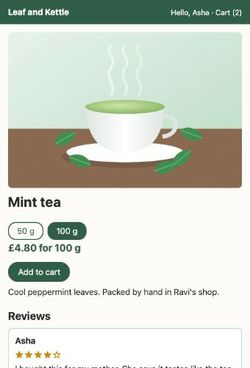 first byte 283.5 msdrawn at 562 ms
- Cold startfirst byte 359.9 msdrawn at 627 ms
Move the slider. Each page appeared in one go, so each frame is either blank or the whole page. Under it: when its first byte came, and when it was drawn.
Edge functions and middleware
An edge function runs on a CDN's servers, close to your visitors. Cloudflare's docs say its Workers run on "a growing global network of thousands of machines distributed across hundreds of locations." By default, a Worker runs "in a data center closest to where the request was received."
Lesson 15.4 compared this to a corner shop that makes sandwiches to order. Each one is made right there, for one customer.
How can one machine run code for thousands of sites? Workers run inside V8, the JavaScript engine in Chrome. Each one gets an isolate, like the worker thread above. Cloudflare says one copy of its runtime "can run hundreds or thousands of isolates." Starting an isolate doesn't mean starting a whole new machine. The cold start section times one.
An edge function has a small shape. It gets a request and returns a response. web.dev says it uses "an API similar to that of the Service Worker API." Here is Ravi's page code. The very same code ran at his server and at the edge:
export default { async fetch(request) { const session = cookieOf(request, "session"); const user = await db.ask("user", { session }); const cart = await db.ask("cart", { user: user.id }); const tea = await db.ask("tea", { slug: "mint-tea" }); return html(teaPage({ user, cart, tea })); },};- Line 1 hands the platform an object. Line 2 is its
fetchfunction, which runs for every request. - Line 3 reads the session cookie, the note that says who Asha is.
- Lines 4 to 6 ask the database three questions: who this is, what is in the cart, and the tea.
awaitwaits for each answer before the next question goes. - Line 7 builds the page with React and sends it back.
db.ask, cookieOf, teaPage and html are the course's own small helpers. The shape is Cloudflare's.
Each platform runs edge code its own way. Read this table across: one platform per row, where it runs your code, and one thing to know:
| Platform | Where your code runs | Good to know |
|---|---|---|
| Cloudflare Workers | In the data center closest to the request, unless you set where it runs. | Each runs in a V8 isolate. The free plan allows 10 ms of CPU time per request. Waiting for the network doesn't count. |
| Netlify Edge Functions | At the edge location closest to each visitor. | They run on Deno, with 50 ms of CPU time per request. |
| CloudFront Functions (AWS) | At CloudFront's edge locations. | They run in under a millisecond, with no network access. They're for headers, redirects and cache keys. |
| Lambda@Edge (AWS) | At AWS locations closer to the visitor than your servers. | They can reach the network, and run for up to 30 seconds. |
| Vercel Functions | Node.js: in the region you pick, iad1 for a new project. Edge runtime: the region closest to the request. | Vercel recommends Node.js over its Edge runtime. Next.js has deprecated runtime = 'edge'. |
Vercel's docs now say: "We recommend migrating from edge to Node.js for improved performance and reliability." Its Node.js functions run in a region you choose, ideally "close to your data source." Keep that idea in mind. It's the whole next section.
Middleware: code that runs before the page
Not all edge code builds pages. Middleware is code that runs before the page, for every request. It reads the request. Then it lets it through, sends it somewhere else, or changes its headers.
A hotel receptionist checks your booking at the front desk. If it's fine, you go up to your room. If not, she sends you to another desk. She never cooks your dinner. The kitchen does that.
- In real life: The receptionist at the front desk
- In web performance: Middleware, before the page
- In real life: Checking your booking
- In web performance: Reading the request's cookie
- In real life: Sending you to another desk
- In web performance: A redirect to another address
- In real life: The kitchen that cooks dinner
- In web performance: The page code, with its data
In Next.js, middleware lives in a file called proxy.ts. Next.js 16 renamed it from middleware.ts. Here is a small one:
import { NextResponse } from "next/server"; export function proxy(request) { if (!request.cookies.has("session")) { return NextResponse.redirect(new URL("/sign-in", request.url)); } return NextResponse.next();}- Line 1 imports
NextResponse, which makes answers. - Line 3 is the proxy function. Next.js runs it before a request reaches the page.
- Line 4 checks for a session cookie.
- Line 5 sends a visitor without one to the sign-in page. That's a redirect.
- Line 7 lets everyone else through to the page.
Next.js's docs say Proxy "is meant to be invoked separately of your render code and in optimized cases deployed to your CDN for fast redirect/rewrite handling." Vercel says its Routing Middleware "runs globally before the cache." For more, see Proxy in Next.js.
Look at what this code needs: only the request. It never waits for a database. Why it matters: work like this is always faster near the visitor, because nothing has to cross the distance. Building a page is different. It needs data.
Data far away: every question crosses the distance
Back to Ravi's puzzle. His page, built near Asha, came 56 ms later than from his far server. Where did the time go? The course split each first byte into parts. Here are two of them:
// Where Asha's first byte waited, in ms. The middle of 5 loads each.const far = { connecting: 423.5, data: 25.2 };const edge = { connecting: 164.2, data: 470.8 }; console.log(`Connecting near Asha saved ${(far.connecting - edge.connecting).toFixed(1)} ms.`);console.log(`Three trips to the far data cost ${(edge.data - far.data).toFixed(1)} ms more.`);- Line 1 says what the numbers are: parts of the wait for the first byte.
- Line 2 is Ravi's far server. Line 3 is the edge, with the data at home.
connectingis setting up the line: TCP, then TLS, from lesson 4.3 and lesson 4.4.datais how long the page code waited for the database.- Line 5 prints
Connecting near Asha saved 259.3 ms. - Line 6 prints
Three trips to the far data cost 445.6 ms more.
Connecting takes two round trips. From Asha to Ravi's server, each one took 210 ms. To the edge, each took 80. So the edge saved her about 260 ms.
Then the edge asked its three questions. Each one went to the database and back: 150 ms, plus the database's own work. One after another, they took 470.8 ms. At Ravi's server, next door to the database, the same three took 25.2 ms.
That's data locality: where the data sits, compared with the code that needs it. Cloudflare's docs tell the same story, with a user in Sydney and a database in Frankfurt: "The latency from multiple round trips between Sydney and Frankfurt adds up." Here is every setup, to scale:
Read the plain bars first. Every setup but Ravi's server connected near Asha, so its plain bar is short. Now the shaded bars. The edge with three trips waited longest. In the other edge setups, the server's wait crossed the distance once, or not at all. There are three ways to cut the crossings.
Ask once, not three times
The three questions don't need three trips. The database can look up all three and answer once:
export default { async fetch(request) { const session = cookieOf(request, "session"); const { user, cart, tea } = await db.ask("teaPage", { session, slug: "mint-tea" }); return html(teaPage({ user, cart, tea })); },};- Line 3 reads the session, as before.
- Line 4 asks one question,
teaPage, with the session and the tea's name. The database looks up the user, the cart and the tea, and sends all three back together. - Line 5 builds the page, as before.
The first byte came at 420.2 ms instead of 725. The wait for data fell from 470.8 ms to 167.1 ms: one trip, plus the database's work. Why it matters: every await in a row is a trip in a row. Ask for what you need in one go. Or send questions that don't depend on each other at the same time.
Run the code near the data
The second way moves the code, not the questions. The edge passes the request on to Ravi's server. His server builds the page next to its database. The page crosses the distance once, between the edge and Ravi's server. And Asha still connects near her, so her short connection stays.
Cloudflare can do this for a Worker. Its docs say a Worker that talks to a database may be faster if it runs "closer to your back-end than the end user." One setting turns on Smart Placement:
{ "name": "tea-page", "placement": { "mode": "smart" }}- Line 2 names the Worker.
- Line 3 turns on Smart Placement. Cloudflare then compares how fast the Worker answers in different places. It moves the Worker only if a place "is significantly faster", its docs say.
In the recording, this first byte came at 432 ms. That's close to the 420.2 ms of one question: both cross the distance once. Why it matters: if a page asks one database many questions, build it next to that database. Keep only request-only work, like the redirect above, at the edge.
Keep a copy of the data near the edge
The third way moves the data. The edge asks a copy of the data that sits right beside it, 1 ms away.
The kitchen on Asha's street gets a fridge. Every morning, a van fills it from Ravi's pantry. Now the cook takes the tea and the milk straight from the fridge. But if Ravi changes a recipe at noon, the fridge keeps the old one until the next van.
- In real life: The fridge in the kitchen
- In web performance: A copy of the data, near the edge
- In real life: Taking the milk from the fridge
- In web performance: A question answered 1 ms away
- In real life: The morning van from the pantry
- In web performance: The copy catching up with the main database
- In real life: Yesterday's recipe still in the fridge
- In web performance: A copy that hasn't caught up yet
With the copy, Asha's first byte came at 283.5 ms, and her photo was on screen at 564 ms. The three questions took 29.2 ms. That's the bottom row of the frames at the top of this lesson.
A copy has a cost, though. Cloudflare's Workers KV keeps copies near its edge. Its docs say changes "may take up to 60 seconds or more to be visible in other global network locations." So copy what may be a little old, like a tea's description. Writes, like a new order, still go to the main database.
Try every setup yourself. Pick one to see where its first byte waited, and when each question came back:
- Connecting: TCP and TLS423.5 ms
- The request's trip there and back219.1 ms
- Question: who is this?0.4 ms to 9 ms
- Question: her cart9 ms to 17.1 ms
- Question: the tea17.1 ms to 25.7 ms
- Building the page with React1.1 ms
- First byte (TTFB)669 ms
- Photo on screen (LCP)1,064 ms
Asha's browser talks to Ravi's server, far away. Connecting takes two of her long round trips, and asking a third. The database is one building away. The questions' times count from the moment the page code started.
The course read these parts in the browser, from the Server-Timing header each server sent, as in lesson 14.2.
Cold starts: the first visit wakes the code
So far, Ravi's edge function was already running when Asha arrived. That's a warm start. But platforms don't keep every function running in every place. Cloudflare's docs say isolates "are not necessarily long-lived." When a request finds no copy running, the platform starts one first. That's a cold start.
A café opens at seven. The first customer waits while the cook lights the stove and heats the pan. The next customers don't wait for that. The pan is already hot. A gas stove is hot in moments. A big oven takes a while.
- In real life: Lighting the stove
- In web performance: Starting a new isolate
- In real life: Heating the pan
- In web performance: Running the code at the top of the file
- In real life: The first customer of the day
- In web performance: The first request after a cold start
- In real life: Later customers, with the pan already hot
- In web performance: Warm requests
The course timed 15 cold starts of Ravi's edge function, with no browser. Each one started a new worker thread, so a new isolate, and then loaded the code:
// Starting Ravi's edge function from cold, in ms. The middle of 15 starts.const start = { isolate: 24.3, react: 15.1, code: 10.8 };const build = { first: 4.6, next: 0.5 }; console.log(`Ready after ${(start.isolate + start.react + start.code).toFixed(1)} ms`);console.log(`First build ${build.first} ms, the next ${build.next} ms`);- Line 1 says what's timed.
- Line 2 holds the start's three parts. First the new isolate runs its first JavaScript. Then it loads React's server renderer. Then it loads Ravi's own code.
- Line 3 holds the first page build, and the next one.
- Line 5 adds the parts and prints
Ready after 50.2 ms. - Line 6 prints
First build 4.6 ms, the next 0.5 ms.
So a cold start costs twice: once to start, and again in a slower first build. Then the course tried it in the browser. For a cold visit, the edge started a new isolate for Asha's request. Her first byte came at 359.9 ms instead of 283.5. The start itself took 64.4 ms by the server's clock. In one of the five cold visits, it took 332.6 ms. Cold starts vary.
That was a worker thread on the course's computer, not a real platform. Here is what three platforms say about their own:
- Cloudflare: "Any given isolate can start around a hundred times faster than a Node process on a container or virtual machine."
- AWS Lambda: "Cold starts typically occur in under 1% of invocations. The duration of a cold start varies from under 100 ms to over 1 second."
- Vercel: a production function that sits unused for two weeks is archived. Its next call adds "at least one second of latency." On paid plans, its docs say, production keeps instances warm.
What runs at a cold start? Everything at the top of the file, outside the fetch function:
import { renderToString } from "react-dom/server"; // once, when the isolate startsconst prices = slowSetup(); // once too, and every cold start waits for it export default { async fetch(request) { return html(renderPage(request, prices)); // for every request },};- Line 1 imports React's server renderer. It loads once, when the isolate starts.
- Line 2 runs some slow setup. It also runs once, but every cold start waits for it.
- Lines 4 to 8 are the fetch function. Line 6 runs for every request, warm or cold.
Cloudflare puts a limit on that top part. A Worker "must parse and execute its global scope (top-level code outside of handlers) within 1 second." Vercel says "Startup time correlates with function size." Why it matters: keep the top of an edge function small. A big library or slow setup there is paid again on every cold start.
Caching a page with Asha's cart in it
The copy of the data made Asha's page fast. But Ravi can't keep a copy of his whole database near every visitor. Could the edge keep the page itself, so most visits never ask the database? Ravi tries it:
export default { async fetch(request) { const kept = await cache.match(request); if (kept) return kept; const response = await oneTrip.fetch(request); response.headers.set("cache-control", "s-maxage=60"); await cache.put(request, response.clone()); return response; },};- Line 3 asks the edge's cache for a copy of this page.
cacheworks like Cloudflare's Cache API. It files each copy under its address. - Line 4 sends that copy back, if there is one.
- Line 5 builds the page with one trip, as the one-question version did.
- Line 6 sets
s-maxage=60. From lesson 15.4, that lets a shared cache, one that serves many visitors, keep the page for 60 seconds. - Line 7 keeps a copy. Line 8 sends the page.
Asha visits first. The edge has no copy, so it builds her page. Then Ben opens the same page. Here is the top of his screen, and of the fixed version you'll meet below:
Ben's page said "Hello, Asha · Cart (2)". It came fast, from the edge's copy. But it was Asha's page.
This is the bug from lesson 15.2, where Ben got a cup with Ana's name on it. The edge filed its copy under the page's address. Ben's cookie wasn't part of it. HTTP's caching standard, RFC 9111, lists what stops a shared cache from keeping a response. private and no-store are on that list. So is an Authorization header on the request, which carries a password or a token. A cookie isn't. The standard itself warns that mistakes like this can show private data to the wrong people.
Here is Ben's visit under four rules. Each time, Asha had just visited:
// Ben's visit, right after Asha's, under each rule. The middle of 5 runs each.const ben = [ { rule: "shared copy", saw: "Hello, Asha · Cart (2)", firstByte: 251.8 }, { rule: "private", saw: "Hello, Ben · Cart (1)", firstByte: 420.9 }, { rule: "Vary: Cookie", saw: "Hello, Ben · Cart (1)", firstByte: 423.8 }, { rule: "shell", saw: "Hello, Ben · Cart (1)", firstByte: 253.8 },]; for (const visit of ben) console.log(`${visit.rule}: ${visit.saw}, first byte ${visit.firstByte} ms`);- Lines 3 to 6 hold Ben's visit under each rule: what his header said, and his first byte.
- Line 9 prints one line per rule.
- It prints
shared copy: Hello, Asha · Cart (2), first byte 251.8 msandprivate: Hello, Ben · Cart (1), first byte 420.9 ms. - Then
Vary: Cookie: Hello, Ben · Cart (1), first byte 423.8 msandshell: Hello, Ben · Cart (1), first byte 253.8 ms.
private: safe, but every visit goes far
The first fix changes line 6 to "private". RFC 9111 says that then "a shared cache MUST NOT store the response." So the edge kept nothing. Ben got his own page. But every visit made the trip to the far data, his and Asha's: about 420 ms to the first byte each time.
Vary: Cookie: one copy per visitor
The second fix keeps s-maxage=60 and adds vary: cookie. Vary, from lesson 15.1, adds request headers to the cache key: what a cache files each copy under. So the edge kept one copy for each cookie. Ben's cookie was new, so his visit missed and went far. Only Asha's second visit found her own copy.
That has two problems. Cookies differ for almost every visitor, so almost nobody shares a copy. And not every cache follows Vary. Cloudflare's docs say: "By default, Cloudflare does not consider vary values in caching decisions." So Vary: Cookie is no safety net.
A shared shell, filled in at the edge
The third fix splits the page in two. Most of it is the same for everyone: the photo, the price, the reviews. Only the greeting is Asha's.
A conference prints a thousand badges, each with the logo and a blank line. At the desk, a helper writes each guest's name on the line. Nobody waits for a badge to be printed. Nobody gets someone else's name.
- In real life: The badges printed in bulk
- In web performance: The shell: one shared copy at the edge
- In real life: The blank line on each badge
- In web performance: The slot where the greeting goes
- In real life: Writing the guest's name at the desk
- In web performance: The edge filling in the greeting from the cookies
- In real life: Handing the badge to its owner
- In web performance: Sending the filled-in page, marked private
export default { async fetch(request) { let shell = await cache.match(request); if (!shell) { shell = await buildShell(); await cache.put(request, shell.clone()); } const name = cookieOf(request, "name"); const cart = cookieOf(request, "cart"); return fillIn(shell, { name, cart }); },};- Line 3 looks for the shell in the edge's cache.
- Lines 4 to 7 build it, if there's none.
buildShellbuilds the page with nobody's name in it, with one trip for the tea. It sends it withs-maxage=60, so the edge may keep it. - Lines 8 and 9 read two more cookies, which Ravi's shop keeps up to date: the visitor's first name, and the number of things in the cart.
- Line 10 writes the greeting into the shell's slot, and sends the page.
fillIn escapes the name first: it turns characters like < into plain text. So a cookie can't add its own HTML to the page. It also marks the filled-in page private, because now it's one visitor's.
Ben's visit was a hit on the shell, with his own name: the second screenshot above. Only the first visit after the cache was empty made the trip. Cloudflare's HTMLRewriter is made for edits like this: it changes HTML inside a Worker. Vercel calls its Routing Middleware "an effective way of providing personalization to statically generated content."
One more rule. A visitor can change their own cookies. So only keep things there that are safe to show back to that visitor, like a first name and a count. Never a price, or anything the shop trusts.
Why it matters: cache the part that's the same for everyone. Add the personal part near the visitor, from what the request already carries. Try all four rules:
- Asha sawHello, Asha · Cart (2)
- Built at the edge1 trip to the far data, kept. First byte 419.3 ms.
- Ben sawHello, Asha · Cart (2)
- From the edge's cacheThe edge's copy. First byte 251.8 ms.
- Asha again sawHello, Asha · Cart (2)
- From the edge's cacheThe edge's copy. First byte 252.6 ms.
Pick a rule. The edge's cache starts empty. Asha visits, then Ben, then Asha again. Each row says what the header showed, and where the page came from.
At the edge, near the data, or cached?
Each card is one job on a shop's site. Sort it by where it belongs:
- Send visitors with no session cookie to the sign-in page
- Put each new visitor in group A or B of a test, and remember it in a cookie
- An order history page that reads five tables, one after another
- Checkout: save the order and take the payment
- A blog post that's the same for every reader
- The list of teas, the same for everyone, changed once a day
- A tea page with the visitor's name and cart count in the header
- A recipe page with a small Signed in as Ben line at the top
Sort each job by where it should run, or how it should be kept.
Common mix-ups
- "Building the page at the edge always makes it faster." No. With three questions to the far database, Asha's first byte came at 725 ms. From Ravi's far server, it came at 669.
- "The edge removes the distance." No. It moves where the page crosses it. Every question to far data crosses it again.
- "Cold starts are always slow." No. A new isolate was ready in about 50 ms here. AWS says a Lambda cold start varies "from under 100 ms to over 1 second."
- "Vary: Cookie makes a personal page safe to cache." No. It only helps if the cache follows Vary, and Cloudflare doesn't by default. Even then, Ben's first visit missed.
- "private turns caching off." No. It stops shared caches, like the edge. The visitor's own browser may still keep the page.
- "Middleware is a good place to build the page." No. Next.js's docs say Proxy is meant to run separately from your render code, for fast redirects and rewrites.
Practice exercises
Answer each one first, then open the hints if you need them.
Another page asks the far database five questions from the edge, one after another. What does it print?
// The edge asks the far database five questions, one after another.
const tripMs = 150; // there and back, from the edge to the database
const workMs = 5;   // the database's own work for each question
const questions = 5;

console.log(`Waiting for data: ${questions * (tripMs + workMs)} ms`);Waiting for data: 775 ms. Each of the five questions crosses the distance there and back, one after another.
This small model asks for the cart and the tea at the same time, after the user. What does the second line print?
// Each question to the far database takes 155 ms there and back.
const ask = 155;
const inARow = ask + ask + ask;                       // user, then cart, then tea
const cartAndTeaTogether = ask + Math.max(ask, ask);  // user, then cart and tea at once

console.log(`One after another: ${inARow} ms`);
console.log(`Cart and tea together: ${cartAndTeaTogether} ms`);Cart and tea together: 310 ms. The cart needs the user first, but the tea doesn't. Asking for the cart and the tea at the same time, with Promise.all, makes two trips in a row instead of three.
On the edge with three trips, when did the answer to the cart question come back, in ms after the page code started?
313.9 ms after the page code started. The second question could only go once the first had come back.
With Vary: Cookie, what was the first byte of Asha's second visit, in ms?
253.5 ms. Her own copy was waiting at the edge, so there was no trip. Ben's visit, in between, had missed.
Open the course's copy of the shell the edge kept. In the Elements panel, what does the header say where the greeting goes?
Sign in. The shell is the page with nobody's name in it, so it holds a word that fits everyone. A visitor with no name cookie keeps seeing it, because fillIn only replaces it when there's a name.
Cloudflare's docs name a header that shows where a placed Worker ran. What is it called?
cf-placement. Its value says whether the request was moved, and to which data center, like remote-LHR. The docs warn it may be removed before Smart Placement leaves beta.
Check your understanding
For each question, ask two things: where did the code run, and how many times did it cross the distance?
Question 1 of 7What does the second line of the trips example print?
Read the code, then predict// Where Asha's first byte waited, in ms. The middle of 5 loads each. const far = { connecting: 423.5, data: 25.2 }; const edge = { connecting: 164.2, data: 470.8 }; console.log(`Connecting near Asha saved ${(far.connecting - edge.connecting).toFixed(1)} ms.`); console.log(`Three trips to the far data cost ${(edge.data - far.data).toFixed(1)} ms more.`);Choose an answer to see the explanation.
Question 2 of 7Ravi's page code asked the far database three questions from the edge. Why did its first byte come later than at his far server?
Choose an answer to see the explanation.
Question 3 of 7Which of these jobs is always quick at the edge, near the visitor?
Choose an answer to see the explanation.
Question 4 of 7What does a cold start add to a visit?
Choose an answer to see the explanation.
Question 5 of 7The edge kept a page that said Hello, Asha, and gave it to Ben. Which header stops a shared cache from keeping that page?
Choose an answer to see the explanation.
Question 6 of 7With Vary: Cookie, why was Ben's first visit no faster than with private?
Choose an answer to see the explanation.
Question 7 of 7How did the shell keep Ben's page fast and still his own?
Choose an answer to see the explanation.
Key takeaways
- An edge function builds the page near the visitor. That saves connecting time, but not the trip to the data.
- Every question to far data crosses the distance again. Three in a row made the edge slower than Ravi's far server.
- Cut the crossings: ask once, run the code near the data, or keep a copy of the data near the edge.
- Middleware that needs only the request always fits the edge.
- A cold start adds a new isolate and the code at the top of the file. Keep that code small.
- A shared cache keeps what you let it. Mark personal pages private, or cache a shell and fill it in at the edge.
Remember the one-liner.
Run the code near the visitor only when its data is near too, and count every trip.
Module 35 in one look
This lesson ends Module 35, Rendering strategies. Each lesson moved one thing:
- 35.1 Rendering strategies compared: where and when the HTML is built.
- 35.2 Streaming HTML: sending the page in pieces, so the browser starts early.
- 35.3 Hydration strategies: how much of the page wakes up in the browser, and when.
- 35.4 Rendering at the edge: building near the visitor, with the data close to the code.
Together: build the HTML where and when it's cheapest. Send it as soon as you can. Wake as little of it as you need. And keep the code next to its data.
Sources
The facts on this page come from these docs, specs and source files:
- How Workers works, Cloudflare.
- Optimize Time to First Byte, web.dev.
- Workers limits, Cloudflare.
- Edge Functions overview, Netlify.
- Edge Functions limits, Netlify.
- Differences between CloudFront Functions and Lambda@Edge, AWS.
- Customize at the edge with Lambda@Edge, AWS.
- Edge Runtime, Vercel.
- Configuring regions for Vercel Functions, Vercel.
- runtime: route segment config, Next.js.
- proxy.js, Next.js.
- Routing Middleware, Vercel.
- Placement, Cloudflare.
- How KV works, Cloudflare.
- Understanding the Lambda execution environment lifecycle, AWS.
- How can I improve function cold start performance on Vercel?, Vercel.
- Fluid compute, Vercel.
- RFC 9111: HTTP Caching, IETF.
- Cache API, Cloudflare.
- Default cache behavior, Cloudflare.
- Cache-Control, Cloudflare.
- HTMLRewriter, Cloudflare.
- NetworkManager.ts: DevTools' network presets, Chrome DevTools source.
- PerformanceServerTiming, MDN.
Coming next: React performance. Module 36 looks at each major framework's own speed tools, starting with React.