HTTP prioritization internals
How Chrome tells HTTP/2 and HTTP/3 servers which response matters most, what servers and CDNs really do with it, and how to test yours.
- 01Read Chrome's priority signalsRead the old HTTP/2 tree and the
priorityheader Chrome sends, and say why the tree was replaced. - 02Predict a server's orderUse urgency and incremental to say which response a server that follows RFC 9218 sends next.
- 03Know what servers and CDNs doSay what quiche, Cloudflare and h2o do with the signal, and why a full buffer can undo it.
- 04Test your own serverSend a late urgent request behind many slow ones, and read the result in DevTools, a NetLog or a qlog.
One photo, three servers
Ravi gave the Mint tea photo fetchpriority="high", as Load the LCP resource early showed. DevTools now lists the photo at High. Then Ravi moves the shop to a new server. The page and its files stay the same.
That evening, Asha opens the page on her phone at home. The photo takes twice as long as before. Chrome still asks for it first. So who sent it late?
Chrome only asks. The server decides what to send. Over HTTP/2 and HTTP/3, one connection carries many responses at once. Each response travels in its own stream. Any packet can carry bytes of any stream. So before each packet, the server picks: whose bytes go next? That choice is called prioritization.
The course built three servers to see it. All three are the same program, on Asha's home line. Only the order they send in is different:
- One follows the priority that Chrome asks for.
- One takes turns: a packet for each response, round and round.
- One sends in request order: each response whole, in the order Chrome asked.
Here is when the photo's last byte arrived from each one:
// When the Mint tea photo's last byte arrived, in ms after Asha opened the page.// The middle of three visits from each server.const photoDone = { follows: 316.7, takesTurns: 670.5, requestOrder: 317.1 }; console.log(`Server that follows the priority: ${photoDone.follows} ms`);console.log(`Server that takes turns: ${photoDone.takesTurns} ms`);console.log(`Server that sends in request order: ${photoDone.requestOrder} ms`);- Lines 1 and 2 are comments. Each time is in milliseconds (ms), and is the middle of three visits.
- Line 3 holds the three recorded times.
- Lines 5 to 7 print
Server that follows the priority: 316.7 ms,Server that takes turns: 670.5 msandServer that sends in request order: 317.1 ms.
The same Chrome asked the same way every time. Yet from the server that takes turns, the photo took twice as long. Here is Asha's screen 400 ms after she opened the page:
From the server that takes turns, the photo's space is still empty. That server sent a little of every photo on the page, all at once. So the big photo finished near the end. Why it matters: fetchpriority only changes what Chrome asks for. The server decides whether it happens.
A café kitchen has one hatch. Only one plate fits through at a time. The waiter adds a note to each order: "this one first, please". One cook reads the notes. Another hands out a spoonful from every plate in turn, so every table waits for its last spoonful. A third serves the plates in the order they came in.
- In real life: The one hatch
- In HTTP: The connection: one packet at a time
- In real life: The plates waiting to go out
- In HTTP: The responses, each in its own stream
- In real life: The waiter's note on each order
- In HTTP: Chrome's priority signal
- In real life: The cook who picks the next plate
- In HTTP: The server's scheduler
- In real life: A spoonful from every plate in turn
- In HTTP: The server that takes turns
The browser asks. The server decides. Chrome tells the server how urgent each request is. The server picks whose bytes go into each packet. A server that ignores the signal can undo fetchpriority.
How the course recorded it:
- The line was Asha's home line from Congestion control: 10 Mbit/s, 20 ms each way, and a router buffer of 512 packets.
- The server was the example HTTP/3 server of quiche 0.30.1, Cloudflare's QUIC library. It sent with BBR, and paced its packets, as in lesson 43.1.
- For the other two servers, the course added a few lines to quiche's server. With a setting, it gives every response the same priority, and ignores Chrome's. The next sections explain those priorities.
- Asha's visits were in Chrome 157.0.8103.52, on a phone-sized screen, over HTTP/3. Chrome's network log, the NetLog, noted when every byte arrived.
- Each server got three visits, taking turns, after one visit that wasn't kept. The page shows the middle one.
HTTP/2's priority tree, and why it was replaced
How does Chrome ask? There are two ways. The first came with HTTP/2. RFC 7540, the first HTTP/2 standard, let each request say three things:
- A parent: another request it depends on. Its bytes should come after the parent's.
- A weight, from 1 to 256: its share of the line, next to requests with the same parent.
- An exclusive flag: "make me the parent's only child". The parent's other children move under the new request.
Together, these make a tree. The server walks the tree to pick the next bytes. A request with no parent hangs from the root, stream 0. It works like a queue with no line on the floor:
At a busy bakery, there's no line on the floor. Each new customer says who they're behind: "I'm after the man in the red coat." Some say "only me after him", and whoever was behind him now stands behind them. The baker keeps the whole queue in her head. If two remarks reach her in the wrong order, her picture of the queue is wrong.
- In real life: The person you say you're behind
- In HTTP: The parent stream
- In real life: "Only me after him"
- In HTTP: The exclusive flag
- In real life: The baker's picture of the queue
- In HTTP: The server's priority tree
- In real life: Remarks that reach her in the wrong order
- In HTTP: HTTP/3 streams, which can arrive in any order
Chrome builds a very plain tree. Every request is exclusive. Its parent is the newest request that's at least as urgent. Here is a model of that rule. It runs on five requests from the course's priorities page, a page with one of each kind of request:
// A model of how Chrome 157 picks each HTTP/2 request's parent.// Urgency 0 is the most urgent. `open` holds the requests still loading.const open = [];function parentOf(stream, urgency) { const ahead = open.filter((item) => item.urgency <= urgency); ahead.sort((a, b) => a.urgency - b.urgency); // ties keep request order open.push({ stream, urgency }); return ahead.length ? ahead.at(-1).stream : 0; // 0 is the root} console.log(parentOf(3, 0)); // shop.cssconsole.log(parentOf(5, 1)); // menu.jsconsole.log(parentOf(7, 1)); // mint-tea.jpgconsole.log(parentOf(9, 2)); // black-tea.jpgconsole.log(parentOf(29, 1)); // stock.json- Lines 1 and 2 say what the model is. Urgency is a number: 0 is the most urgent.
- Line 3 keeps every request started so far.
- Line 5 picks the ones that are at least as urgent as the new one.
- Line 6 sorts them by urgency. Requests with the same urgency keep the order they started in.
- Line 8 takes the last one as the parent. With none, the parent is 0, the root.
- Lines 11 to 15 start five requests. They print
0,3,5,7and7.
Look at the last line. stock.json is a fetch() at urgency 1, like the photo. It started after black-tea.jpg, but its parent is the photo, stream 7. It's exclusive, so black-tea.jpg moves under it. The tree stays one long line, one request after another. Chrome's own comment calls it a single linked list.
The course loaded that page in Chrome 157.0.8103.52 over HTTP/2, and read the NetLog. Every request went out exclusive, with the parent the model gives. The weights followed urgency: 256 for urgency 0, 220 for 1, 183 for 2 and 147 for 3. A formula from SPDY, HTTP/2's older cousin, turns each priority into a weight. Here are the five requests, both ways:
The left side is the tree. The right side is the newer way to ask, in the next section: each request only says how urgent it is.
Why the tree was replaced
The tree let a browser say a lot. In practice, it didn't work well. RFC 9113, the current HTTP/2 standard, says the system "proved to be complex, and it was not uniformly implemented." Many servers ignored it. Its summary is short: "the prioritization signaling in RFC 7540 was not successful."
RFC 9218 adds more reasons:
- Different browsers built very different trees for the same page. So servers struggled to read them.
- A tree only describes the requests open at that moment, on one connection.
- HTTP/3 doesn't keep its streams in order. A request can name a parent the server hasn't seen yet, so the tree gets out of step. So HTTP/3 has no tree at all.
RFC 9113 now deprecates the tree. The fields stay in HTTP/2's frames, so old and new programs still understand each other. Chrome 157.0.8103.52 still fills them in on every request. A server can say it ignores them, with a setting called SETTINGS_NO_RFC7540_PRIORITIES. Chrome's own settings don't include it. The NetLog showed the 4 it sent, and that wasn't one of them. Why it matters: an HTTP/2 server gets two signals from Chrome, the tree and the header you'll meet next. Find out which one yours reads.
Extensible priorities: two numbers per request
RFC 9218 replaces the tree with two numbers. A request carries them in a priority header. They don't name any other request. Each request only describes itself:
- Urgency,
u: a whole number from 0 to 7. Lower is more urgent. The default is 3. - Incremental,
i: whether the file is useful a piece at a time. A photo can show its top half. A script can't run half. The default is no.
The scheme is called extensible priorities, because new parameters can be added later. Think of the slips at a print shop:
At a print shop, each job comes with a slip. One box says how urgent it is, from 0 to 7. A tick box says "I can use the pages as they come out". The printer runs the most urgent jobs first. Jobs with the tick can share the printer, a few pages each. Jobs without it print whole, one after another. A blank box means the usual: 3, and no tick.
- In real life: The urgency box, 0 to 7
- In HTTP:
u, the urgency - In real life: The tick box
- In HTTP:
i, incremental - In real life: Sharing the printer, a few pages each
- In HTTP: Incremental responses of one urgency taking turns
- In real life: Printing whole, one after another
- In HTTP: Responses that aren't incremental, in the order asked
- In real life: A box left blank
- In HTTP: A missing parameter: it takes its default
The header is a short list: u=1, i means urgency 1, incremental. A part that's missing takes its default. Here is a reader that follows those rules:
// Reading a priority header the way RFC 9218 says: missing means default.function readPriority(header) { const priority = { urgency: 3, incremental: false }; for (const part of header.split(",")) { const [key, value] = part.trim().split("="); if (key === "u") priority.urgency = Number(value); if (key === "i") priority.incremental = value !== "?0"; } return priority;} console.log(readPriority("u=1, i"));console.log(readPriority("i"));console.log(readPriority(""));- Line 3 starts from the defaults: urgency 3, not incremental.
- Line 4 splits the header at each comma. Line 5 splits each part at the equals sign.
- Line 6 reads the urgency. Line 7 reads incremental. A bare
imeans true. The format writes false asi=?0. - Line 12 prints
{ urgency: 1, incremental: true }. - Line 13 has no urgency, so it keeps the default. It prints
{ urgency: 3, incremental: true }. - Line 14 is an empty header. It prints
{ urgency: 3, incremental: false }: both defaults.
A server should also ignore any parameter it doesn't know. Why it matters: a request with no header isn't the least important. It sits at urgency 3, in the middle.
What Chrome sends
Chrome adds the header itself, when the request has none. It sends the same header over HTTP/2 and HTTP/3. Each part comes from somewhere:
- The urgency comes from the priority DevTools shows. Chrome counts down from the top: Highest is 0, High is 1, Medium is 2 and Low is 3.
- Incremental comes from the kind of file. Stylesheets, scripts and fonts aren't. Images and
fetch()are. - Chrome leaves out any default. Urgency 3 isn't written, and neither is "not incremental".
The course loaded its priorities page over HTTP/3. Read each row across:
| Request | DevTools shows | The priority header |
|---|---|---|
| The page itself | Highest | u=0, i: urgency 0, incremental. |
| The stylesheet, and the font it asks for | Highest | u=0: urgency 0, not incremental. |
| The script in the head | High | u=1: urgency 1, not incremental. |
The photo with fetchpriority="high", and fetch() | High | u=1, i: urgency 1, incremental. |
| The next four large images | Medium | u=2, i: urgency 2, incremental. |
Later images, an image with fetchpriority="low", and fetch() with priority: "low" | Low | i: urgency 3, the default, incremental. |
| The async script and the deferred one | Low | No header: urgency 3 and not incremental, both the defaults. |
Look at the last row. The async and deferred scripts sent no header at all. Both their numbers are defaults. The rows above show fetchpriority at work. high gave the photo urgency 1. low gave another image urgency 3.
Changing a priority later
A priority can change after a request starts. For that, RFC 9218 adds the PRIORITY_UPDATE frame. It's a short message that says "stream 12 is now u=1". On HTTP/3, it travels on the control stream, a stream for messages about the connection itself.
Chrome 157.0.8103.52 uses it at the start instead. Before each request whose priority isn't the default, it sets the priority, and that sends a PRIORITY_UPDATE. On the priorities page, the NetLog showed 15 updates for 17 requests. Each came just before its own request. The two scripts at the defaults got none. The server logged the same 15.
After layout, Chrome raised 4 images from Medium to High, as How Chromium loads resources showed. DevTools showed the change. But no update followed. Over HTTP/3, a later change stays in Chrome. Over HTTP/2, Chrome's PRIORITY_UPDATE frames are off by default, and the NetLog showed no old-style PRIORITY frames either. Why it matters: the server works with the priority a request started with. To change it, change what Chrome asks for at the start.
Here are the two ways to ask, side by side. Read each row across:
| Question | The HTTP/2 tree | The priority header |
|---|---|---|
| What a request says | Its parent, its weight, and whether it's exclusive. | Its urgency, and whether it's incremental. |
| What the server must keep | The whole tree of open requests. | Two numbers for each request. |
| Over HTTP/3 | It isn't there at all. | In the header, and in PRIORITY_UPDATE frames. |
| What Chrome 157 sends | A parent, a weight and the exclusive flag on every HTTP/2 request. | The header over HTTP/2 and HTTP/3, unless both numbers are defaults. |
| Its standard | RFC 7540, deprecated by RFC 9113. | RFC 9218. |
What the server does with two numbers
The header is only a request. RFC 9218 calls it "only a suggestion". But it also says what a good server does with it:
- Send responses with a higher urgency before those with a lower one.
- At one urgency, send responses that aren't incremental one by one, in the order they were asked for.
- At one urgency, share the line between incremental responses.
quiche does just that. Its queue sorts by urgency first. At one urgency, two whole files go in request order. A whole file goes before one that comes in pieces. After each packet of an incremental response, quiche moves it to the back of its group. Here is that queue, in a few lines:
// Each response: its urgency u, whether it's incremental i, and packets left.const queue = [ { name: "black", u: 2, i: true, left: 2 }, { name: "mint", u: 1, i: true, left: 2 }, { name: "green", u: 2, i: true, left: 2 }, { name: "css", u: 0, i: false, left: 2 },];const order = [];while (queue.length) { queue.sort((a, b) => a.u - b.u || a.i - b.i); // urgency, then whole files first const next = queue.shift(); order.push(next.name); next.left -= 1; if (next.left > 0) next.i ? queue.push(next) : queue.unshift(next);}console.log(order.join(" "));- Lines 3 to 6 are four responses. Each needs two packets.
- Line 10 sorts the queue: lowest urgency first, then whole files before pieces. Equal ones keep their order.
- Line 11 takes the first response. Line 12 notes its name. Line 13 counts one packet sent.
- Line 14 puts an unfinished response back. A whole file goes to the front, so it carries on. A file in pieces goes to the back, so it waits its turn.
- Line 16 prints
css css mint mint black green black green.
The stylesheet goes first, whole. Then the photo, alone at urgency 1. Then the two urgency 2 teas take turns. Asha's visit looked just like this. Here is when each photo's bytes arrived, from two of the servers:
Following the priority, the Mint tea photo had the line to itself until it was done. The four urgency 2 teas came next, sharing the line. Taking turns, the server gave all eight photos the same urgency, incremental. So each got a packet in turn, and the photo finished second to last. Why it matters: taking turns sounds fair. But a page needs some files whole before others are of any use.
Request order did just as well for the photo, at 317.1 ms. That's because the photo was the first image in the HTML. Request order can't let a later, urgent file jump ahead. The test two sections on shows that.
Slide through Asha's screen, from each server:
- Follows the priority
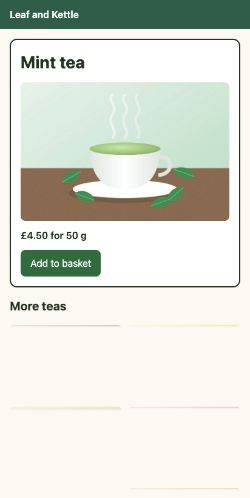 drawn at 370 ms
- Takes turns
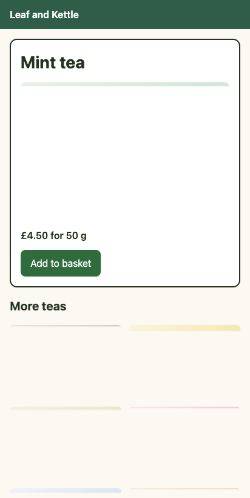 drawn at 293 ms
- Request order
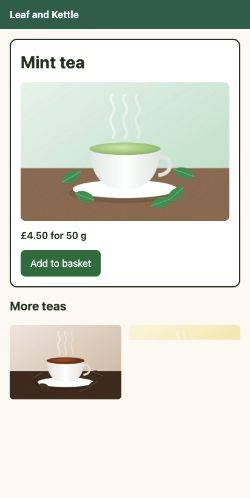 drawn at 388 ms
Move the slider. Each column shows the last frame Chrome drew by then. Watch where the Mint tea photo appears, and how the teas below it fill in.
Then pick a photo, and see when its bytes arrived from each server:
- Follows the priority137.6 to 315.6 ms
- Takes turns141.5 to 669.5 ms
- Request order138.8 to 316.8 ms
priority: u=1, iRavi's photo, with fetchpriority="high". Following the priority, it came first and alone. Taking turns, it shared the line with seven other photos. In request order, it came first because Chrome asked for it first.
Two photos don't follow the pattern. jasmine.jpg went out at urgency 3, though DevTools later showed High. oolong.jpg went out at urgency 1, like the photo, but came after it. The playground's notes say why, and the next section explains the second one.
What real servers and CDNs do
A server only follows priorities if someone wrote that code. Many didn't. Patrick Meenan wrote on the Cloudflare blog that "a good number of servers don't support doing anything at all with the prioritization". Here is what a few real ones do:
- quiche follows RFC 9218, as the last section showed. It sends HTTP/3's control streams first. An urgency out of range, such as
u=9, counts as 7, the least urgent. - Cloudflare's CDN follows RFC 9218 for HTTP/3, on all plans. For HTTP/2, its docs say that by default, it "will follow the order requested by the browser". Its paid Enhanced HTTP/2 Prioritization uses its own order instead.
- h2o, a web server, says it's "one of the few servers that fully implement" HTTP/2's priorities. It picks the next response for every 16 KB it sends. When a browser doesn't use the tree, it sends blocking files, like CSS and JavaScript, before the rest.
A server can also overrule the browser. RFC 9218 lets a response carry its own priority header, and a CDN in front of it can use that instead. Cloudflare reads it from your origin server or from a Worker. Why it matters: if you know the hero image matters most, your server can say so, whatever the browser asked.
Bytes that have already left
A scheduler only orders the bytes it still holds. Once bytes are handed on, they're out of its hands.
You post ten letters in the morning. At noon, an urgent one turns up. You can't take the ten back out of the postbox. The urgent letter goes in on top, and waits for the same van. The fewer you post early, the sooner it can leave.
- In real life: The postbox
- In the server: A send buffer: bytes handed on, but not sent yet
- In real life: The ten letters posted in the morning
- In the server: Photo bytes the server already handed on
- In real life: The urgent letter
- In the server: A late, urgent response
- In real life: Posting only a few at a time
- In the server: A small send buffer, like
tcp_notsent_lowat
For TCP, the operating system holds a send buffer: bytes the server has written but the network hasn't taken yet. Cloudflare's post on tuning HTTP/2 puts it plainly: "Once the response data has been written into the TCP send buffer it is beyond the server's control". Its fix is a small buffer. A Linux setting, tcp_notsent_lowat, set to 16 KB, means "at most 16KB of lower priority data will be buffered" ahead of an urgent response.
QUIC runs inside the server program, so quiche picks the bytes for each packet itself. But quiche only takes as much as the congestion window has room for. When there's no room, quiche's example server keeps the answer aside and tries again later. oolong.jpg fits that rule. Its request left Chrome just after the others, and its first bytes came only after the photo's last, even at urgency 1. Under this rule, an answer that arrives while the room is full waits its turn.
The router's buffer is a postbox too. Congestion control showed CUBIC filling it. Bytes waiting there can't be reordered by anyone. Why it matters: prioritization needs small buffers all along the way. The next section measures that.
Test prioritization yourself
How do you know what your server does? Cloudflare's post sets the goal. An urgent file on a busy connection, with lots of other streams, should come as fast as on an empty one. In the post's words, its time "will be identical to the time to retrieve it on an empty connection." So test exactly that. Start many slow downloads, then ask for one urgent file, late.
An ambulance sets off on a busy road. If every driver pulls aside, it arrives as fast as on an empty road. If they don't, it crawls along with the traffic. And if a junction ahead is jammed, pulling aside doesn't help. The cars there have nowhere to go.
- In real life: The ambulance
- In HTTP: The late, urgent request
- In real life: The traffic
- In HTTP: The photos still downloading
- In real life: Drivers pulling aside
- In HTTP: A server that sends the urgent bytes first
- In real life: The same trip on an empty road
- In HTTP: The urgent file on an empty connection
- In real life: A jammed junction ahead
- In HTTP: Bytes already waiting in the router's buffer
The course's test page shows eight photos, all with fetchpriority="low". After 300 ms, a script asks for late.css, a stylesheet of 20,000 bytes:
setTimeout(() => { const link = document.createElement("link"); link.rel = "stylesheet"; link.href = "late.css"; link.onload = () => { const [entry] = performance.getEntriesByName(link.href); document.querySelector("#result").textContent = `late.css took ${Math.round(entry.responseEnd - entry.startTime)} ms`; }; document.head.append(link);}, 300);- Line 1 waits, while the photos download. Line 10 sets the wait: 300 ms.
- Lines 2 to 4 make a stylesheet link to late.css.
- Line 5 runs when the file has loaded. Line 6 reads its Resource Timing entry.
- Line 7 shows how long it took, from asking to its last byte.
- Line 9 adds the link to the page. That starts the request.
Here is how long late.css took, the middle of three tests each:
Following the priority, late.css took 105.6 ms. On an empty connection, it took 106.5 ms. The goal is met. Taking turns, it took 150.1 ms: it shared the line with the photos. In request order, it took 320.2 ms: it waited behind all eight. Why it matters: a server that passes this test lets a late font or stylesheet through at once.
The last row is the same server, still following priorities, but sending with CUBIC. late.css took 157 ms. The server sent it first. But CUBIC sends more than the line holds, as lesson 43.1 showed. The rest queues in the router's buffer. So late.css waited behind photo bytes that had already left. That's the jammed junction.
Pick a server, and see the bytes:
- mint-tea.jpg
- black-tea.jpg
- chamomile.jpg
- green-tea.jpg
- hibiscus.jpg
- jasmine.jpg
- oolong.jpg
- rooibos.jpg
- late.css
- Chrome asked for late.css
- 400.3 ms
- Its first byte arrived
- 490.3 ms
- Its last byte arrived
- 505.3 ms
The moment late.css arrived, the server sent it ahead of every photo. Its bytes came in one stretch, about as fast as on an empty connection.
Reading it in a NetLog and a qlog
You can run the same test on your own site, with two logs:
- In Chrome, open
chrome://net-export, record while the page loads, and open the file in the NetLog viewer. For HTTP/3, look at the QUIC session'sQUIC_SESSION_STREAM_FRAME_RECEIVEDevents. Each one names its stream, so you can see whose bytes came when. - On the server, a qlog lists every packet sent, and what each one carried. quiche's example server writes one when the QLOGDIR setting names a folder.
Here is the qlog of the server that follows the priority, from one test. It starts just before late.css's request arrived, shortened:
{"time":396.6,"name":"quic:packet_sent","frames":[{"stream_id":20,"length":1324}]}{"time":397,"name":"quic:packet_sent","frames":[{"stream_id":12,"length":1324}]}{"time":397.4,"name":"quic:packet_sent","frames":[{"stream_id":4,"length":1324}]}{"time":397.8,"name":"quic:packet_sent","frames":[{"stream_id":24,"length":108}]}{"time":399.8,"name":"http3:frame_parsed","stream_id":28,"headers":{":path":"/late.css"}}{"time":400.2,"name":"quic:packet_sent","frames":[{"stream_id":28,"length":1321}]}{"time":400.3,"name":"quic:packet_sent","frames":[{"stream_id":28,"length":1326}]}{"time":400.3,"name":"quic:packet_sent","frames":[{"stream_id":28,"length":1326}]}- Lines 1 to 4 are packets the server sent. Each carries bytes of a photo: streams 20, 12, 4 and 24.
- Line 5 is the server reading a request's headers:
/late.css, on stream 28. - Lines 6 to 8 are the next packets. All of them carry stream 28.
In the full log, every packet after that carried stream 28, until late.css was done. Why it matters: the qlog shows what the server decided. The NetLog shows what arrived. Together, they tell you whether a delay was the server's or the network's.
What a frontend team can change
Chrome and the server do most of this work. But your page decides what Chrome asks for. And you can ask your server team the right questions:
- Mark what matters.
fetchpriority="high"on the hero image gave it urgency 1 instead of 2. That's what let the server send it first. - Put it early in the HTML. At the same urgency, request order decides. Request order also saved the photo from the third server.
- Ask right the first time. Over HTTP/3, a change after layout doesn't reach the server. Don't count on layout to raise a hero image. Mark it.
- Test your server. Ask for one urgent file behind many slow ones, as above, and compare with an empty connection.
- Ask about buffers. On TCP, a small
tcp_notsent_lowat. On any line, a sender like BBR that keeps the router's buffer short. - Ask your CDN. Does it follow RFC 9218? Can you set a
priorityresponse header?
Each of these belongs to someone. Sort them by who decides:
- Sending
u=0with a stylesheet in the head - Picking each HTTP/2 request's parent in the chain
- Sending a PRIORITY_UPDATE frame before a request
- Asking for the photo at urgency 1 instead of 2
- Putting the photo's img early in the HTML
- Choosing which response's bytes go in the next packet
- Raising the photo's urgency with a
priorityresponse header - Keeping send buffers small, so urgent bytes can jump ahead
Sort each job by who does it.
Common mix-ups
- "fetchpriority='high' makes the server send the image first." No. It changes what Chrome asks for. The server may ignore it, like the one that takes turns.
- "A request with no priority header is the least important." No. A missing header means the defaults: urgency 3, not incremental.
- "HTTP/2 servers use the priority tree." No. Many never did, and RFC 9113 deprecates it. Chrome sends the
priorityheader over HTTP/2 too. - "If DevTools shows High, the server knows it's High." No. Over HTTP/3, Chrome 157.0.8103.52 doesn't tell the server about a change after the request has gone.
- "Taking turns is the fairest order." No. Equal shares made every photo slow, and the most important one finished second to last.
- "A server that follows priorities is enough." No. Bytes already in a buffer can't be reordered. With CUBIC queueing photo bytes in the router's buffer, late.css took 157 ms instead of 105.6.
Practice exercises
Answer first, then use the hints.
The reader gets i=?0, u=2. What does it print?
// Reading a priority header the way RFC 9218 says: missing means default.
function readPriority(header) {
  const priority = { urgency: 3, incremental: false };
  for (const part of header.split(",")) {
    const [key, value] = part.trim().split("=");
    if (key === "u") priority.urgency = Number(value);
    if (key === "i") priority.incremental = value !== "?0";
  }
  return priority;
}

console.log(readPriority("i=?0, u=2"));{ urgency: 2, incremental: false }. The reader handles each part by its name, wherever it is. ?0 sets incremental to false, which is also the default.
A sixth request starts: offers.json, at urgency 3. Which stream does the model pick as its parent?
// A model of how Chrome 157 picks each HTTP/2 request's parent.
// Urgency 0 is the most urgent. `open` holds the requests still loading.
const open = [];
function parentOf(stream, urgency) {
  const ahead = open.filter((item) => item.urgency <= urgency);
  ahead.sort((a, b) => a.urgency - b.urgency); // ties keep request order
  open.push({ stream, urgency });
  return ahead.length ? ahead.at(-1).stream : 0; // 0 is the root
}

parentOf(3, 0); // shop.css
parentOf(5, 1); // menu.js
parentOf(7, 1); // mint-tea.jpg
parentOf(9, 2); // black-tea.jpg
parentOf(29, 1); // stock.json
console.log(parentOf(31, 3)); // offers.json9, which is black-tea.jpg. It's the newest of the least urgent requests that are still at least as urgent as offers.json. In the recording, more requests were open, so offers.json hung under card.svg, stream 27.
The server's queue holds three responses. What does it print?
// Each response: its urgency u, whether it's incremental i, and packets left.
const queue = [
  { name: "photo", u: 1, i: true, left: 2 },
  { name: "menu", u: 1, i: false, left: 2 },
  { name: "font", u: 0, i: false, left: 1 },
];
const order = [];
while (queue.length) {
  queue.sort((a, b) => a.u - b.u || a.i - b.i); // urgency, then whole files first
  const next = queue.shift();
  order.push(next.name);
  next.left -= 1;
  if (next.left > 0) next.i ? queue.push(next) : queue.unshift(next);
}
console.log(order.join(" "));font menu menu photo photo. The font is the most urgent. At urgency 1, menu.js isn't incremental, so it goes before the photo and is sent whole. Then the photo gets the line.
In the photos playground, pick Green tea. When did its last byte arrive from the server that takes turns, in ms?
647.5 ms. Taking turns, every photo shared every round, so green tea, a big one, finished near the end. Following the priority, it was done at 608.6 ms.
In Chrome, open the lesson's copy of the priority test. Which priority header did Chrome send with late.css?
u=0: urgency 0, not incremental. Chrome gives a stylesheet its top priority, Highest, which is urgency 0. Stylesheets aren't incremental, and Chrome leaves out that default.
This server sends the card icon first and the stylesheet last. Fix line 10. What does it print then?
// Each response: its urgency u, whether it's incremental i, and packets left.
const queue = [
  { name: "card", u: 3, i: true, left: 1 },
  { name: "css", u: 0, i: false, left: 2 },
  { name: "photo", u: 1, i: true, left: 1 },
];
const order = [];
while (queue.length) {
  queue.sort((a, b) => b.u - a.u || a.i - b.i); // urgency, then whole files first
  const next = queue.shift();
  order.push(next.name);
  next.left -= 1;
  if (next.left > 0) next.i ? queue.push(next) : queue.unshift(next);
}
console.log(order.join(" "));// Each response: its urgency u, whether it's incremental i, and packets left.
const queue = [
{ name: "card", u: 3, i: true, left: 1 },
{ name: "css", u: 0, i: false, left: 2 },
{ name: "photo", u: 1, i: true, left: 1 },
];
const order = [];
while (queue.length) {
queue.sort((a, b) => a.u - b.u || a.i - b.i); // urgency, then whole files first
const next = queue.shift();
order.push(next.name);
next.left -= 1;
if (next.left > 0) next.i ? queue.push(next) : queue.unshift(next);
}
console.log(order.join(" "));css css photo card. b.u - a.u sorts the least urgent first, so the card icon went before the stylesheet. With a.u - b.u, urgency 0 goes first, as RFC 9218 asks.
Check your understanding
For each question, ask who asks, who decides, and where the bytes are waiting.
Question 1 of 7What does the priority reader print on its second line?
Read the code, then predict// Reading a priority header the way RFC 9218 says: missing means default. function readPriority(header) { const priority = { urgency: 3, incremental: false }; for (const part of header.split(",")) { const [key, value] = part.trim().split("="); if (key === "u") priority.urgency = Number(value); if (key === "i") priority.incremental = value !== "?0"; } return priority; } console.log(readPriority("u=1, i")); console.log(readPriority("i")); console.log(readPriority(""));Choose an answer to see the explanation.
Question 2 of 7Why does RFC 9113, the current HTTP/2 standard, deprecate the old priority tree?
Choose an answer to see the explanation.
Question 3 of 7An async script's request carries no priority header at all. What should the server take its priority to be?
Choose an answer to see the explanation.
Question 4 of 7After layout, DevTools shows an image's priority go from Medium to High. Over HTTP/3, what does Chrome 157 tell the server?
Choose an answer to see the explanation.
Question 5 of 7From the server that takes turns, why did the Mint tea photo finish about twice as late?
Choose an answer to see the explanation.
Question 6 of 7In the priority test, late.css took about as long as it did on an empty connection. What does that tell you about the server?
Choose an answer to see the explanation.
Question 7 of 7The server followed priorities but sent with CUBIC on the big buffer, and late.css took longer. Why?
Choose an answer to see the explanation.
Key takeaways
- The browser only asks. The server picks whose bytes go into each packet.
- HTTP/2's tree was complex and widely ignored. RFC 9113 deprecates it, though Chrome still sends it.
- RFC 9218 asks with two numbers: urgency, 0 to 7, default 3, and incremental, default no. Missing means default.
- Chrome sends the header over HTTP/2 and HTTP/3, from the priority DevTools shows. A later change doesn't reach the server.
- A good server sends the most urgent first, whole files in order, and shares the line between incremental ones.
- Test it: one late urgent file on a busy connection should be as fast as on an empty one. Full buffers can still undo it.
Remember the one-liner.
Chrome asks with an urgency and a tick box. The server decides, and only for the bytes it still holds.
Sources
The facts on this page come from these standards, docs, posts and source files:
- RFC 7540: HTTP/2, section 5.3, Stream Priority, IETF.
- RFC 9113: HTTP/2, section 5.3, Prioritization, IETF.
- RFC 9114: HTTP/3, appendix A.2.1, Prioritization Differences, IETF.
- RFC 9218: Extensible Prioritization Scheme for HTTP, section 2, the motivation, IETF.
- RFC 9218, section 4, Priority Parameters, IETF.
- RFC 9218, section 7, The PRIORITY_UPDATE Frame, IETF.
- RFC 9218, section 8, Merging Client- and Server-Driven Priority Parameters, IETF.
- RFC 9218, section 10, Server Scheduling, IETF.
- Adopting a new approach to HTTP prioritization, Lucas Pardue, the Cloudflare blog.
- Better HTTP/2 Prioritization for a Faster Web, Patrick Meenan, the Cloudflare blog.
- Enhanced HTTP/2 Prioritization, Cloudflare docs.
- Introducing HTTP/3 Prioritization, the Cloudflare blog.
- Optimizing HTTP/2 prioritization with BBR and tcp_notsent_lowat, Patrick Meenan, the Cloudflare blog.
- HTTP/2 directives, h2o docs.
- Providing network details for bug reports (net-export), The Chromium Projects.
- Chromium 157.0.8103.52: net/spdy and net/quic, Chromium source.
- QUICHE at Chrome 157.0.8103.52: quic_stream_priority.cc, Google's QUIC library.
- quiche 0.30.1, Cloudflare.
- Priority header, MDN, with its browser compatibility data.
Coming next: QUIC internals. You'll open up the streams this lesson scheduled, and see how QUIC finds and resends a lost packet.